cancel
Showing results for 
Search instead for 
Did you mean: 

Learn from the best! Meet the four finalists headed to the FINALS of the Power BI Dataviz World Championships! Register now

Reply
johnmelbourne
Helper V
Helper V

Use the value of a customer rank in a card visual

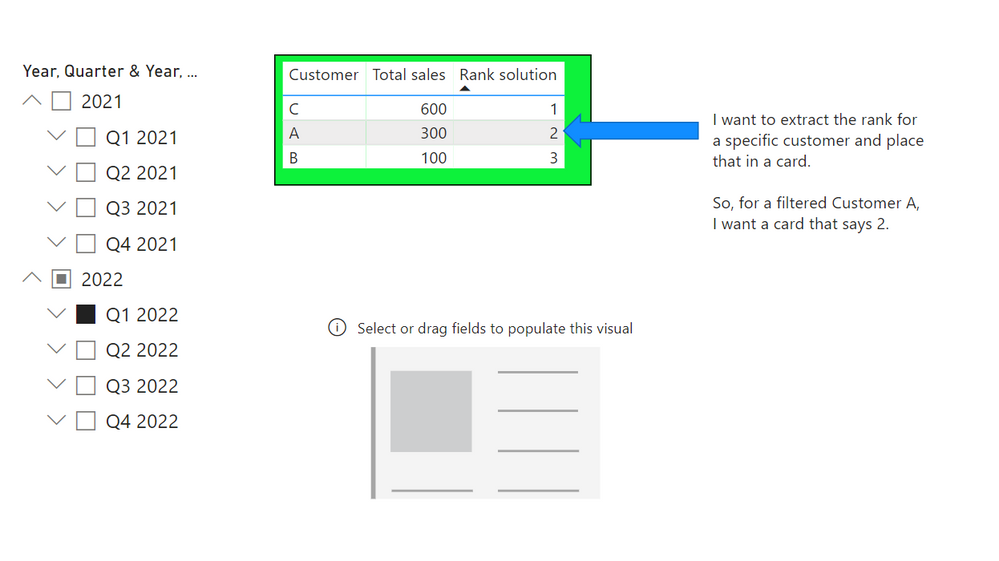
I have a table visual with the following values .... and I want to place the rank of Customer A in a card. That is, the number 2. 

However, obviously when I filter for the customer, it only has one row and therefore ranks 1. 

I want to return the rank of customer A in the content of all the customers. 

5.png

PBIX link: 

https://drive.google.com/file/d/1WuEalnD65nIrCjJJNV95TAnWp6hN7QdW/view?usp=share_link


Thanks for any ideas.


2 ACCEPTED SOLUTIONS
Jihwan_Kim
Super User
Super User

Hi,

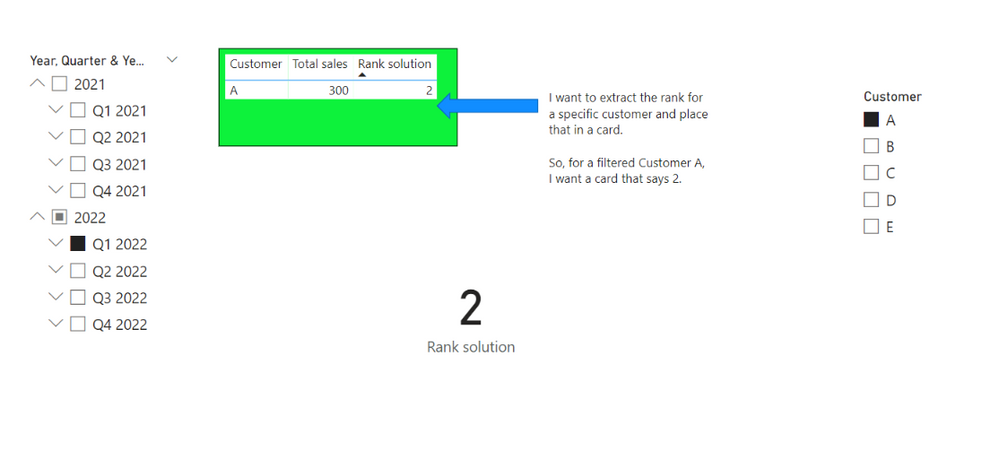
Please check the below picture and the attached pbix file.

I think, in this case, you can try to use ALL, instead of using ALLSELECTED.


Jihwan_Kim_0-1671692920750.png


Rank solution =
IF (
    HASONEVALUE ( Customers[Customer] ),
    IF (
        NOT ( ISBLANK ( [Total sales] ) ),
        RANKX (
            FILTER ( ALL ( 'Customers'[Customer] ), NOT ( ISBLANK ( [Total sales] ) ) ),
            [Total sales]
        )
    ),
    "select one customer"
)


If this post helps, then please consider accepting it as the solution to help other members find it faster, and give a big thumbs up.


Click here to visit my LinkedIn page

View solution in original post

johnmelbourne
Helper V
Helper V

SOLUTION:
 
Rank of customer =
var _tVisibleCustomers =
    CALCULATETABLE(
        FILTER (
            ALLSELECTED ( 'Customers'[Customer] ),
            NOT ( ISBLANK ( [Total sales] ) )
        ))
VAR _sResult = CALCULATE( RANKX( _tVisibleCustomers, [Total sales],,DESC,Dense), Customers[Customer] = "A")                  
Return
_sResult  

View solution in original post

3 REPLIES 3
johnmelbourne
Helper V
Helper V

SOLUTION:
 
Rank of customer =
var _tVisibleCustomers =
    CALCULATETABLE(
        FILTER (
            ALLSELECTED ( 'Customers'[Customer] ),
            NOT ( ISBLANK ( [Total sales] ) )
        ))
VAR _sResult = CALCULATE( RANKX( _tVisibleCustomers, [Total sales],,DESC,Dense), Customers[Customer] = "A")                  
Return
_sResult  
Jihwan_Kim
Super User
Super User

Hi,

Please check the below picture and the attached pbix file.

I think, in this case, you can try to use ALL, instead of using ALLSELECTED.


Jihwan_Kim_0-1671692920750.png


Rank solution =
IF (
    HASONEVALUE ( Customers[Customer] ),
    IF (
        NOT ( ISBLANK ( [Total sales] ) ),
        RANKX (
            FILTER ( ALL ( 'Customers'[Customer] ), NOT ( ISBLANK ( [Total sales] ) ) ),
            [Total sales]
        )
    ),
    "select one customer"
)


If this post helps, then please consider accepting it as the solution to help other members find it faster, and give a big thumbs up.


Click here to visit my LinkedIn page

Brilliant @Jihwan_Kim !  I didn't think of ALL. 
Thank you @Jihwan_Kim.  I had a solution, but wanted exactly what you gave me. You took it that extra step that I needed and made it dynamic. I like the HASONEVALUE error message solution as well. 
Many thanks.


Helpful resources

Announcements
Join our Fabric User Panel

Join our Fabric User Panel

Share feedback directly with Fabric product managers, participate in targeted research studies and influence the Fabric roadmap.

February Power BI Update Carousel

Power BI Monthly Update - February 2026

Check out the February 2026 Power BI update to learn about new features.

FabCon Atlanta 2026 carousel

FabCon Atlanta 2026

Join us at FabCon Atlanta, March 16-20, for the ultimate Fabric, Power BI, AI and SQL community-led event. Save $200 with code FABCOMM.