Fabric Data Days starts November 4th!
Advance your Data & AI career with 50 days of live learning, dataviz contests, hands-on challenges, study groups & certifications and more!
Get registered- Power BI forums
- Get Help with Power BI
- Desktop
- Service
- Report Server
- Power Query
- Mobile Apps
- Developer
- DAX Commands and Tips
- Custom Visuals Development Discussion
- Health and Life Sciences
- Power BI Spanish forums
- Translated Spanish Desktop
- Training and Consulting
- Instructor Led Training
- Dashboard in a Day for Women, by Women
- Galleries
- Data Stories Gallery
- Themes Gallery
- Contests Gallery
- Quick Measures Gallery
- Visual Calculations Gallery
- Notebook Gallery
- Translytical Task Flow Gallery
- TMDL Gallery
- R Script Showcase
- Webinars and Video Gallery
- Ideas
- Custom Visuals Ideas (read-only)
- Issues
- Issues
- Events
- Upcoming Events
Get Fabric Certified for FREE during Fabric Data Days. Don't miss your chance! Learn more
- Power BI forums
- Forums
- Get Help with Power BI
- Desktop
- Re: Use DAX Measure as Categories
- Subscribe to RSS Feed
- Mark Topic as New
- Mark Topic as Read
- Float this Topic for Current User
- Bookmark
- Subscribe
- Printer Friendly Page


- Mark as New
- Bookmark
- Subscribe
- Mute
- Subscribe to RSS Feed
- Permalink
- Report Inappropriate Content
Use DAX Measure as Categories
Consider the following table:
| Name | Field | Value |
| A | ABC | -10 |
| A | DEF | 15 |
| B | ABC | -20 |
| B | DEF | 25 |
| C | ABC | 15 |
| D | ABC | 20 |
| D | DEF | 25 |
| E | ABC | -1 |
| E | DEF | 2 |
I am trying to create categories for 'Name' when the aggregate value of each 'Name' is more than 0.05 times the total of all categories.
For example, Total Value of all is 71 and 71 * 0.05 = 3.55.
So when Total Value of each 'Name' is greater than 3.55, mark it as the 'Name' otherwise mark it as 'Others'.
End result:
| Name | Total Value | Category |
| A | 5 | A |
| B | 5 | B |
| C | 15 | C |
| D | 45 | D |
| E | 1 | Other |
This category needs to be column as I will need to place it as a Column in visuals.
Steps Taken:
1) I build a measure to get aggregated values of 'Name' multipled by 0.05

2) Trying to create a Column of this:
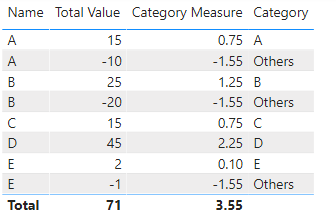
Which is not correct.
Any help will be appreciated.
Solved! Go to Solution.


- Mark as New
- Bookmark
- Subscribe
- Mute
- Subscribe to RSS Feed
- Permalink
- Report Inappropriate Content

- Mark as New
- Bookmark
- Subscribe
- Mute
- Subscribe to RSS Feed
- Permalink
- Report Inappropriate Content
Hi,
These calculated column formulas work
Total for Name = =CALCULATE(SUM(Data[Value]),FILTER(data,Data[Name]=EARLIER(Data[Name])))Total for all names = SUM(Data[Value])Threshold = 0.05*[Total for all names]Category = if([Total for name]>[Threshold],Data[Name],"Others")Hope this helps.
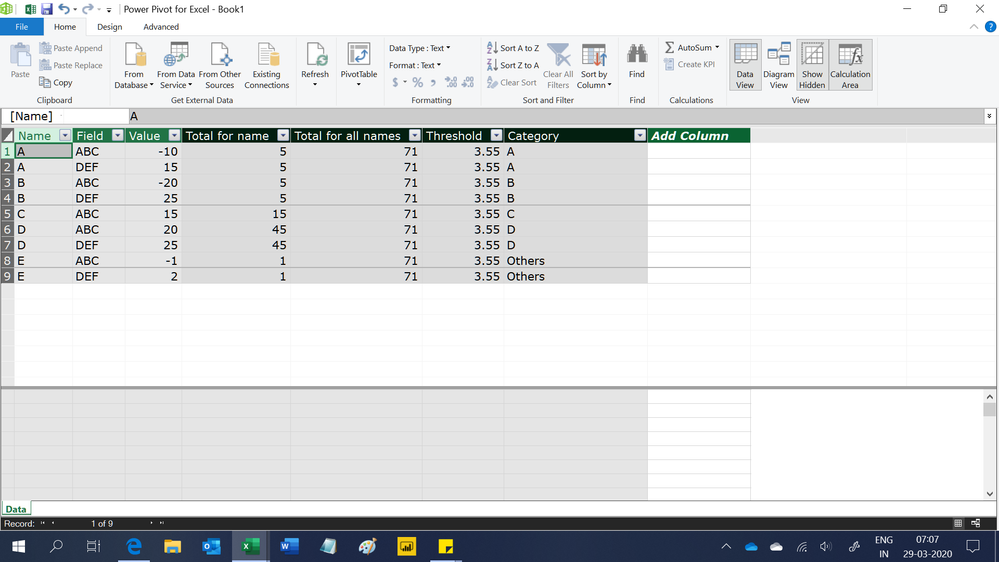
Regards,
Ashish Mathur
http://www.ashishmathur.com
https://www.linkedin.com/in/excelenthusiasts/

- Mark as New
- Bookmark
- Subscribe
- Mute
- Subscribe to RSS Feed
- Permalink
- Report Inappropriate Content
Is there anyway to get totals by Category (relative or absolute) i.e. not requireing Name to be part of the Table visual?
For example in Relative method to select Category[Category Name] in the filter and to see
"Others, 7"
in the table view
I.e. using a measure (that doesn't appear as a data element in the Input table)
- Mark as New
- Bookmark
- Subscribe
- Mute
- Subscribe to RSS Feed
- Permalink
- Report Inappropriate Content
Hi,
Share some data, describe the question and show the expected result.
Regards,
Ashish Mathur
http://www.ashishmathur.com
https://www.linkedin.com/in/excelenthusiasts/
- Mark as New
- Bookmark
- Subscribe
- Mute
- Subscribe to RSS Feed
- Permalink
- Report Inappropriate Content
https://1drv.ms/u/s!Am26UCUW42k4gd1lNr7zuQ2pCdEBlQ?e=gm0fF8
basically I want to show summary totals based on the status.
the status is dynamic based on the dates chosen.
so when the dates are set to show a combination of statuses
say 2 on active-full and two on active-partial
I want to be able to show on a separate cards (or table) the totals for both statuses and have that dynamically change when the dates change. So if dates change to make all transactions have a status of Future then we should have a total for just that status.
hope I'm making sense (and hope the quickly put together sample helps.
- Mark as New
- Bookmark
- Subscribe
- Mute
- Subscribe to RSS Feed
- Permalink
- Report Inappropriate Content
Thank you @amitchandak and @Ashish_Mathur ! I understand the EARLIER function was vital to this. Thank you both for your efforts!
- Mark as New
- Bookmark
- Subscribe
- Mute
- Subscribe to RSS Feed
- Permalink
- Report Inappropriate Content
You are welcome.
Regards,
Ashish Mathur
http://www.ashishmathur.com
https://www.linkedin.com/in/excelenthusiasts/

- Mark as New
- Bookmark
- Subscribe
- Mute
- Subscribe to RSS Feed
- Permalink
- Report Inappropriate Content
Here you have 2 versions: one uses an absolute calculation and another one that uses a relative calculation. You don't have to create columns in any tables to make it work. All you need is a disconnected table and a few measures. This is a very flexible design that I think you'll appreciate when you see it.
Best
D
- Mark as New
- Bookmark
- Subscribe
- Mute
- Subscribe to RSS Feed
- Permalink
- Report Inappropriate Content
Hi,
Write these measures
Total value = SUM(Data[Value])Threshold = 0.05*CALCULATE([Total value],ALL(Data[Name]))Measure = if(HASONEVALUE(Data[Name]),if([Total value]>=[Threshold],VALUES(Data[Name]),"Others"))Hope this helps.
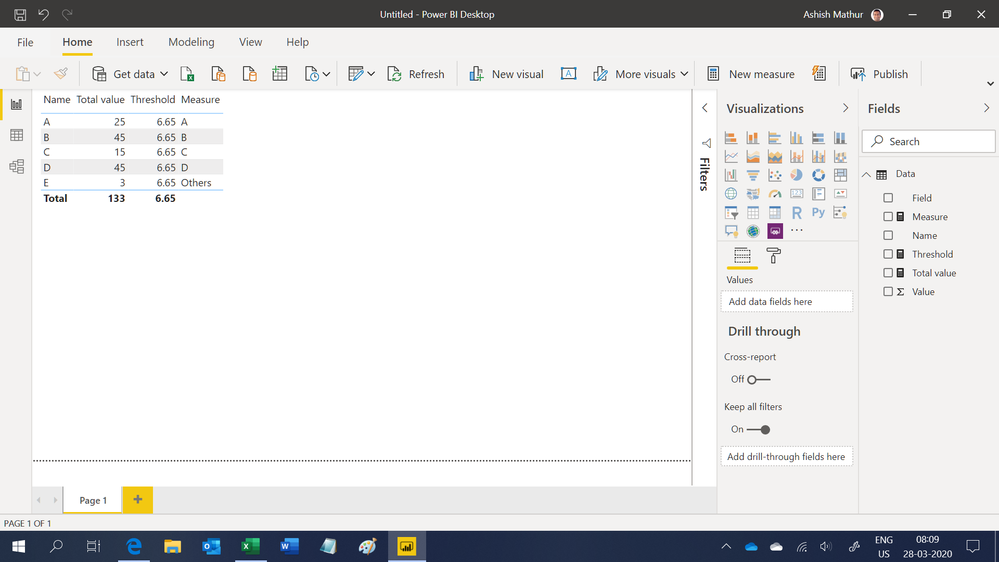
Regards,
Ashish Mathur
http://www.ashishmathur.com
https://www.linkedin.com/in/excelenthusiasts/
- Mark as New
- Bookmark
- Subscribe
- Mute
- Subscribe to RSS Feed
- Permalink
- Report Inappropriate Content
Thanks Ashish.
However I need to be placing 'Measure' as a column or a slicer in my report visuals which is not possible since it's a Measure. Any other suggestions?
- Mark as New
- Bookmark
- Subscribe
- Mute
- Subscribe to RSS Feed
- Permalink
- Report Inappropriate Content
Hi,
These calculated column formulas work
Total for Name = =CALCULATE(SUM(Data[Value]),FILTER(data,Data[Name]=EARLIER(Data[Name])))Total for all names = SUM(Data[Value])Threshold = 0.05*[Total for all names]Category = if([Total for name]>[Threshold],Data[Name],"Others")Hope this helps.
Regards,
Ashish Mathur
http://www.ashishmathur.com
https://www.linkedin.com/in/excelenthusiasts/
- Mark as New
- Bookmark
- Subscribe
- Mute
- Subscribe to RSS Feed
- Permalink
- Report Inappropriate Content
@apollo89 , Create this one as a new column
Category column= sumx(Table,Table[Value]) * 0.05
or
Category column= sumx(all(Table),Table[Value]) * 0.05
Then
Category Column = IF([Total Value] > [Category column],'Table'[Name],"Others")
- Mark as New
- Bookmark
- Subscribe
- Mute
- Subscribe to RSS Feed
- Permalink
- Report Inappropriate Content
Thanks Amit.
This was close but due to negative values also present in my dataset, the category columns are incorrect. Please see the revised dataset in my question. Apologies for the inconvenience.
- Mark as New
- Bookmark
- Subscribe
- Mute
- Subscribe to RSS Feed
- Permalink
- Report Inappropriate Content
- Mark as New
- Bookmark
- Subscribe
- Mute
- Subscribe to RSS Feed
- Permalink
- Report Inappropriate Content
Thanks again Amit, however Categories as Measures won't work for me as I need to be place the Categories as Columns or Slicers in my visuals which is not possible with Measures.
- Mark as New
- Bookmark
- Subscribe
- Mute
- Subscribe to RSS Feed
- Permalink
- Report Inappropriate Content
- Mark as New
- Bookmark
- Subscribe
- Mute
- Subscribe to RSS Feed
- Permalink
- Report Inappropriate Content
Hi,
I have data with customer ids where each row represents transaction info. I am supposed to find average transaction per day for each customer. There is a slicer for date where I can choose last 30 days, or last 7 days. According to the chosen dates, avg per day gets changed. If I just use existing table, there exists an issue of correct average. For example, a customer did 10 transactions in only 5 days among our chosen 30 days. We get average here 10/5 instead of 10/30. The only way to solve this is by creating a measure using another table called calender, having one to many relationship with date of existing table. It solves the problem.
Now, I need to make a pie chart with categories like less than 0.5 transaction per day on avg, less than 1, less than 2, more than 5 etc. How can I create such categories using just the measure "avg per day". As we can not make a column in the table as avg per day because the avg values in the table doesnt change with slicer date (as discussed before eg, last 30 days or last 7 days). I could not figure out how to make categories in pie chart using just a measure here. Kindly help me in this!


- Mark as New
- Bookmark
- Subscribe
- Mute
- Subscribe to RSS Feed
- Permalink
- Report Inappropriate Content
In general, to use a measure in that way, you need to use the Disconnected Table Trick as this article demonstrates: https://community.powerbi.com/t5/Community-Blog/Solving-Attendance-with-the-Disconnected-Table-Trick...
Follow on LinkedIn
@ me in replies or I'll lose your thread!!!
Instead of a Kudo, please vote for this idea
Become an expert!: Enterprise DNA
External Tools: MSHGQM
YouTube Channel!: Microsoft Hates Greg
Latest book!: DAX For Humans
DAX is easy, CALCULATE makes DAX hard...
Helpful resources

Fabric Data Days
Advance your Data & AI career with 50 days of live learning, contests, hands-on challenges, study groups & certifications and more!

Power BI Monthly Update - October 2025
Check out the October 2025 Power BI update to learn about new features.

FabCon Atlanta 2026
Join us at FabCon Atlanta, March 16-20, for the ultimate Fabric, Power BI, AI and SQL community-led event. Save $200 with code FABCOMM.


