cancel
Showing results for 
Search instead for 
Did you mean: 

View all the Fabric Data Days sessions on demand. View schedule

Reply
klcwgs
Frequent Visitor

Use ALLEXCEP but still consider applied filter

Fund;     Investment;     Invested

F1          Inv1                 20

F2          Inv1                 30

F3          Inv2                 40


I want to have a column: Total invested. Which i understood i can get by Calculate(Sum(Invested),Allexcept(table, investment)).

Fund;     Investment;     Invested;    Total invested

F1          Inv1                 20               50

F2          Inv1                 30               50

F3          Inv2                 40               40


However I have a filter on the page to filter Fund the fund, and if i select only F1 and F3 the desired result is

F1          Inv1                 20               20

F3          Inv2                 40               40


The formula above still gives me 50 for the total invested for F1.


Please can you advise the correct formula to tackle this?


Thanks for your help!


Best regards,

Chris

1 ACCEPTED SOLUTION
MFelix
Super User
Super User

Hi @klcwgs,


Try this solution with ALLSELECT:


ALLSELECTED =
IF (
    COUNT ( Table1[Fund] ) = 1,
    CALCULATE (
        SUM ( Table1[Invested] ),
        FILTER (
            ALLSELECTED ( Table1 ),
            Table1[Investement] = MAX ( Table1[Investement] )
        )
    ),
    CALCULATE ( SUM ( Table1[Invested] ), ALLSELECTED ( Table1 ) )
)

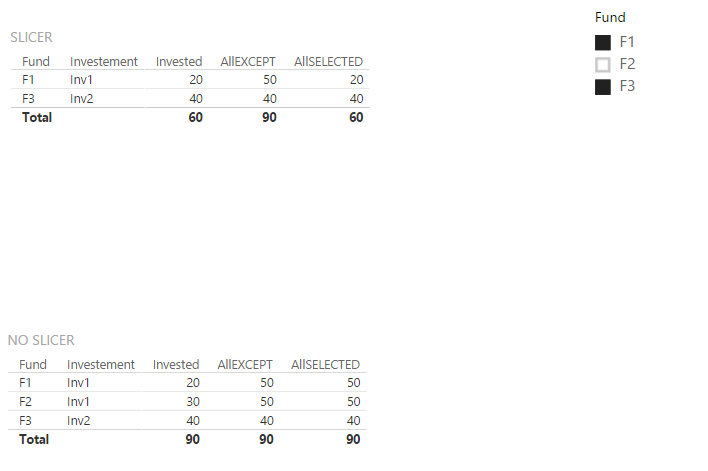
 The first part with IF is to return the total value if you need to have it in the table, think this works result is below with a slicer but also works with page filters. (ALLEXCEPT is your formula - ALLSELECT is mine)


All_Except.png


Regards,

MFelix


Regards

Miguel Félix


Did I answer your question? Mark my post as a solution!

Proud to be a Super User!

Check out my blog: Power BI em Português


View solution in original post

1 REPLY 1
MFelix
Super User
Super User

Hi @klcwgs,


Try this solution with ALLSELECT:


ALLSELECTED =
IF (
    COUNT ( Table1[Fund] ) = 1,
    CALCULATE (
        SUM ( Table1[Invested] ),
        FILTER (
            ALLSELECTED ( Table1 ),
            Table1[Investement] = MAX ( Table1[Investement] )
        )
    ),
    CALCULATE ( SUM ( Table1[Invested] ), ALLSELECTED ( Table1 ) )
)

 The first part with IF is to return the total value if you need to have it in the table, think this works result is below with a slicer but also works with page filters. (ALLEXCEPT is your formula - ALLSELECT is mine)


All_Except.png


Regards,

MFelix


Regards

Miguel Félix


Did I answer your question? Mark my post as a solution!

Proud to be a Super User!

Check out my blog: Power BI em Português


Helpful resources

Announcements
November Power BI Update Carousel

Power BI Monthly Update - November 2025

Check out the November 2025 Power BI update to learn about new features.

Fabric Data Days Carousel

Fabric Data Days

Advance your Data & AI career with 50 days of live learning, contests, hands-on challenges, study groups & certifications and more!

FabCon Atlanta 2026 carousel

FabCon Atlanta 2026

Join us at FabCon Atlanta, March 16-20, for the ultimate Fabric, Power BI, AI and SQL community-led event. Save $200 with code FABCOMM.

Top Solution Authors
Top Kudoed Authors