Hi,
I am trying to summarize/groupby a Unioned table.
I use a combination of UNION(SUMMARIZECOLUMNS(...),SUMMARIZECOLUMS(...)) and would like to summarize further this table so that I only have one unique row per category (Name).
Summarize table 1:
SUMMARIZECOLUMNS(
TBL1.NAME
,"AMOUNT VALUES1"
,SUM(Value1)
,"AMOUNT VALUES2"
,0
)
| NAME | AMOUNT VALUES1 | AMOUNT VALUES2 |
| Name 1 | 5 | 0 |
| Name 2 | 3 | 0 |
Summarize table 2:
SUMMARIZECOLUMNS(
TBL2.NAME
,"AMOUNT VALUES1"
,0
,"AMOUNT VALUES2"
,SUM(Value2)
)
| NAME | AMOUNT VALUES1 | AMOUNT VALUES2 |
| Name 1 | 0 | 2 |
| Name 2 | 0 | 2 |
| Name 3 | 0 | 2 |
The Union Table:
UNION(
SUMMARIZECOLUMNS(
TBL1.NAME
,"AMOUNT VALUES1"
,SUM(Value1)
,"AMOUNT VALUES2"
,0
)
,
SUMMARIZECOLUMNS(
TBL2.NAME
,"AMOUNT VALUES1"
,0
,"AMOUNT VALUES2"
,SUM(Value2)
)
)
| NAME | AMOUNT VALUES 1 | AMOUNT VALUES 2 |
| Name 1 | 5 | 0 |
| Name 2 | 3 | 0 |
| Name 1 | 0 | 2 |
| Name 2 | 0 | 2 |
| Name 3 | 0 | 2 |
The problem:
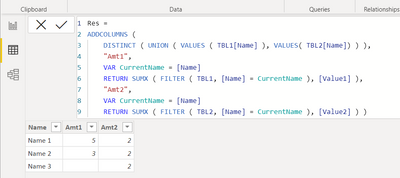
I want the table above to be summarized further in this manner:
| NAME | AMOUNT VALUES 1 | AMOUNT VALUES 2 |
| Name 1 | 5 | 2 |
| Name 2 | 3 | 2 |
| Name 3 | | 2 |
But When I try to include a GROUPBY or SUMMARIZECOLUMN on top of the union I am not able to sum the "AMOUNT VALUES" as it is not detected.
This is what I tried
SUMMARIZECOLUMNS(
UNIONTABLE
,NAME --> it gets picked up OK
,"AMOUNT1"
,SUM( I cannot chose the "AMOUNT VALUES1" created earlier)
Any thought on how to get it to work?
Regards,
Alex