
cancel
Showing results for 
Search instead for 
Did you mean: 

The Power BI Data Visualization World Championships is back! Get ahead of the game and start preparing now! Learn more

Reply
Anonymous
Not applicable

Unable to use Query Editor nor add columns after connected to PowerBI Datasets

Hello,

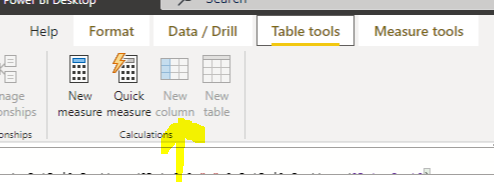
I'm connected to a PowerBI dataset but unable to create a column nor transform data. My goal is to be able to sort a date from ascending to descending in columns on a matrix. But since I cannot add a column, I can't create a sort in query editor now know how to do something lile this is DAX. The table name is RptDailyDashboard and the field is Date. Can someone please assist? Also part of the issue probably is that the date format is stuck on mm-dd-yy. So its automatically sorted from oldest to newest left to right but I need it coming the opposite

error.PNG

error2.PNG

error3.PNG

error4.PNG

Thanks

Patrick

1 ACCEPTED SOLUTION
DataInsights
Super User
Super User

@Anonymous,


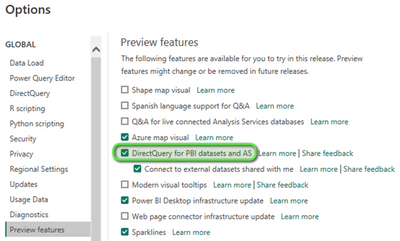
Once you enable the Preview feature below, you can load Power Query and convert your model from Live Connection to DirectQuery. Then you will be able to create a calculated column.


DataInsights_0-1675007421880.png


Did I answer your question? Mark my post as a solution!

Proud to be a Super User!


View solution in original post

3 REPLIES 3
DataInsights
Super User
Super User

@Anonymous,


Once you enable the Preview feature below, you can load Power Query and convert your model from Live Connection to DirectQuery. Then you will be able to create a calculated column.


DataInsights_0-1675007421880.png


Did I answer your question? Mark my post as a solution!

Proud to be a Super User!


I don't have that option in the latest version

@MarkyMark1,


This option is now generally available (no longer in preview mode), and doesn't need to be enabled.


Did I answer your question? Mark my post as a solution!

Proud to be a Super User!


Helpful resources

Announcements
November Power BI Update Carousel

Power BI Monthly Update - November 2025

Check out the November 2025 Power BI update to learn about new features.

Fabric Data Days Carousel

Fabric Data Days

Advance your Data & AI career with 50 days of live learning, contests, hands-on challenges, study groups & certifications and more!

FabCon Atlanta 2026 carousel

FabCon Atlanta 2026

Join us at FabCon Atlanta, March 16-20, for the ultimate Fabric, Power BI, AI and SQL community-led event. Save $200 with code FABCOMM.

Top Kudoed Authors