Join us at FabCon Atlanta from March 16 - 20, 2026, for the ultimate Fabric, Power BI, AI and SQL community-led event. Save $200 with code FABCOMM.
Register now!The Power BI Data Visualization World Championships is back! Get ahead of the game and start preparing now! Learn more
I have two tables
Table 1 (Datasource SQL - 100 rows) - Computer Name
Table 2 (Datasource is CSV - 2000 rows) - Computer Name
Created relationship between these two using the Computer Name column, Many to Many and Both.
Now i have to do a lookupvalue search between these two Tables.
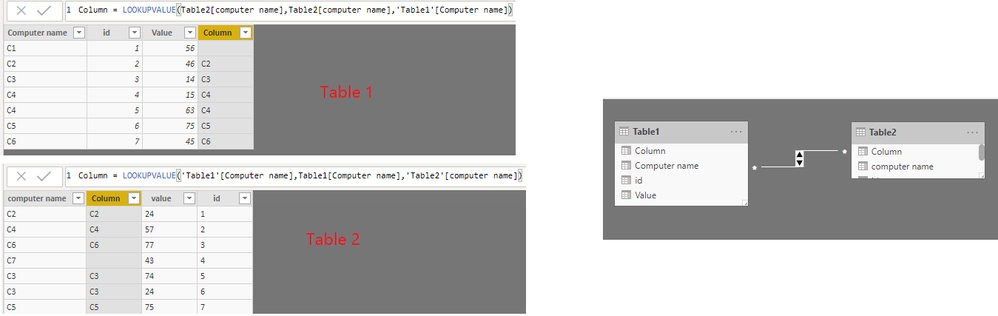
First in Table 1 I created a column (DAX) - Lookupvalue (Table2.ComputerName,Table1.ComputerName,Table1.ComputerName) - This is success.
Now if I do vice versa i am not able to write he formula. Dont know why seriously...
Trying to create a column in Table 2 - Lookupupvalue (Table1.ComputerName,Table2.ComputerName,Table2.ComputerName) - But I am not able to write Table2.ComputerName,Table2.ComputerName since the name is not popping up in DAX formula editor for adding to the formula.
Solved! Go to Solution.
Hi @Anonymous ,
By my tests, I cannot reproduce your issue.
More details, you could refer to my attachment.
If you still need help, please share a dummy pbix file which can reproduce the scenario, so that we can help further investigate on it? You can upload it to OneDrive and post the link here. Do mask sensitive data before uploading.
Best Regards,
Cherry
Hi @Anonymous ,
Have you solved your problem?
If you have solved, please always accept the replies making sense as solution to your question so that people who may have the same question can get the solution directly.
If you still need help, please share a dummy pbix file which can reproduce the scenario, so that we can help further investigate on it? You can upload it to OneDrive and post the link here. Do mask sensitive data before uploading.
Best Regards,
Cherry
Hi @Anonymous ,
By my tests, I cannot reproduce your issue.
More details, you could refer to my attachment.
If you still need help, please share a dummy pbix file which can reproduce the scenario, so that we can help further investigate on it? You can upload it to OneDrive and post the link here. Do mask sensitive data before uploading.
Best Regards,
Cherry
The Power BI Data Visualization World Championships is back! Get ahead of the game and start preparing now!
| User | Count |
|---|---|
| 38 | |
| 36 | |
| 33 | |
| 30 | |
| 28 |
| User | Count |
|---|---|
| 128 | |
| 88 | |
| 79 | |
| 67 | |
| 62 |