Forum Discussion

 Post Prodigy
UTC to AEST
Morning,
The DateTime column in my sql table is in UTC time, but I would like this column to be in the AEST (-10 or -11) timezone. I've read quite a lot through the forums and all of the solutions don't seem to handle Daylight savings well; they simply either offset or +/- duration (less effective offset).
I was wondering if anyone had a way to convert UTC to AEST reliably taking into account daylight savings or if this is the kind of thing best handled by a stored procedure in the sql table while using data factory?
Very useful post: https://community.powerbi.com/t5/Desktop/Convert-utc-to-local-time-zone-using-Power-Query/m-p/45533#M17691
You can use the table and function from my post as illustrated in this video:

17 Replies
 steven_stevenRegular Visitor
Perhaps this can help others.
I've taken a different way to solve for DST with the plan to not rely on a table (not that there's anything wrong with that either!)
Use case may be limited as it addresses converting UTC to another timezone with daylight savings time support with DST starting on the 2nd Sunday in March and ending on the 1st Sunday in November.
Last Refresh Pacific = // First let's find the date of the second Sunday of March // For the forumla below: // In DAX, we use the functions DATE() and WEEKDAY() // "1+7*2", generically, "1+7*n" where n represents // the nth occurence of that "weekday name" // "8-1", generically, "8-y", where // y can be a number from 1 to 7, where // 1 = Sunday through to 7 = Saturday // // Thus, the date of the second Sunday of the month // is returned to the variable ZZQQ_DST_START //
// ZZQQ_DATE is the date/time in UTC.
VAR ZZQQ_DST_START = DATE(YEAR(ZZQQ_DATE),3,1+7*2) - WEEKDAY(DATE(YEAR(ZZQQ_DATE),3,8-1)) // Next let's find the date of the first Sunday in November VAR ZZQQ_DST_END = DATE(YEAR(ZZQQ_DATE),11,1+7*1) - WEEKDAY(DATE(YEAR(ZZQQ_DATE),11,8-1)) RETURN IF ( // Evaluate if ZZQQ_DATE is between DST start and end // If yes, change time to Pacific Daylight Savings Time // else, change time to Pacific Standard Time (ZZQQ_DATE >= ZZQQ_DST_START) && (ZZQQ_DATE <= ZZQQ_DST_END), ZZQQ_DATE + (-7/24), // If condition matches, convert UTC to PDT ZZQQ_DATE + (-8/24) // Else convert UTC to PST ) RachnaV
Helper I
This worked for me, I was looking for a way to address timezone issue in DAX itself without creating a calculated column or using Power Query languaue. I changed this a bit to cater to my requirements and its working fine.
Would you pleas explain the logic in below two lines wherein you are subtracting weekday from a date, also where can i find the syntax of date function that explains how you have used the day part of date function (i.e. 1+7*2 and 8-1) :
  VAR ZZQQ_DST_START = DATE(YEAR(ZZQQ_DATE),3,1+7*2)
    - WEEKDAY(DATE(YEAR(ZZQQ_DATE),3,8-1))

  // Next let's find the date of the first Sunday in November
  VAR ZZQQ_DST_END = DATE(YEAR(ZZQQ_DATE),11,1+7*1)
    - WEEKDAY(DATE(YEAR(ZZQQ_DATE),11,8-1))
- MarcelBeug
Community Champion
And what happened with my answer to your same question???? :smileysad:
- MarcelBeug
It is always posssible to converrt between local time and UTC time, but then you are dependent on the time zone setting of your computer (which might as well be a server running on UTC).
Example query:
let Source = Table.FromColumns({List.DateTimes(#datetime(2017,1,1,1,0,0),10,#duration(25,1,0,0))},type table[UTC = datetime]), #"Added Custom" = Table.AddColumn(Source, "Local", each DateTime.From(DateTime.AddZone([UTC],0,0)), type datetime) in #"Added Custom"  ElliotP
Evening,
For some reason I didn't see the post pop up a while ago, I'm so sorry. :smileysad:
I've had a look, I'm not sure how to create that original TimeTable? As well, the pbix will have a locale of United States as so I'm able to convert the string which my datetime is identified and stored as, into a DateTime data type.
- v-caliao-msft
Microsoft Employee
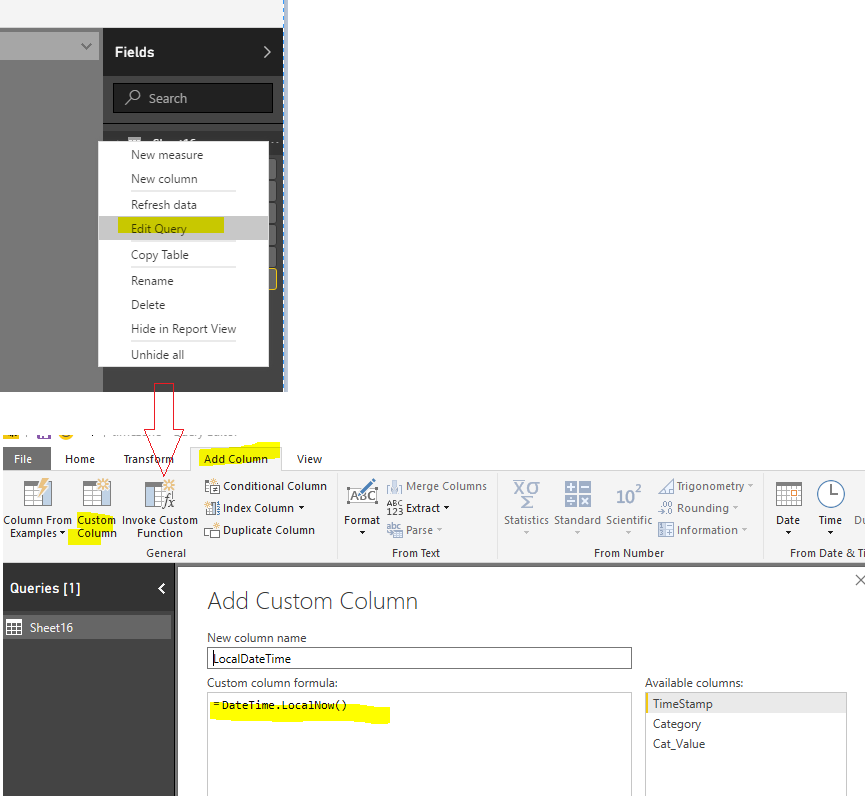
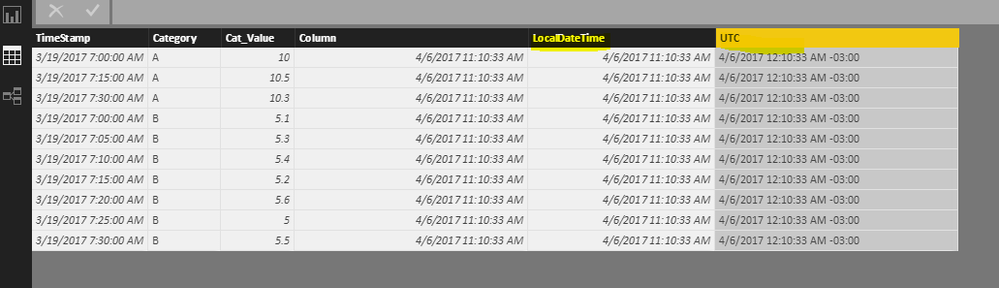
We can switch time zone when add a custom column. I have tested it on my local environment.
Regards,
Charlie Liao