Forum Discussion

URL Parameter FIlter - Issue.
Hi Expert
I have tried the following, not sure what i am doing wrong here (See below). i have published a report to PBI Services, i have a query string URL as per point 2.2 below.
When i click the URL is takes me to a new PBI Services window with the filters applied. HAPPY.
However, when i go to my workspaces to find the published PBIX report the filter are what they where when i initially published the PBIX file.
Surely the filter from the Query String Parameter should have carried through into the Publish PBIX file and retained in PBI Service until the uRL is changed.
Question is it possible to retain filtering in a PBIX Report Published to APP workspace when using a URL Paramters. Attached is a sample file.
1.Please publish the second tab "Duplicate of complnay details" to your app work space
2. update the URL = Measure is Report URL
3. click the url link in Company details and see what happens, this takes you to a new window within PBI Service and the filter sare applied.
4. then click back to your workspce and see if the filter have carried through to your original PBIX file you published to your APP Workspace
https://www.dropbox.com/s/o4mcgbu13msbofi/URL_Link_Test_File_7.pbix?dl=0
- Please make sure the option wasn’t ticked in your desktop. Otherwise the filter will be reset every time.
- If you didn’t tick the option above, could you please share us the detailed procedure that you created the functional filter URL?
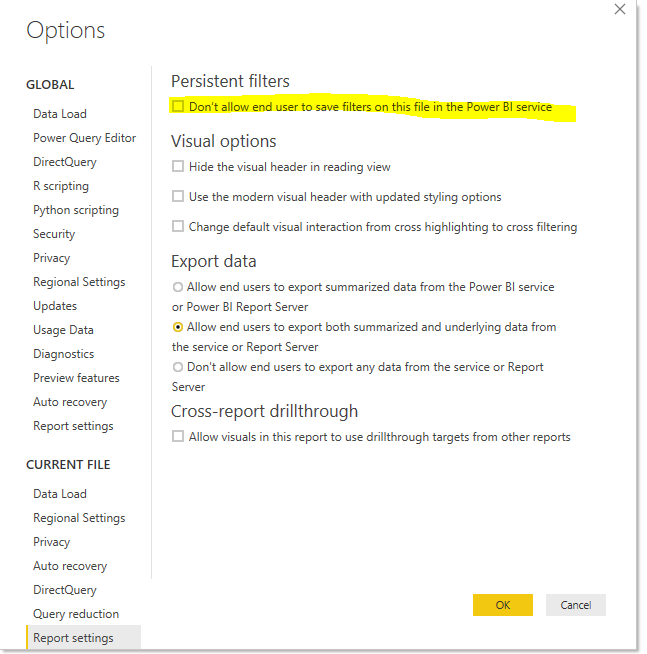
There’s 2 ways to filter the report in service, and get the link related.
- Open the report in Editing view, apply the filter, and save the report. Then simply copied the URL link generated.
- Filter a report using query string parameters in the URL
- Anonymous7 years ago
Hi Anonymous ,
AFAIK, 'persistent filter' option not affect url filter, it only reset filter changes your applied on report read view mode.
Announcing Persistent Filters in the Power BI Service
Url filter is applied on url string, its changes will been reset if you reload web page(original report url). I don't think it is possible to keep these changed url strings
Regards,
Xiaoxin Sheng
2 Replies
- AnonymousNot applicable
Hi Anonymous ,
AFAIK, 'persistent filter' option not affect url filter, it only reset filter changes your applied on report read view mode.
Announcing Persistent Filters in the Power BI Service
Url filter is applied on url string, its changes will been reset if you reload web page(original report url). I don't think it is possible to keep these changed url strings
Regards,
Xiaoxin Sheng
 AndrewFinNew Member
Does the same url format apply when the report is public (published to web)? I find that the filter won't apply to a public report.