cancel
Showing results for 
Search instead for 
Did you mean: 

View all the Fabric Data Days sessions on demand. View schedule

Reply
Anonymous
Not applicable

UNION to be applied after visual filtering (slicer)

Hi guys,
I have a long table of Products having various attributes - size, color, etc. I would like to have a matrix to "benchmark" (compare) particular product's attributes against according attributes of another small subset of products.
So, I duplicated my Products table to Products Benchmarks and then created a 'Union Table':

Union Table = UNION(Products, 'Products Benchmarks')
and created a visual matrix for this table.
I also created 2 slicers - one against Products to select single "benchmark" product and another against 'Products Benchmarks'. But currently they do not affect the matrix. What I want, is that the matrix should contain product selected by 1st slicer and subset of products selected by 2nd slicer (so the UNION should be basically applied to tables AFTER applying visual filtering).

The sample can be downloaded here:
https://1drv.ms/u/s!AtoFc8iRNnAHesiWHjvcvVBXEKU?e=rXUh7t
1 ACCEPTED SOLUTION
Icey
Community Support
Community Support

Hi @Anonymous ,


Please check:


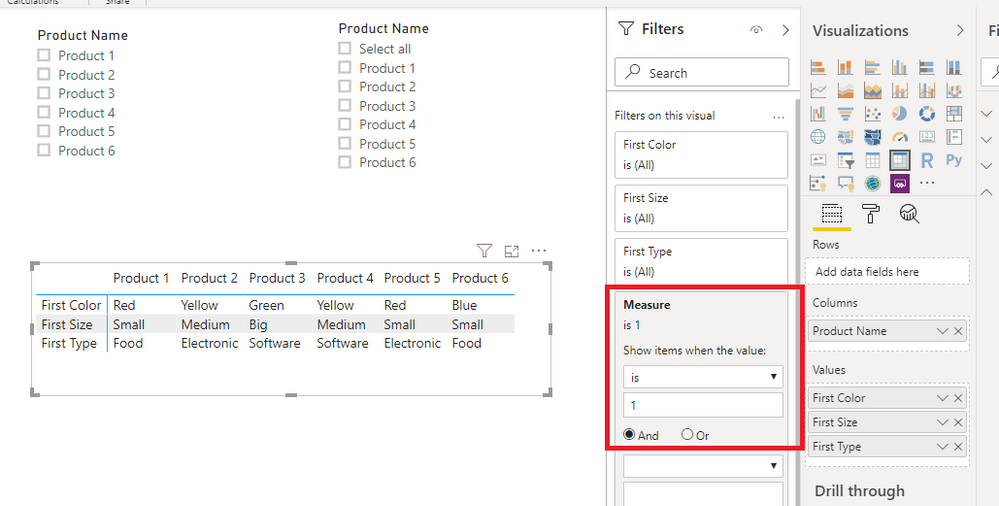
1. Create a measure.

Measure =
IF (
    MAX ( 'Union Table'[Product Name] ) = SELECTEDVALUE ( Products[Product Name] )
        || MAX ( 'Union Table'[Product Name] )
            IN VALUES ( 'Products Benchmarks'[Product Name] ),
    1
)


2. Put it on "Filters on this visual" of your table visual.

measure.PNG


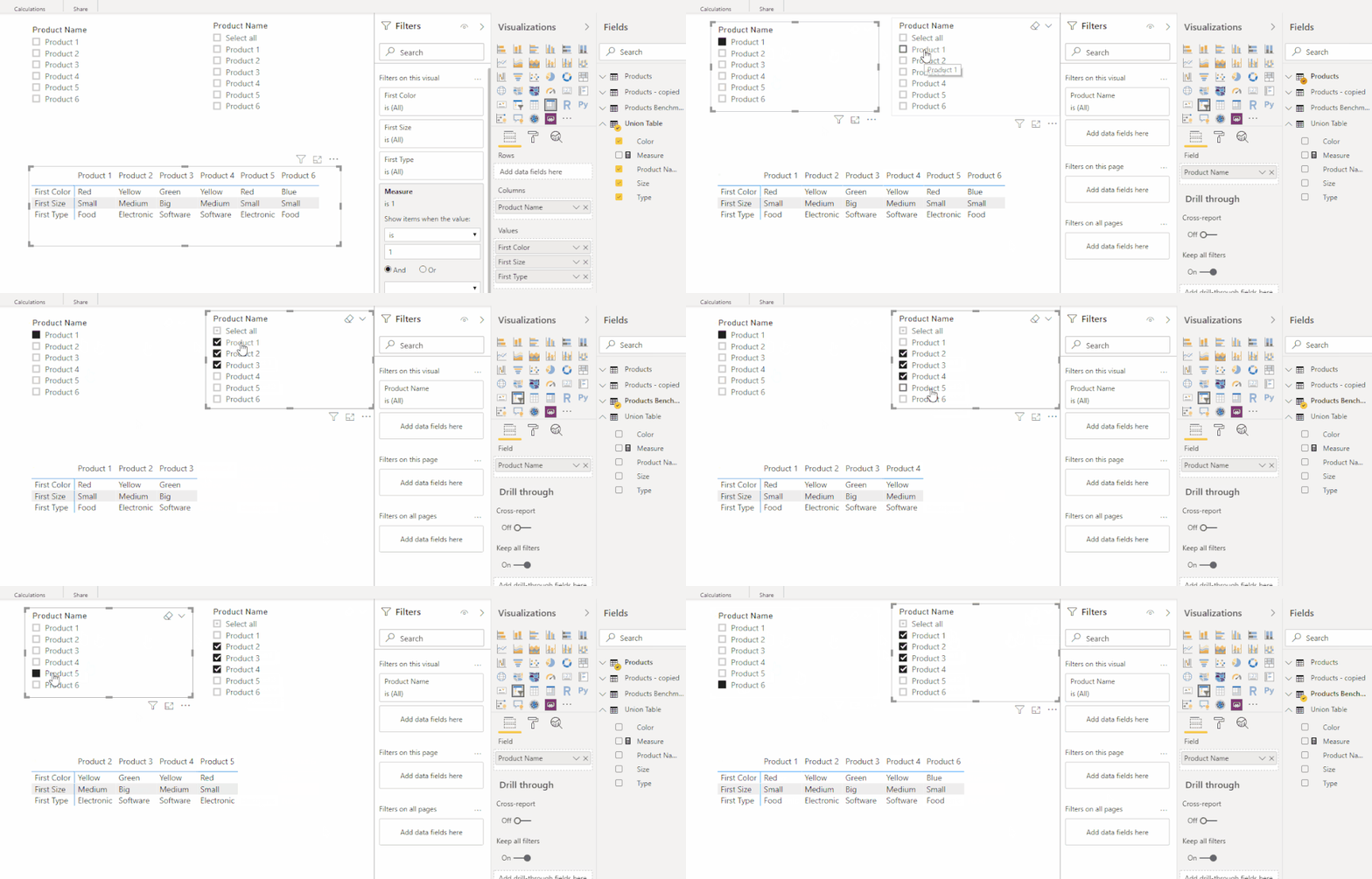
3. Test.

product.gif


Best Regards,

Icey


If this post helps, then please consider Accept it as the solution to help the other members find it more quickly.

View solution in original post

3 REPLIES 3
Icey
Community Support
Community Support

Hi @Anonymous ,


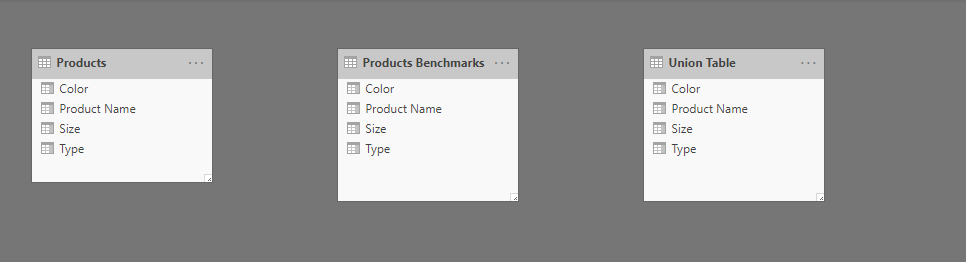
The cause is that there is no relationship among your tables.

no relationship.PNG


Please Create and manage relationships in Power BI Desktop.


In addition, it is suggested to understand the Unpivot related content.

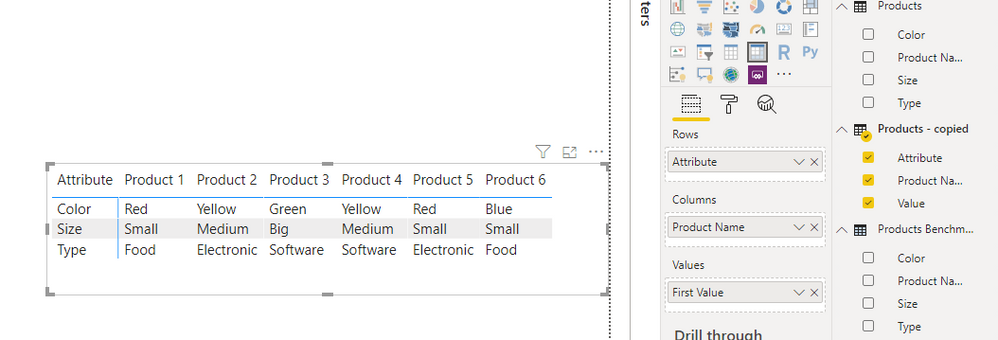
Then, you can create a matrix visual like so:

unpivot.PNG


Best Regards,

Icey


If this post helps, then please consider Accept it as the solution to help the other members find it more quickly.

Anonymous
Not applicable

@Icey,
I'm not sure how relationship can solve my issue.
I assume, you meant 'Products' to 'Union Table' and 'Products Benchmarks' to 'Union Table' relationship in this case (both by Product Name field). If I do it this way, then the final visual (matrix for 'Union Table') shows the intersection of what's selected by 2 slicers (i.e. products selected in both slicers simultaneously), whereas I need the union of what's selected by 2 slicers (i.e. products selected in at least one of 2 slicers).

Icey
Community Support
Community Support

Hi @Anonymous ,


Please check:


1. Create a measure.

Measure =
IF (
    MAX ( 'Union Table'[Product Name] ) = SELECTEDVALUE ( Products[Product Name] )
        || MAX ( 'Union Table'[Product Name] )
            IN VALUES ( 'Products Benchmarks'[Product Name] ),
    1
)


2. Put it on "Filters on this visual" of your table visual.

measure.PNG


3. Test.

product.gif


Best Regards,

Icey


If this post helps, then please consider Accept it as the solution to help the other members find it more quickly.

Helpful resources

Announcements
November Power BI Update Carousel

Power BI Monthly Update - November 2025

Check out the November 2025 Power BI update to learn about new features.

Fabric Data Days Carousel

Fabric Data Days

Advance your Data & AI career with 50 days of live learning, contests, hands-on challenges, study groups & certifications and more!

FabCon Atlanta 2026 carousel

FabCon Atlanta 2026

Join us at FabCon Atlanta, March 16-20, for the ultimate Fabric, Power BI, AI and SQL community-led event. Save $200 with code FABCOMM.

Top Solution Authors
Top Kudoed Authors