Join us at FabCon Atlanta from March 16 - 20, 2026, for the ultimate Fabric, Power BI, AI and SQL community-led event. Save $200 with code FABCOMM.
Register now!The Power BI Data Visualization World Championships is back! Get ahead of the game and start preparing now! Learn more
When exporting a table/matrix from a Power BI report, the export file has the "Applied Filters" section with all filters applied.
Is there a setting to turn this off, so the export does not have this? I have hidden filters that the end-user does not need to see, but they come up on the export.
Solved! Go to Solution.
Hi @astano05
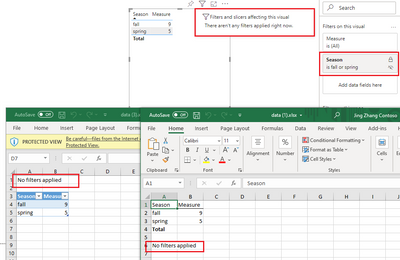
How did you hide the filters? Based on my test, if I hide a filter in Filter Pane, it will not appear on the visual. It shows "No filters applied" no matter I export data with current layout or export the summarized data.
Best Regards,
Community Support Team _ Jing
If this post helps, please Accept it as Solution to help other members find it.
I love how every problem is solved even though none ever are by microsoft. They just want to get points for doing nothing and saying they solved everyones issues. There is NO WAY to remove the filter on export.
Hi @astano05
How did you hide the filters? Based on my test, if I hide a filter in Filter Pane, it will not appear on the visual. It shows "No filters applied" no matter I export data with current layout or export the summarized data.
Best Regards,
Community Support Team _ Jing
If this post helps, please Accept it as Solution to help other members find it.
i think this is it. i have the entire filter pane hidden; not the individual applied filters.
"I have hidden filters that the end-user does not need to see" - you may want to rethink that. It will be better to apply these in Power Query instead.
Note that if you allow users to "Analyze in Excel" (as you should) then these hidden filters will be meaningless also.
The Power BI Data Visualization World Championships is back! Get ahead of the game and start preparing now!
| User | Count |
|---|---|
| 38 | |
| 38 | |
| 36 | |
| 28 | |
| 28 |
| User | Count |
|---|---|
| 124 | |
| 89 | |
| 73 | |
| 66 | |
| 65 |