cancel
Showing results for 
Search instead for 
Did you mean: 

Get Fabric Certified for FREE during Fabric Data Days. Don't miss your chance! Request now

Reply
WinYit
Frequent Visitor

Try to get work hour and break hour from a single line

Hi, I have a problem that I cant find works hour and break hour in my data. I only found this line: 

FREQ=WEEKLY;INTERVAL=1;BYDAY=MO,TU,WE,TH,FR


Now I might think that this line can get the works hour and breaks hour but i dont know how to solve it. 

2. Either can or cannot, can i separate this line to Monday, Tuesday,..., Sunday?

4 REPLIES 4
sturlaws
Resident Rockstar
Resident Rockstar

Hi, @WinYit,


you have not provided much context here, but assuming you are working in power bi desktop in import mode, you can solve this with power query.

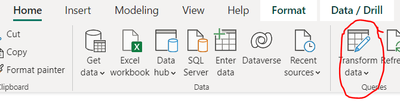
Find the transform button:

sturlaws_0-1670449861682.pngCheers,
Sturla

If this post helps, then please consider Accepting it as the solution. Kudos are nice too.


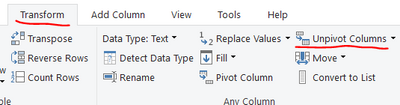
Split the sting first by semi-colon, then by comma:

sturlaws_1-1670449926906.png


Then play around with the pivot-functions to change the columns to rows

sturlaws_2-1670450098811.png


I think its cant help me. I have two questions.

1. can I get work hour and break hour from the recurrence pattern: FREQ=WEEKLY;INTERVAL=1;BYDAY=MO,TU,WE,TH,FR

2. can I get Day(Monday, Tuesday, Wednesday, Thursday, Friday, Saturday,Sunday) from the recurrence pattern:FREQ=WEEKLY;INTERVAL=1;BYDAY=MO,TU,WE,TH,FR

WinYit
Frequent Visitor

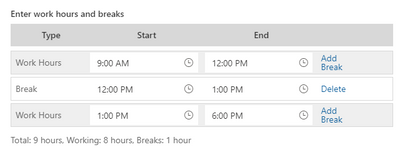
WinYit_0-1670468007201.png

This is the work hour and break hour that i need 

If this is the data you have:

FREQ=WEEKLY;INTERVAL=1;BYDAY=MO,TU,WE,TH,FR


you obviously cannot get work hours and break hours directly from this, as it does not contain any information about this. 

If you can assume a fixed number of hours each day, you can use the method I described, using power query, and adding a few steps to calculate the number of hours.

Look at the attached file:

Helpful resources

Announcements
Fabric Data Days Carousel

Fabric Data Days

Advance your Data & AI career with 50 days of live learning, contests, hands-on challenges, study groups & certifications and more!

October Power BI Update Carousel

Power BI Monthly Update - October 2025

Check out the October 2025 Power BI update to learn about new features.

FabCon Atlanta 2026 carousel

FabCon Atlanta 2026

Join us at FabCon Atlanta, March 16-20, for the ultimate Fabric, Power BI, AI and SQL community-led event. Save $200 with code FABCOMM.

Top Solution Authors
Top Kudoed Authors