Get Fabric or SQL Certified for Free.
Get certified for free when you join Fabric Data Days 2026 and dive into Fabric, Power BI, SQL, AI, and other essential data skills.
Join now- Power BI forums
- Get Help with Power BI
- Desktop
- Service
- Report Server
- Power Query
- Mobile Apps
- Developer
- DAX Commands and Tips
- Custom Visuals Development Discussion
- Health and Life Sciences
- Power BI Spanish forums
- Translated Spanish Desktop
- Training and Consulting
- Instructor Led Training
- Dashboard in a Day for Women, by Women
- Galleries
- Data Stories Gallery
- Themes Gallery
- Contests Gallery
- QuickViz Gallery
- Quick Measures Gallery
- Visual Calculations Gallery
- Notebook Gallery
- Translytical Task Flow Gallery
- TMDL Gallery
- R Script Showcase
- Webinars and Video Gallery
- Ideas
- Custom Visuals Ideas (read-only)
- Issues
- Issues
- Events
- Upcoming Events
Data Days is here! Join us now for 60+ days of learning, challenges, and connection. Learn more
- Power BI forums
- Forums
- Get Help with Power BI
- Desktop
- Re: Transposing data
- Subscribe to RSS Feed
- Mark Topic as New
- Mark Topic as Read
- Float this Topic for Current User
- Bookmark
- Subscribe
- Printer Friendly Page

- Mark as New
- Bookmark
- Subscribe
- Mute
- Subscribe to RSS Feed
- Permalink
- Report Inappropriate Content
Transposing data
Hi, I have a table which is a long list of materials, some of which are duplicates - in that they are the same material but with a different number. Fortunately, as can be seen in the picuture, these materials can identified through cross referencing the details in the 'Old material number' and 'Legacy Material Number' columns. To aid some downstram modelling we need to do, ideally what I would like to do is stack these two records up side by side - possibly in another table? - with the 'SC???????' material (and its associated data elements) to the right of the ?????/???? material.
Any thoughts on how to do this would be much appreciated?
Mick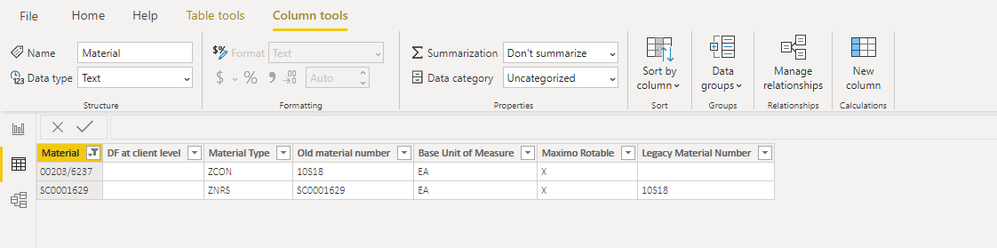
Solved! Go to Solution.

- Mark as New
- Bookmark
- Subscribe
- Mute
- Subscribe to RSS Feed
- Permalink
- Report Inappropriate Content
Hi @MickThurman
You can try merge function in power query editor.
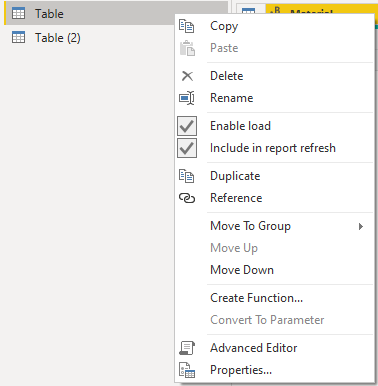
Firstly we need to duplicate this table in power query editor.
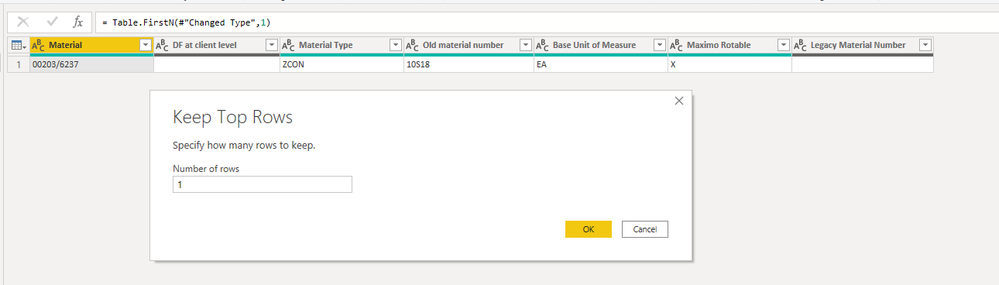
Keep first top row in Table(2)
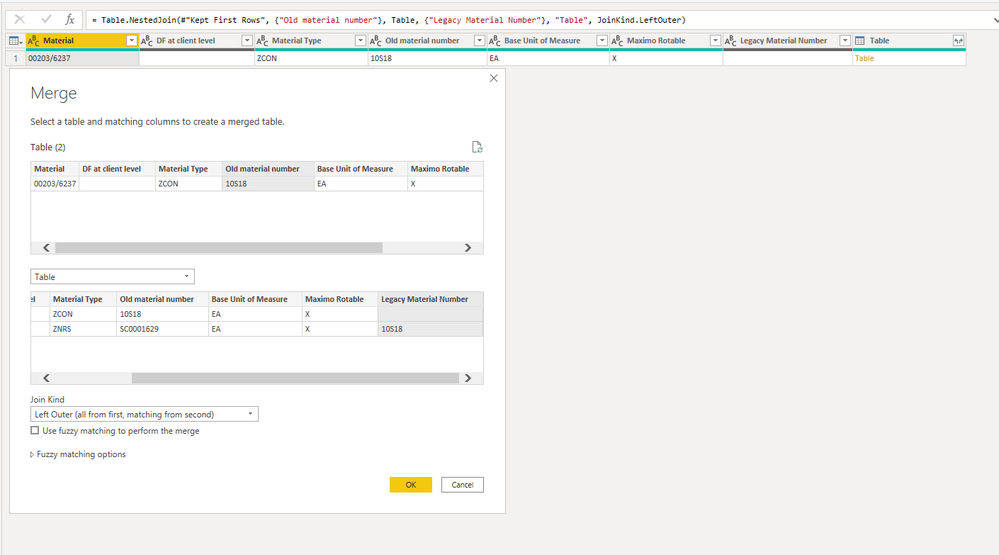
Then merge Table (2) and Table by Old material number column in Table(2) and Legacy Material Number column in Table.
Final expand all rows in Table.
Result is as below.


All elements will show in one row.
Best Regards,
Rico Zhou
If this post helps, then please consider Accept it as the solution to help the other members find it more quickly.
- Mark as New
- Bookmark
- Subscribe
- Mute
- Subscribe to RSS Feed
- Permalink
- Report Inappropriate Content
Hi @MickThurman
Could you tell me if your problem has been solved? If it is, kindly Accept it as the solution. More people will benefit from it. Or you are still confused about it, please provide me with more details about your table and your problem or share me with your pbix file from your Onedrive for Business.
Best Regards,
Rico Zhou
- Mark as New
- Bookmark
- Subscribe
- Mute
- Subscribe to RSS Feed
- Permalink
- Report Inappropriate Content
Hi @MickThurman
You can try merge function in power query editor.
Firstly we need to duplicate this table in power query editor.
Keep first top row in Table(2)
Then merge Table (2) and Table by Old material number column in Table(2) and Legacy Material Number column in Table.
Final expand all rows in Table.
Result is as below.
All elements will show in one row.
Best Regards,
Rico Zhou
If this post helps, then please consider Accept it as the solution to help the other members find it more quickly.


- Mark as New
- Bookmark
- Subscribe
- Mute
- Subscribe to RSS Feed
- Permalink
- Report Inappropriate Content
Speaking just in theory, as we'll need more sample data to really help step by step. Here's one idea....
* Copy this table to a new table
* Filter rows to remove any row with a Legacy Value
* Perform a Lookup in a new column, matching Old Material Number to the (Original Table) Legacy Material Column
* Return from the Lookup whatever values you need?
Please give Kudos or Mark as a Solution!
https://www.linkedin.com/in/forrest-hill-04480730/
Proud to give back to the community!
Thank You!


- Mark as New
- Bookmark
- Subscribe
- Mute
- Subscribe to RSS Feed
- Permalink
- Report Inappropriate Content
so you want one row, but to keep all the legacy attributes but in one row, is that what you are saying? how will you be using this data?
If I took the time to answer your question and I came up with a solution, please mark my post as a solution and /or give kudos freely for the effort 🙂 Thank you!
Proud to be a Super User!
- Mark as New
- Bookmark
- Subscribe
- Mute
- Subscribe to RSS Feed
- Permalink
- Report Inappropriate Content
Hi, Yes one row, for these data. Will be using the data against a raft other attributes from other tables to manage their consolidation.

- Mark as New
- Bookmark
- Subscribe
- Mute
- Subscribe to RSS Feed
- Permalink
- Report Inappropriate Content
@MickThurman - Not entirely sure what you want as output. Can you provide an example. There is a transpose function in Power Query and I wrote a DAX solution for transpose as well. TRANSPOSE (powerbi.com)
Follow on LinkedIn
@ me in replies or I'll lose your thread!!!
Instead of a Kudo, please vote for this idea
Become an expert!: Enterprise DNA
External Tools: MSHGQM
YouTube Channel!: Microsoft Hates Greg
Latest book!: DAX For Humans
DAX is easy, CALCULATE makes DAX hard...
Helpful resources

Fabric Data Days 2026
Don't miss out on Data Days, June 15 through August 7. Learn Fabric, Power BI, SQL, AI and more.

Power BI Monthly Update - May 2026
Check out the May 2026 Power BI update to learn about new features.

Power BI DataViz World Championships - June 2026
A new Power BI DataViz World Championship is coming this June! Don't miss out on submitting your entry.

| User | Count |
|---|---|
| 23 | |
| 23 | |
| 21 | |
| 20 | |
| 15 |


| User | Count |
|---|---|
| 58 | |
| 55 | |
| 43 | |
| 30 | |
| 24 |


