Join us at FabCon Atlanta from March 16 - 20, 2026, for the ultimate Fabric, Power BI, AI and SQL community-led event. Save $200 with code FABCOMM.
Register now!View all the Fabric Data Days sessions on demand. View schedule
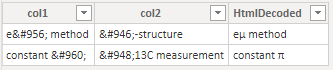
This is my data: 2 original columns + 1 made from the first one.
let
Source = Table.FromRows(Json.Document(Binary.Decompress(Binary.FromText("i45WSo0pNTAwMlO2NDWzVshNLcnIT1HSUYIJmphZ6xaXFJUml5QWpSrF6kQrJefnFZck5pUowJSYGVgja7CwNjR2BhqUWAzUkZuaV6IUGwsA", BinaryEncoding.Base64), Compression.Deflate)), let _t = ((type nullable text) meta [Serialized.Text = true]) in type table [col1 = _t, col2 = _t]),
#"Changed Type" = Table.TransformColumnTypes(Source,{{"col1", type text}, {"col2", type text}}),
HtmlTable = Table.AddColumn(#"Changed Type", "HtmlTable", each Html.Table([col1],{{"HtmlDecoded",":root"}})),
#"Expanded HtmlTable" = Table.ExpandTableColumn(HtmlTable, "HtmlTable", {"HtmlDecoded"}, {"HtmlDecoded"})
in
#"Expanded HtmlTable"
I cannot find a way to transform 2 columns at once. Is there one?
Solved! Go to Solution.
Thank you, @mahoneypat .
Using your answer I was able to create what I needed.
let
Source = Table.FromRows(Json.Document(Binary.Decompress(Binary.FromText("i45WSo0pNTAwMlO2NDWzVshNLcnIT1HSUYIJmphZ6xaXFJUml5QWpSrF6kQrJefnFZck5pUowJSYGVgja7CwNjR2BhqUWAzUkZuaV6IUGwsA", BinaryEncoding.Base64), Compression.Deflate)), let _t = ((type nullable text) meta [Serialized.Text = true]) in type table [col1 = _t, col2 = _t]),
#"Changed Type" = Table.TransformColumnTypes(Source,{{"col1", type text}, {"col2", type text}}),
Decoded = Table.TransformColumns(#"Changed Type", {
{"col1", each Table.FirstValue(Html.Table(_,{{"HtmlDecoded1",":root"}}))},
{"col2", each Table.FirstValue(Html.Table(_,{{"HtmlDecoded2",":root"}}))} } )
in
Decoded
Thank you, @mahoneypat .
Using your answer I was able to create what I needed.
let
Source = Table.FromRows(Json.Document(Binary.Decompress(Binary.FromText("i45WSo0pNTAwMlO2NDWzVshNLcnIT1HSUYIJmphZ6xaXFJUml5QWpSrF6kQrJefnFZck5pUowJSYGVgja7CwNjR2BhqUWAzUkZuaV6IUGwsA", BinaryEncoding.Base64), Compression.Deflate)), let _t = ((type nullable text) meta [Serialized.Text = true]) in type table [col1 = _t, col2 = _t]),
#"Changed Type" = Table.TransformColumnTypes(Source,{{"col1", type text}, {"col2", type text}}),
Decoded = Table.TransformColumns(#"Changed Type", {
{"col1", each Table.FirstValue(Html.Table(_,{{"HtmlDecoded1",":root"}}))},
{"col2", each Table.FirstValue(Html.Table(_,{{"HtmlDecoded2",":root"}}))} } )
in
Decoded
Yes. The Table.TransformColumns function takes a list of lists as an argument, each of which is a column name and the function to be applied. In below, I took your M, highlighted your first two columns and chose lowercase on the Transform tab. This code can now be changed to do different transform to each column.
= Table.TransformColumns(#"Expanded HtmlTable",{{"col1", Text.Lower, type text}, {"col2", Text.Lower, type text}})
Regards,
Pat
To learn more about Power BI, follow me on Twitter or subscribe on YouTube.
Check out the November 2025 Power BI update to learn about new features.
Advance your Data & AI career with 50 days of live learning, contests, hands-on challenges, study groups & certifications and more!