Forum Discussion

Tracking Customers Year Over Year
- 8 years ago
- 8 years ago
Hi,
You have to go to Modelling > New Table and then write that formula in the formula bar.

Hi,
Share some data (for 5 years atleast) and show the expected result there.

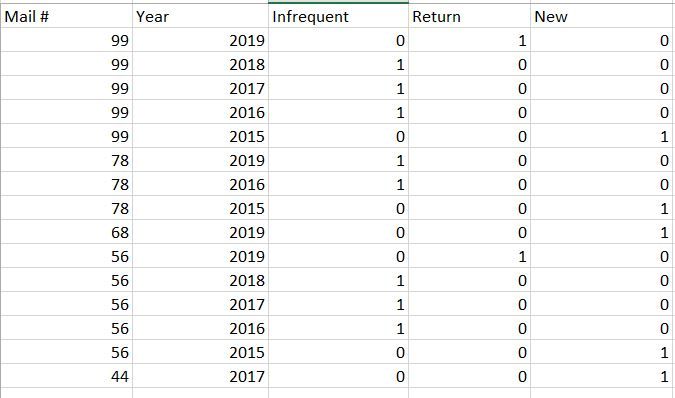
So I would like to have it so that if the Mail # appears for five consecutive years for them to be considered Returning. If the Mail # appears between 4-5 times in five years to be Considered Infrequent. When the Mail # occurs for the first time for it to show up as New.
Is this possible?
Thanks!
- Ashish_Mathur7 years agoSuper User
Hi,
I do not understand. For Mail # 99, what is the logic of 0,1,1,1,0? Explain in detail.
- CIWEB7 years agoHelper I
The first year a Mail # appears they are considered New, and recieve a 1.
The Second year a Mail # appears within a five year period they are no longer considered New and are now considered Infrequent, so they have a 0 for the New column, and a 1 for the Infrequent column.
The Third year a Mail # appears within a five year period they remain as Infrequent and get a 1 in the Infrequent column.
The Fourth Year a Mail # appears within a five year period they remain as Infrequent and get a 1 in the Infrequent column.
The Fifth Year a Mail # appears within a five year period they are no longer considered Infrequent and are now considered Returning, so they have a 0 for the Infrequent column, a 0 for the New column and a 1 for the Returning column.
If a Mail # appears each year for more than five consecutive years they recieve a 1 in the Returning column for each of the years after year five.
Does this make more sense? - Ashish_Mathur7 years agoSuper User
- CIWEB7 years agoHelper I
Great thank you so much, the only thing is am I not able to get a count of returning, new, or infrequent by year?
If I change the Mail # to a count it looks like it turns the whole display chart blank. I would love to be able to take the data and get a count of each of those customer types by year...
Thanks - Ashish_Mathur7 years agoSuper User
Hi,
I have done it for new customer only. Please apply the same concept for the others yourself. You may download my PBI file from here.
Hope this helps.
 chq7 years agoHelper II
I am trying to do the same thing. How would you account for any duplicate data points that appear?
- Ashish_Mathur7 years agoSuper User
Hi,
I do not understand your question. Share some data and show the expected result.
- chq7 years agoHelper II
In the example you provided you only did New Customers, I just attempted to apply those steps to all customers but my totals do not come out? I had assumed it had to do with duplicated data but maybe I misunderstood your example. Are you able to provide a file with the steps applied to Returning and Infrequent as well?
- Ashish_Mathur7 years agoSuper User
Hi,
Share some data and show the expected result.
- chq7 years agoHelper II
I want to use the same logic the previous poster used. We use "Reservation Number" in place of Mail #. I tried to follow the sample that you provided but you only provided the steps for "New". Can you explain how you apply the logic to Infrequent and Returning?