FabCon is coming to Atlanta
Join us at FabCon Atlanta from March 16 - 20, 2026, for the ultimate Fabric, Power BI, AI and SQL community-led event. Save $200 with code FABCOMM.
Register now!- Power BI forums
- Get Help with Power BI
- Desktop
- Service
- Report Server
- Power Query
- Mobile Apps
- Developer
- DAX Commands and Tips
- Custom Visuals Development Discussion
- Health and Life Sciences
- Power BI Spanish forums
- Translated Spanish Desktop
- Training and Consulting
- Instructor Led Training
- Dashboard in a Day for Women, by Women
- Galleries
- Data Stories Gallery
- Themes Gallery
- Contests Gallery
- QuickViz Gallery
- Quick Measures Gallery
- Visual Calculations Gallery
- Notebook Gallery
- Translytical Task Flow Gallery
- TMDL Gallery
- R Script Showcase
- Webinars and Video Gallery
- Ideas
- Custom Visuals Ideas (read-only)
- Issues
- Issues
- Events
- Upcoming Events
View all the Fabric Data Days sessions on demand. View schedule
- Power BI forums
- Forums
- Get Help with Power BI
- Desktop
- Re: Totals Calculations using a % - a real proble...
- Subscribe to RSS Feed
- Mark Topic as New
- Mark Topic as Read
- Float this Topic for Current User
- Bookmark
- Subscribe
- Printer Friendly Page


- Mark as New
- Bookmark
- Subscribe
- Mute
- Subscribe to RSS Feed
- Permalink
- Report Inappropriate Content
Totals Calculations using a % - a real problem
HI,
I have a calculation that's not working at the TOTAL level...it's fine at row level. I can see the problem and why it's happening but can't figure out a solution...hopefully a DAX Wizard will have an answer.
Below is a table of results. The BLUE totals are correct and would be the result if you had summed the figures in Excel.
The RED totals are the results from a Power BI table...as you can see the 'Adjusted by Probability' total is incorrect.
The total should be a sum of that column, whose figures are simply the 'Year 1 Authorised' figure multiplied by the 'Probabiliy'.
At a row level this calculation works fine.
I can see the problem for the Total is that the calculation is simply taking the sum of the 'Year 1 Authorised' and multiplying it by the sum of the 'Probability'...in this case 6.1...which is obviously wrong but understandable.
How to I fix this, I'm totally YouTube'd out!
This is the Measure I have created:
SUM ( Pipeline_MFMA[xDelChance_Number] )
)
| Project | Year 1 Authorised | Year 1 Adjusted by Probability | Probability |
| Scheme 1 | £116,356.31 | £58,178.16 | 0.5 |
| Scheme 2 | £68,799.15 | £41,279.49 | 0.6 |
| Scheme 3 | £35,205.69 | £7,041.14 | 0.2 |
| Scheme 4 | £18,367.85 | £11,020.71 | 0.6 |
| Scheme 5 | £0.00 | £0.00 | 0.8 |
| Scheme 6 | £0.00 | £0.00 | 0.8 |
| Scheme 7 | £0.00 | £0.00 | 0.6 |
| Scheme 8 | £0.00 | £0.00 | 0.8 |
| Scheme 9 | £0.00 | £0.00 | 0.6 |
| Scheme 10 | £0.00 | £0.00 | 0.6 |
| Correct | £238,729.00 | £117,519.50 | |
| Power BI Totals | £238,729.00 | £1,456,246.00 | 6.1 |
Any help would be a great Christmas present 😁
Thanks
Paul
Solved! Go to Solution.


- Mark as New
- Bookmark
- Subscribe
- Mute
- Subscribe to RSS Feed
- Permalink
- Report Inappropriate Content
Hi,
Try this measure
Measure = SUMX(VALUES(Pipelime_MFMA[Project]),[Year 1 Adjusted by Probability])
Hope this helps.
Regards,
Ashish Mathur
http://www.ashishmathur.com
https://www.linkedin.com/in/excelenthusiasts/
- Mark as New
- Bookmark
- Subscribe
- Mute
- Subscribe to RSS Feed
- Permalink
- Report Inappropriate Content
Hi,
Try this measure
Measure = SUMX(VALUES(Pipelime_MFMA[Project]),[Year 1 Adjusted by Probability])
Hope this helps.
Regards,
Ashish Mathur
http://www.ashishmathur.com
https://www.linkedin.com/in/excelenthusiasts/


- Mark as New
- Bookmark
- Subscribe
- Mute
- Subscribe to RSS Feed
- Permalink
- Report Inappropriate Content
Hi @Ashish_Mathur - I had the same issue and this solution gives me the right result. However the Project field in my case is a field parameter. For example my measure is -
Measure Final =
var _total =
IF(HASONEFILTER(WD_Dim[L3]),[Measure Interim],
SUMX(VALUES(WD_Dim[L3]),[Measure Interim]))
return _total
This gives right result, but based on field paramater it can be L3, L2 field etc from the WD_Dim table , so how do i tweak the above measure to get that result?
- Mark as New
- Bookmark
- Subscribe
- Mute
- Subscribe to RSS Feed
- Permalink
- Report Inappropriate Content
Hi,
I am not sure how much i can help but i can try. Share the download link of the PBI file. Show the visual clearly in which you have dragged the measure and would like to incorporate the change.
Regards,
Ashish Mathur
http://www.ashishmathur.com
https://www.linkedin.com/in/excelenthusiasts/

- Mark as New
- Bookmark
- Subscribe
- Mute
- Subscribe to RSS Feed
- Permalink
- Report Inappropriate Content
Hi @Otto_Luvpuppy ,
Currently you cannot use Field parameters to change your table dynamicaly, only option would be to do SUMX for each of the values in the field parameters.
Regards
Miguel Félix
Did I answer your question? Mark my post as a solution!
Proud to be a Super User!
Check out my blog: Power BI em Português- Mark as New
- Bookmark
- Subscribe
- Mute
- Subscribe to RSS Feed
- Permalink
- Report Inappropriate Content
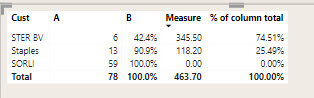
Thank you for your reply. That's clear. However I do have a related question and would be great if you can help. I have measure generated using formula (1-B) * A. The values appear right in Measure and I show them as % of column total using power bi functionality to show calc as % of column total in visualization pane.
However I want to achive same thing using measure. so I want a measure in DAX to show me same resultset as % of column total and could you please help. Result is measure value / grand total column of column, so 345,5/463,7 = 74,5%
- Mark as New
- Bookmark
- Subscribe
- Mute
- Subscribe to RSS Feed
- Permalink
- Report Inappropriate Content
Hi @askpbiuser
Try the following code:
% Total = DIVIDE([Measure], CALCULATE([Measure], ALLSELECTED(Table[Cust]))
Regards
Miguel Félix
Did I answer your question? Mark my post as a solution!
Proud to be a Super User!
Check out my blog: Power BI em Português- Mark as New
- Bookmark
- Subscribe
- Mute
- Subscribe to RSS Feed
- Permalink
- Report Inappropriate Content
Hi Ashish,
Thanks for your repsonse.
I'm not quite sure how this would work as the final part of your measure references itself...so doesn't that make it a circulare reference?
Paul
- Mark as New
- Bookmark
- Subscribe
- Mute
- Subscribe to RSS Feed
- Permalink
- Report Inappropriate Content
Mine is a new measure.
Regards,
Ashish Mathur
http://www.ashishmathur.com
https://www.linkedin.com/in/excelenthusiasts/
- Mark as New
- Bookmark
- Subscribe
- Mute
- Subscribe to RSS Feed
- Permalink
- Report Inappropriate Content
Hi Ashish,
Ignore my last post I did what I thought you meant and it WORKS!!!!!!!!!
Brilliant...thank you very much...you have saved my PC from being thrown out of my window 😁
Paul
- Mark as New
- Bookmark
- Subscribe
- Mute
- Subscribe to RSS Feed
- Permalink
- Report Inappropriate Content
You are welcome.
Regards,
Ashish Mathur
http://www.ashishmathur.com
https://www.linkedin.com/in/excelenthusiasts/
- Mark as New
- Bookmark
- Subscribe
- Mute
- Subscribe to RSS Feed
- Permalink
- Report Inappropriate Content
Hi Ashish,
So are you saying that my original measure is fine but use it in your measure for the table column I want to show?
Paul
- Mark as New
- Bookmark
- Subscribe
- Mute
- Subscribe to RSS Feed
- Permalink
- Report Inappropriate Content
Yes.
Regards,
Ashish Mathur
http://www.ashishmathur.com
https://www.linkedin.com/in/excelenthusiasts/
- Mark as New
- Bookmark
- Subscribe
- Mute
- Subscribe to RSS Feed
- Permalink
- Report Inappropriate Content
Ashish,
This solution works brilliantly if I create a seperate measure as you suggested but to reduce the number of measuer I thought the same logic would work if I simply created another variable in the first measure and then used your code after the RETURN....as shown below...
What is different about using a seperate measure as a opposed to what I've done in the code with the variable? Just interested in why that happens....content to use seperate measures if I need to.
Thanks again
- Mark as New
- Bookmark
- Subscribe
- Mute
- Subscribe to RSS Feed
- Permalink
- Report Inappropriate Content
Hi,
I do not work with variables so i would not be able to help.
Regards,
Ashish Mathur
http://www.ashishmathur.com
https://www.linkedin.com/in/excelenthusiasts/
- Mark as New
- Bookmark
- Subscribe
- Mute
- Subscribe to RSS Feed
- Permalink
- Report Inappropriate Content
No problem...thanks for you help on this.
- Mark as New
- Bookmark
- Subscribe
- Mute
- Subscribe to RSS Feed
- Permalink
- Report Inappropriate Content
Hi @Otto_Luvpuppy ,
You need to use a SUMX in order to make the correct calculation of the value try the following measure:
Year 1 Adjusted by Probability =
VAR _Chance =
CALCULATE (
SUM ( Pipeline_MFMA[xDelChance_Number] )
)
VAR _Authorised =
CALCULATE (
SUM ( Pipeline_MFMA[xCPY1] ) - [CPY1_DEL_Unauthorised],
Pipeline_MFMA,
Pipeline_MFMA[xDevDel_CPY1] = "Delivery"
)
RETURN
SUMX(VAlUES(Table[Project],_Authorised * _Chance)
Regards
Miguel Félix
Did I answer your question? Mark my post as a solution!
Proud to be a Super User!
Check out my blog: Power BI em Português- Mark as New
- Bookmark
- Subscribe
- Mute
- Subscribe to RSS Feed
- Permalink
- Report Inappropriate Content
Hi Miguel,
Many thanks for your reponse...I'm trying to implement it now but can't see where the Table[Project] comes from, in the final line, or what to replace it with.
Paul
- Mark as New
- Bookmark
- Subscribe
- Mute
- Subscribe to RSS Feed
- Permalink
- Report Inappropriate Content
Hi @Otto_Luvpuppy,
The table[project] is the column you present on your data that has the values Scheme 1, Scheme 2 and so on.
Since I did not know the name of the table and column place that generic name, you should replace by the column on your model regarding that Shecme values.
Regards
Miguel Félix
Did I answer your question? Mark my post as a solution!
Proud to be a Super User!
Check out my blog: Power BI em Português- Mark as New
- Bookmark
- Subscribe
- Mute
- Subscribe to RSS Feed
- Permalink
- Report Inappropriate Content
Hi Miguel,
The problem is solved using a combination of your code and that of Ashish.....thank you both very much.
Paul
- Mark as New
- Bookmark
- Subscribe
- Mute
- Subscribe to RSS Feed
- Permalink
- Report Inappropriate Content
Hi Miguel,
Thanks again for taking thee time with this. I tried the following using your code...
Unfortunately I get the same result as I did with my original code.

Helpful resources

Power BI Monthly Update - November 2025
Check out the November 2025 Power BI update to learn about new features.

Fabric Data Days
Advance your Data & AI career with 50 days of live learning, contests, hands-on challenges, study groups & certifications and more!

FabCon Atlanta 2026
Join us at FabCon Atlanta, March 16-20, for the ultimate Fabric, Power BI, AI and SQL community-led event. Save $200 with code FABCOMM.


