cancel
Showing results for 
Search instead for 
Did you mean: 

Get Fabric Certified for FREE during Fabric Data Days. Don't miss your chance! Request now

Reply
Raul
Post Patron
Post Patron

Total sum of a table

Hello everybody!
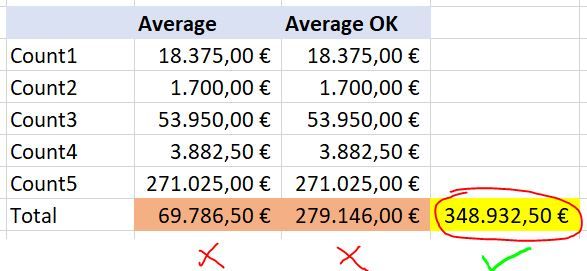
I have the following matrix where I show by a field the average of some values:

Matrix1.JPG

The column Average is the measure:
Average = CALCULATE(AVERAGE(Table[Amount]), Table[Type]="Count")

which returns an incorrect value for the total row, because I want it to be the sum of all the values in the column.

To get the sum of the total, I created a second measure (Average OK) with the following formula:

Average OK =
VAR avg= CALCULATE(AVERAGE(Table1[Amount]), Table[Type]="Count")
VAR tableTotals = SUMMARIZE(Table2, Table2[Counts], "TotalColumn", avg)
RETURN IF(HASONEFILTER(Table2[Counts]), avg, SUMX(tableTotals, [TotalColumn]))


but it doesn't return the expected value (348,932.50).
What is wrong with the formula? Is there any other way to get this total with the sum of the column values?
Thank you very much.


1 ACCEPTED SOLUTION
Jihwan_Kim
Super User
Super User

Hi, @Raul 

Please try the below.


New Measures =
SUMX (
VALUES ( [your column that contains count12345] ),
[average (put the measure here, not formula]
)


Or, please share your sample pbix file, then I can try to look into it to come up with a more accurate measure.


Hi, My name is Jihwan Kim.


If this post helps, then please consider accept it as the solution to help other members find it faster, and give a big thumbs up.


Linkedin: linkedin.com/in/jihwankim1975/

Twitter: twitter.com/Jihwan_JHKIM


If this post helps, then please consider accepting it as the solution to help other members find it faster, and give a big thumbs up.


Click here to visit my LinkedIn page

Click here to schedule a short Teams meeting to discuss your question.

View solution in original post

2 REPLIES 2
Jihwan_Kim
Super User
Super User

Hi, @Raul 

Please try the below.


New Measures =
SUMX (
VALUES ( [your column that contains count12345] ),
[average (put the measure here, not formula]
)


Or, please share your sample pbix file, then I can try to look into it to come up with a more accurate measure.


Hi, My name is Jihwan Kim.


If this post helps, then please consider accept it as the solution to help other members find it faster, and give a big thumbs up.


Linkedin: linkedin.com/in/jihwankim1975/

Twitter: twitter.com/Jihwan_JHKIM


If this post helps, then please consider accepting it as the solution to help other members find it faster, and give a big thumbs up.


Click here to visit my LinkedIn page

Click here to schedule a short Teams meeting to discuss your question.

Great! Quick and easy.
Thank you very much for your help @Jihwan_Kim , it works

Helpful resources

Announcements
November Power BI Update Carousel

Power BI Monthly Update - November 2025

Check out the November 2025 Power BI update to learn about new features.

Fabric Data Days Carousel

Fabric Data Days

Advance your Data & AI career with 50 days of live learning, contests, hands-on challenges, study groups & certifications and more!

FabCon Atlanta 2026 carousel

FabCon Atlanta 2026

Join us at FabCon Atlanta, March 16-20, for the ultimate Fabric, Power BI, AI and SQL community-led event. Save $200 with code FABCOMM.

Top Solution Authors
Top Kudoed Authors