cancel
Showing results for 
Search instead for 
Did you mean: 

Get Fabric Certified for FREE during AI Skills Fest. This week only. Secure your voucher now.

Reply
Anonymous
Not applicable

Top N displaying more than N when duplicate values exist

Hi All,


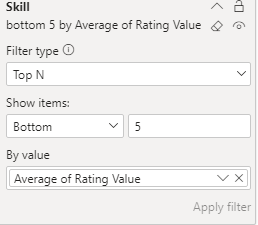
Have an issue with Top N filter in PowerBI visual, when there is a duplicate ranked value. shows more than 5 results.

There a large amount of solutions around this forum and the web, but non seem to fit my use case after trialling them due to ranking 1-5.


RankX works, until there is a duplicate - even setting Dense or Skip for the tiebreaker does not work.

Tried various methods and fields, even creating a separate table, all with varying degrees of success.


Visual Appearance (Bottom 5)

carlG_2-1600136833166.png

Filter Settings

carlG_1-1600136810808.png


Data is populated by a likert survey ("Rank 1-5 how well you can use each item") and TopN filter shows bottom 5.

No additional data exists to modify the value as they are all submitted at the same time on the survey (No date hack method available)


Table Data Sample

SkillAverage of Rating Value
3D Scanner - Einscan Pro+2.5
Dynamic Microphone - Rode2.5
Gimbal - Zhiyun Crane32.5
Mixer - Rode Procaster2.5
PTX Camera System2.5
Resolume2.5
Video mic - Rode GO2.5
Volumetric Display - Looking Glass2.5
RTI Panels2.25
Volumetric Display - Voxon VX12.25
Chroma Key Kit2
Elgato Stream Deck2
1 ACCEPTED SOLUTION
Greg_Deckler
Community Champion
Community Champion

@Anonymous Right, that' because of how RANKX and TOPN handle duplicates. You can add a small random number RAND()/100 to break ties. You'd have to create a measure to rank by like:


Measure = AVERAGE([Rating Value])*RAND()/100


Follow on LinkedIn
@ me in replies or I'll lose your thread!!!
Instead of a Kudo, please vote for this idea
Become an expert!: Enterprise DNA
External Tools: MSHGQM
YouTube Channel!: Microsoft Hates Greg
Latest book!:
DAX For Humans

DAX is easy, CALCULATE makes DAX hard...

View solution in original post

2 REPLIES 2
amitchandak
Super User
Super User

@Anonymous , In your Rank, adds a small random variable using Rand


Rank =  Rankx(<code>) +rank()/1000  and then use this in Top N filter

Share with Power BI Enthusiasts: Full Power BI Video (20 Hours) YouTube
Microsoft Fabric Series 60+ Videos YouTube
Microsoft Fabric Hindi End to End YouTube
Greg_Deckler
Community Champion
Community Champion

@Anonymous Right, that' because of how RANKX and TOPN handle duplicates. You can add a small random number RAND()/100 to break ties. You'd have to create a measure to rank by like:


Measure = AVERAGE([Rating Value])*RAND()/100


Follow on LinkedIn
@ me in replies or I'll lose your thread!!!
Instead of a Kudo, please vote for this idea
Become an expert!: Enterprise DNA
External Tools: MSHGQM
YouTube Channel!: Microsoft Hates Greg
Latest book!:
DAX For Humans

DAX is easy, CALCULATE makes DAX hard...

Helpful resources

Announcements
May Power BI Update Carousel

Power BI Monthly Update - May 2026

Check out the May 2026 Power BI update to learn about new features.

Fabric SQL PBI Data Days

Data Days 2026 coming soon!

Sign up to receive a private message when registration opens and key events begin.

New to Fabric survey Carousel

New to Fabric Survey

If you have recently started exploring Fabric, we'd love to hear how it's going. Your feedback can help with product improvements.

Power BI DataViz World Championships carousel

Power BI DataViz World Championships - June 2026

A new Power BI DataViz World Championship is coming this June! Don't miss out on submitting your entry.