cancel
Showing results for 
Search instead for 
Did you mean: 

Get Fabric Certified for FREE during Fabric Data Days. Don't miss your chance! Request now

Reply
afrutos
Resolver I
Resolver I

Tooltip

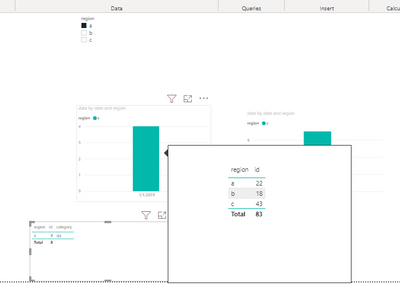
Hi everyone I have created a tooltip, like this: 

afrutos_0-1637853976422.png

How can I leave the bar chart fixed once I have applied the tooltips on the main page?
Because what happens to me, and I would like to change, is that it filters the bar chart according to the year I select, and I want it to show me all the years in the tooltip regardless of the filter I apply.

afrutos_1-1637854043639.png


Thanks everyone in advanced!

7 REPLIES 7
V-lianl-msft
Community Support
Community Support

Have you created a tooltip page and turned off the "Keep all filters"option? It is normal in my test.

Vlianlmsft_0-1638164443089.png


Hi, yes I tried doing that but it's not working for me

afrutos_0-1638174186868.pngafrutos_1-1638174310703.png


could you try by adding 4 years?

Thanks a lot for the effort! 


afrutos
Resolver I
Resolver I

I wanted to ask you if I have a way to add a tooltips to a matrix without applying the page filters.
I need to display the tooltips that shows the years 2018, 2019, 2020 and 2021. For example, if 2019 is selected, the tooltips would have to show me 2018, 2019, 2020 and 2021.
The problem is that when I add the tooltips to the matrix and select an element it shows me only the year I have selected on the page.
Is there any solution to this problem?

I have tried editing interactions, but as it is a tooltips of a Matrix, when I select to edit interactions it cannot be unlinked (only the matrix appears).

Thank you

afrutos
Resolver I
Resolver I

Oh thank you very much, but it still doesn't work
In the tooltip page I have tried putting the filters I need; but when I go to the main one and for example the table for 2021 is filtered, if I want to keep the 4 years in the bar chart it filters me, it filters me for that year....

@afrutos , just wanted to confirm that you have not dragged the year column into Add Tooltip/drill down filter .


Share with Power BI Enthusiasts: Full Power BI Video (20 Hours) YouTube
Microsoft Fabric Series 60+ Videos YouTube
Microsoft Fabric Hindi End to End YouTube

afrutos_1-1637925636644.png

These are the filters I have
I hope I have explained myself well, and I appreciate your help.


amitchandak
Super User
Super User

@afrutos , On tooltip page uncheck keep all filter, page level format option and below that drag all parameter you want to pass to the tooltip page

Share with Power BI Enthusiasts: Full Power BI Video (20 Hours) YouTube
Microsoft Fabric Series 60+ Videos YouTube
Microsoft Fabric Hindi End to End YouTube

Helpful resources

Announcements
November Power BI Update Carousel

Power BI Monthly Update - November 2025

Check out the November 2025 Power BI update to learn about new features.

Fabric Data Days Carousel

Fabric Data Days

Advance your Data & AI career with 50 days of live learning, contests, hands-on challenges, study groups & certifications and more!

FabCon Atlanta 2026 carousel

FabCon Atlanta 2026

Join us at FabCon Atlanta, March 16-20, for the ultimate Fabric, Power BI, AI and SQL community-led event. Save $200 with code FABCOMM.

Top Solution Authors
Top Kudoed Authors