cancel
Showing results for 
Search instead for 
Did you mean: 

Get Fabric Certified for FREE during Fabric Data Days. Don't miss your chance! Request now

Reply
Anonymous
Not applicable

Tooltip Value Showing Twice

Hello,

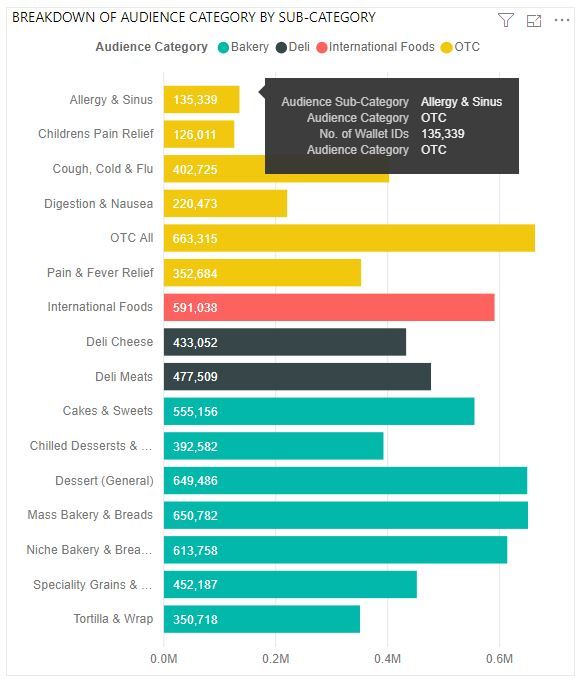
I'm wondering how to essentially sort a bar chart visualization by the legend. In the visualization below, I am visualizing the number of people belonging to a sub-category of an Audience; there are multiple sub-categories within an Audience Category. 

I'd like to sort the bar chart by the Audience Category, and how I'm currently achieving this is moving the Audience Category field into the tooltip option. The issue with this is that the Audience Category shows twice in the tooltip (once for legend and once for having the field included manually in the tooltip). Not including the Audience Category field in the tooltip manually would only give me the options to sort the chart by number of people or by the sub-category (alphabetically). I'm looking for a way to only show this Audience Category once in the tooltip, is this possible?

PBI_Issue_2.JPG

1 ACCEPTED SOLUTION
MFelix
Super User
Super User

Hi  @Anonymous ,


The sorting of the default tooltip is made based on:

  • Axis value
  • Legend value
  • Value
  • Tooltip fields (in the order you place them)

You cannot change this behaviour so adding the Audience Category to the tooltip part duplicated the value and does nothing to sorting.


To achieve a custom sorting you need to create a custom tooltip para that way you can sort the values of the tooltip as you need.


https://docs.microsoft.com/en-us/power-bi/desktop-tooltips


Regards

Miguel Félix


Did I answer your question? Mark my post as a solution!

Proud to be a Super User!

Check out my blog: Power BI em Português


View solution in original post

2 REPLIES 2
MFelix
Super User
Super User

Hi  @Anonymous ,


The sorting of the default tooltip is made based on:

  • Axis value
  • Legend value
  • Value
  • Tooltip fields (in the order you place them)

You cannot change this behaviour so adding the Audience Category to the tooltip part duplicated the value and does nothing to sorting.


To achieve a custom sorting you need to create a custom tooltip para that way you can sort the values of the tooltip as you need.


https://docs.microsoft.com/en-us/power-bi/desktop-tooltips


Regards

Miguel Félix


Did I answer your question? Mark my post as a solution!

Proud to be a Super User!

Check out my blog: Power BI em Português


luapdoniv
Resolver II
Resolver II

Not am aware off. The workaround is to create a tooltip dashboard with a table visual formatted out to resemble exactly the way the tooltip is seen, and that is possible.

Helpful resources

Announcements
November Power BI Update Carousel

Power BI Monthly Update - November 2025

Check out the November 2025 Power BI update to learn about new features.

Fabric Data Days Carousel

Fabric Data Days

Advance your Data & AI career with 50 days of live learning, contests, hands-on challenges, study groups & certifications and more!

FabCon Atlanta 2026 carousel

FabCon Atlanta 2026

Join us at FabCon Atlanta, March 16-20, for the ultimate Fabric, Power BI, AI and SQL community-led event. Save $200 with code FABCOMM.

Top Solution Authors
Top Kudoed Authors