FabCon is coming to Atlanta
Join us at FabCon Atlanta from March 16 - 20, 2026, for the ultimate Fabric, Power BI, AI and SQL community-led event. Save $200 with code FABCOMM.
Register now!- Power BI forums
- Get Help with Power BI
- Desktop
- Service
- Report Server
- Power Query
- Mobile Apps
- Developer
- DAX Commands and Tips
- Custom Visuals Development Discussion
- Health and Life Sciences
- Power BI Spanish forums
- Translated Spanish Desktop
- Training and Consulting
- Instructor Led Training
- Dashboard in a Day for Women, by Women
- Galleries
- Data Stories Gallery
- Themes Gallery
- Contests Gallery
- QuickViz Gallery
- Quick Measures Gallery
- Visual Calculations Gallery
- Notebook Gallery
- Translytical Task Flow Gallery
- TMDL Gallery
- R Script Showcase
- Webinars and Video Gallery
- Ideas
- Custom Visuals Ideas (read-only)
- Issues
- Issues
- Events
- Upcoming Events
Get Fabric Certified for FREE during Fabric Data Days. Don't miss your chance! Request now
- Power BI forums
- Forums
- Get Help with Power BI
- Desktop
- Re: To calculate the total dynamically
- Subscribe to RSS Feed
- Mark Topic as New
- Mark Topic as Read
- Float this Topic for Current User
- Bookmark
- Subscribe
- Printer Friendly Page


- Mark as New
- Bookmark
- Subscribe
- Mute
- Subscribe to RSS Feed
- Permalink
- Report Inappropriate Content
To calculate the total dynamically
Hi,
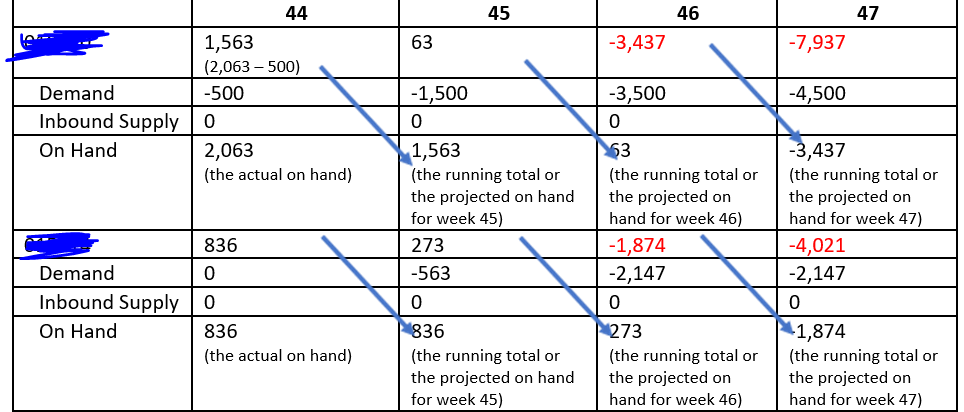
I am stuck up in calculating a running total for one of my reports.In the image given beloww i would basically liske to adjust the on hand demand like the one shown below.
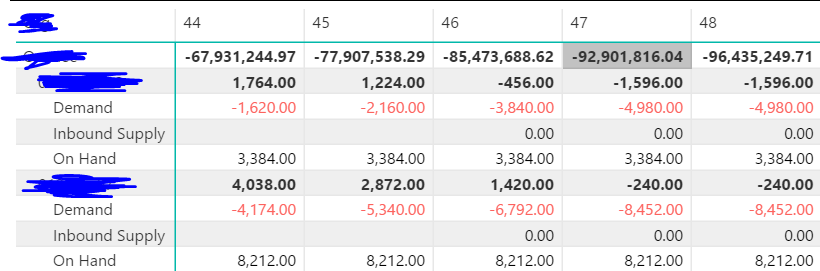
Presently it is taking the values that are coming from the database and then adding it up.I have used a calculated measure for doing up the cumulative calculation.
Any help would be much appreciated!!


- Mark as New
- Bookmark
- Subscribe
- Mute
- Subscribe to RSS Feed
- Permalink
- Report Inappropriate Content
Hi,
Share the download link of your file.
Regards,
Ashish Mathur
http://www.ashishmathur.com
https://www.linkedin.com/in/excelenthusiasts/
- Mark as New
- Bookmark
- Subscribe
- Mute
- Subscribe to RSS Feed
- Permalink
- Report Inappropriate Content
Hi,
Thank you for your reply.
My pbix file is having some private data.So is there any way to share it with you by hiding the data that is private?
- Mark as New
- Bookmark
- Subscribe
- Mute
- Subscribe to RSS Feed
- Permalink
- Report Inappropriate Content
Dummy your dataset and then share the download link.
Regards,
Ashish Mathur
http://www.ashishmathur.com
https://www.linkedin.com/in/excelenthusiasts/
- Mark as New
- Bookmark
- Subscribe
- Mute
- Subscribe to RSS Feed
- Permalink
- Report Inappropriate Content
Hi,
I am unable to attach my pbix file in the message.
So could you please tell me a way to do this?
- Mark as New
- Bookmark
- Subscribe
- Mute
- Subscribe to RSS Feed
- Permalink
- Report Inappropriate Content
Hi,
Upload the file to Google Drive and share the download link here.
Regards,
Ashish Mathur
http://www.ashishmathur.com
https://www.linkedin.com/in/excelenthusiasts/
- Mark as New
- Bookmark
- Subscribe
- Mute
- Subscribe to RSS Feed
- Permalink
- Report Inappropriate Content
Hi,
Thank you for help.
I have uploaded my file in the location below:
https://drive.google.com/drive/folders/12Ou3PcwDie0aju7ZV8ISSbeKsvXdZ6Vp
In the file if you will click on B then a screenshot will appear as follows
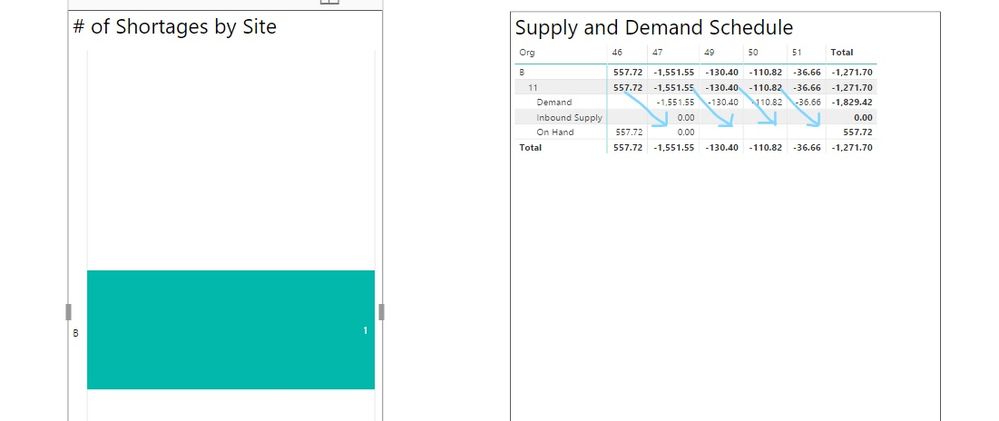
So now I would like to see the previous week's running total value in the on hand supply part till last week and again calcluate the running total with the newly adjusted values.
Thanks.
- Mark as New
- Bookmark
- Subscribe
- Mute
- Subscribe to RSS Feed
- Permalink
- Report Inappropriate Content
Hi,
I need permissino to download the file.
Regards,
Ashish Mathur
http://www.ashishmathur.com
https://www.linkedin.com/in/excelenthusiasts/
- Mark as New
- Bookmark
- Subscribe
- Mute
- Subscribe to RSS Feed
- Permalink
- Report Inappropriate Content
Hi,
I have updated my test file with some changes in the calculation for running total
I need to change my pbi file as follows:
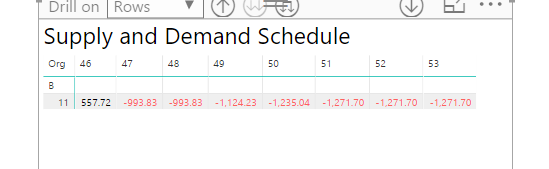
The cumulative total for a previous week should be assigned to the on hand quantity of next week.
week 47:
On hand = total of week 46 = 557.72
week 48:
On hand = total of week 47 = -993.83
week 49:
On hand = total of week 48 = -1551.55 +(- 993.83) = -2545.83
and like this in the remaining weeks.
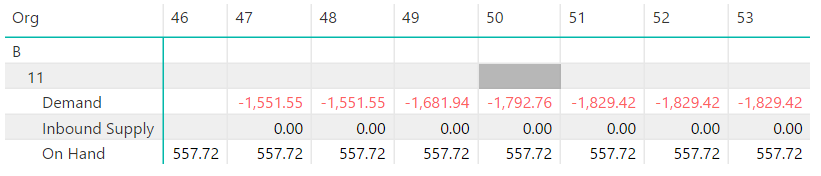
Please find the updated link below.
https://drive.google.com/drive/folders/12Ou3PcwDie0aju7ZV8ISSbeKsvXdZ6Vp?usp=sharing
I need to implement this in one of my report very urgently.
Any help will be greatly appreciated!!
- Mark as New
- Bookmark
- Subscribe
- Mute
- Subscribe to RSS Feed
- Permalink
- Report Inappropriate Content
Hi,
I may be able to solve this in Ecel using the PowerPivot and CUBE functions. I cannot solve this in PBI desktop. Sorry but will not be able to help.
Regards,
Ashish Mathur
http://www.ashishmathur.com
https://www.linkedin.com/in/excelenthusiasts/
- Mark as New
- Bookmark
- Subscribe
- Mute
- Subscribe to RSS Feed
- Permalink
- Report Inappropriate Content
Thanks for your help and time!!
- Mark as New
- Bookmark
- Subscribe
- Mute
- Subscribe to RSS Feed
- Permalink
- Report Inappropriate Content
Hi @Anonymous
Thank you for the update!!
Were you able to find a solution to this problem with the pbi file shared in one of the trailing posts?
I am very new to Power BI and need to implement it in one of my reports urgently.
- Mark as New
- Bookmark
- Subscribe
- Mute
- Subscribe to RSS Feed
- Permalink
- Report Inappropriate Content
I have modified my pbi file with some calculations and shared it below:
https://drive.google.com/drive/folders/12Ou3PcwDie0aju7ZV8ISSbeKsvXdZ6Vp
Now i need to make some changes in the way data is being represented in the file.I need to re-adjust the value of on hand quantity of the current week with the cumulative total of the previous week(demand+inbound supply+on Hand).Presently the on hand field is showing the same value for every week(in this example)
For week 47:
On hand = running total of previous week(46)= 557.72
For week 48:
On hand = running total of previous week(46)=-993.83 etc.. till the last week.
Adjusting the value of on hand will also change the cumulative total that is being represented for any week.
I need to implement this in one of my reports very urgently as it is hampering the progress of it.
Any help/pointers will be greatly appreciated!!
Please let me know for any question/clarification
Thanks
- Mark as New
- Bookmark
- Subscribe
- Mute
- Subscribe to RSS Feed
- Permalink
- Report Inappropriate Content
Hi @sajal161292,
I think you can add filter to check where the formula is calculated on and use previous result to replace current value.(your visual contains complex grouping columns, it is hard to write a specific condition to filter on it)
For example:
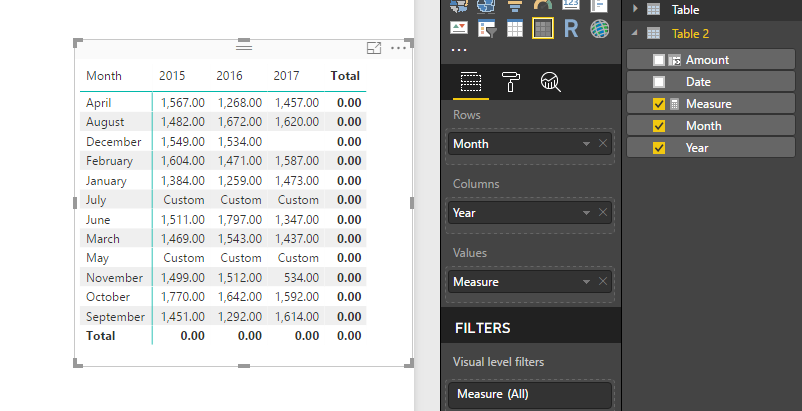
Modify formula shows total as 0, May,July shows 'custom'.
Regards,
Xiaoxin Sheng
- Mark as New
- Bookmark
- Subscribe
- Mute
- Subscribe to RSS Feed
- Permalink
- Report Inappropriate Content
Hi @Anonymous,
I have modified my pbi file with adding up a new measure for representing the previous week sales.
Additionally i have added a new order type as Total.
Now i am stuck up while re-assigning the value of previous week sales to the field Total.
Is there any way to perform iteration in DAX and traverse for each record?
Please find the link of new pbi file below
https://drive.google.com/drive/folders/12Ou3PcwDie0aju7ZV8ISSbeKsvXdZ6Vp
Thanks for your help!!
- Mark as New
- Bookmark
- Subscribe
- Mute
- Subscribe to RSS Feed
- Permalink
- Report Inappropriate Content
HI @sajal161292,
>>Is there any way to perform iteration in DAX and traverse for each record?
It is possible to achieve this, but you need to add huge amount of conditions to help measures confirm where current content calculated.
In my opinion, power bi not support auto/dynamic calculate on complex measures(exist some specific filters, contains break row contents function e.g. 'all/allexcept').
Notice: if your data contains any privacy data, please do mask sensitive data before sharing.
Regards,
Xiaoxin Sheng
- Mark as New
- Bookmark
- Subscribe
- Mute
- Subscribe to RSS Feed
- Permalink
- Report Inappropriate Content
Hi,
So will it be possible to perform this operation in DAX?
Thanks
Har**bleep**a Singh

- Mark as New
- Bookmark
- Subscribe
- Mute
- Subscribe to RSS Feed
- Permalink
- Report Inappropriate Content
Hi @sajal161292,
Please share the sample pbix file to test, it will be help to analysis your situation.(if your file contains some privacy data, you only need to share part of them or use original structure to create some fake data)
BTW, measures which works on specific filters normally not work properly on total row. In my opinion, you need to add a filter to check on total row and write a specific formula who works on total row.
For example:
checkrow =
IF (
    COUNTROWS ( table ) <> COUNTROWS ( ALLSELECTED ( table ) ),
    "normula row",
    "total row"
)
Regards,
Xiaoxin Sheng
Helpful resources

Power BI Monthly Update - November 2025
Check out the November 2025 Power BI update to learn about new features.

Fabric Data Days
Advance your Data & AI career with 50 days of live learning, contests, hands-on challenges, study groups & certifications and more!

FabCon Atlanta 2026
Join us at FabCon Atlanta, March 16-20, for the ultimate Fabric, Power BI, AI and SQL community-led event. Save $200 with code FABCOMM.


