cancel
Showing results for 
Search instead for 
Did you mean: 

The Power BI Data Visualization World Championships is back! Get ahead of the game and start preparing now! Learn more

Reply
st-dat
Helper III
Helper III

Timeline display error date period as against table and chart

Hello community,


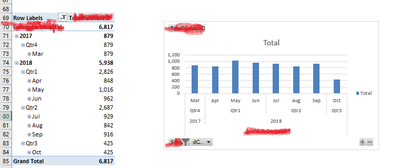
It's not funny at all. I just noticed when slicer is inserted in my PowerPivot excel 2016, it used to display correct value until few days ago I noticed wrong date values in quarter period, see image - slicer1 and slicer2 attached.


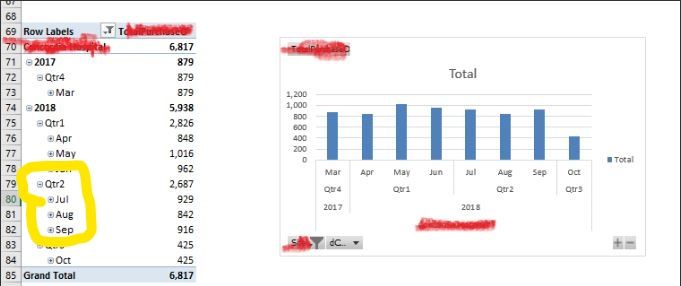
Until this week it has been working and returning correct value. The one on top is correct while the one below is wrong instead on showing Jul, Aug,Sept as Quater 3, it shows them as Quarter 2.


Someone to please help with solution


St-datslicer1.pngslicer2.png


4 REPLIES 4
Christann
Advocate IV
Advocate IV

@st-dat

Notice that in the first picture you also had July-September as Qtr2:

Inkeddsfasfd;sf;ljfdslkj_LI.jpg

Could you have an incorrect Fiscal Year? For instance if you inserted the wrong month in CalendarAuto(), you might end up with a result like this.

Hi Christann,


Thank you for your response.


The month you're seeing is correct for my fiscal year which start from April 1st and ends March 31st

So Quarter 1 = Apr, May, Jun; Quarter 2 = Jul, Aug, Sept; Quarter 3 = Oct, Nov, Dec; Quarter 4 = Jan, Feb and Mar.


Further assistance will be appreciated


St-dta


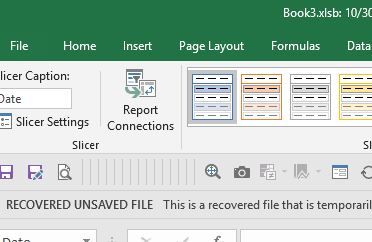
If your issue is that the slicer is selecting Qtr3 but the chart is showing Qtr2, check to see if your chart is connected to the slicer. Go to Report Connections to check.

aaaaaaaaaaaaaaaaaaaaaa.JPG

Thanks Christiann,


What I have done is created a new pivot table and chart which display correct date in Years 2017 with Quarter 4 and 2018 with quarters 1 ,2 ,3.


Then, I inserted Timeline which wrongly displayed 2018 -Quarter 1 as 2017 -Quarter 4;

2018-Quarter2 as 2018-Quarter1, and again, wrongly display 2018 - Quarter 3 as 2018 - Quarter 4  


Hope I have been able to explain better this time...The two images is also the clear scenerio i'm trying to explain here.


St-dat

Helpful resources

Announcements
Power BI DataViz World Championships

Power BI Dataviz World Championships

The Power BI Data Visualization World Championships is back! Get ahead of the game and start preparing now!

December 2025 Power BI Update Carousel

Power BI Monthly Update - December 2025

Check out the December 2025 Power BI Holiday Recap!

FabCon Atlanta 2026 carousel

FabCon Atlanta 2026

Join us at FabCon Atlanta, March 16-20, for the ultimate Fabric, Power BI, AI and SQL community-led event. Save $200 with code FABCOMM.