FabCon is coming to Atlanta
Join us at FabCon Atlanta from March 16 - 20, 2026, for the ultimate Fabric, Power BI, AI and SQL community-led event. Save $200 with code FABCOMM.
Register now!- Power BI forums
- Get Help with Power BI
- Desktop
- Service
- Report Server
- Power Query
- Mobile Apps
- Developer
- DAX Commands and Tips
- Custom Visuals Development Discussion
- Health and Life Sciences
- Power BI Spanish forums
- Translated Spanish Desktop
- Training and Consulting
- Instructor Led Training
- Dashboard in a Day for Women, by Women
- Galleries
- Data Stories Gallery
- Themes Gallery
- Contests Gallery
- QuickViz Gallery
- Quick Measures Gallery
- Visual Calculations Gallery
- Notebook Gallery
- Translytical Task Flow Gallery
- TMDL Gallery
- R Script Showcase
- Webinars and Video Gallery
- Ideas
- Custom Visuals Ideas (read-only)
- Issues
- Issues
- Events
- Upcoming Events
Get Fabric Certified for FREE during Fabric Data Days. Don't miss your chance! Request now
- Power BI forums
- Forums
- Get Help with Power BI
- Desktop
- Re: Time representation with DATEDIFF
- Subscribe to RSS Feed
- Mark Topic as New
- Mark Topic as Read
- Float this Topic for Current User
- Bookmark
- Subscribe
- Printer Friendly Page


- Mark as New
- Bookmark
- Subscribe
- Mute
- Subscribe to RSS Feed
- Permalink
- Report Inappropriate Content
Time representation with DATEDIFF
Hi all !
I'm stuck on this one for good. Here is my problem on PowerBI. I have a sensor, that sends to the DB its state "Marche"(On) or "Arrêt"(Off). When the state change, it sends a new row, with a new date called (Date/Heure). Here are my raw data :
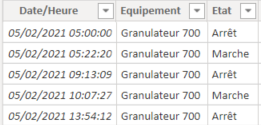
In order to calculate how long the device connected to the sensor is on, I've added a column (Date de fin) which is the starting date of the next event. By doing this, i could calculate the difference between the start and the end of the event :
Durée état = (DATEDIFF('TF GRA 700'[Date/Heure],'TF GRA 700'[Date de fin],MINUTE)/1440)*24So I got this
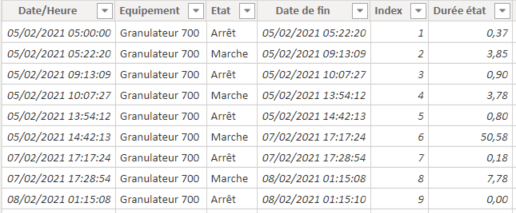
Even if it's good, I'm still not happy with it. As you can see on the previous image, on the 05/02/20 at 14:42:13, the device has been running for 50,58h in a row. That means, when i'm trying to visualize it:
-on the 05/02/21 I have the sum of every "Durée état" (more than 58h)
-nothing on the 06/02/21
-only 0,18h on the 07/02/2021
With a graphic, it may be clearer :
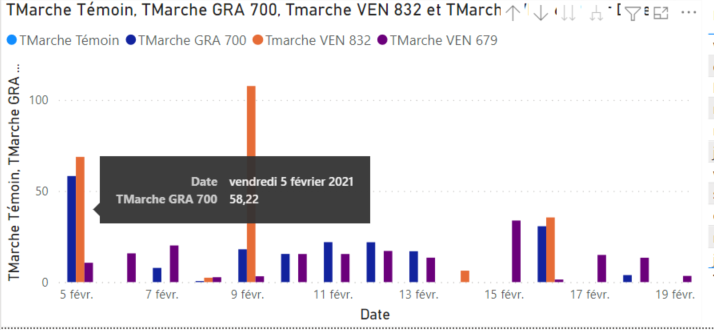
So, what I would like to have is :
24h on the 5th, 24h on the 6th, and the overage on the 7th.
I hope despite my poor english, I'm still clear !
Thanks for all,
Solved! Go to Solution.


- Mark as New
- Bookmark
- Subscribe
- Mute
- Subscribe to RSS Feed
- Permalink
- Report Inappropriate Content
With this you get all dates required ?
Tables des Dates Intervalles =
VAR DateDebut=MIN('TF GRA 700 (2)'[Date de début])
VAR DateFin=MAX('TF GRA 700 (2)'[Date de début])
VAR TabDates=SELECTCOLUMNS(CALCULATETABLE(Dates,
                DATESBETWEEN(Dates[Date],DateDebut,DateFin)),
                "Dates TF",Dates[Date])
RETURN TabDates
Then you need to add column(s), but depends on what you want.
If you want the total hours per day or make difference by machine...
Next step could be something inspired by that :
Tables des Dates Intervalles =
VAR DateDebut=MIN('TF GRA 700 (2)'[Date de début])
VAR DateFin=MAX('TF GRA 700 (2)'[Date de début])
VAR TabDates=SELECTCOLUMNS(CALCULATETABLE(Dates,
                DATESBETWEEN(Dates[Date],DateDebut,DateFin)),
                "Dates TF",Dates[Date])
VAR TabDates2=CROSSJOIN(TabDates,'TF GRA 700 (2)')
VAR TabDates3=ADDCOLUMNS(TabDates2,"Valeur",IF([Dates TF]>='TF GRA 700 (2)'[Date de début]&&[Dates TF]<='TF GRA 700 (2)'[Date de fin],1,0))
RETURN FILTER(TabDates3,[Valeur]=1)
This could be done with less lines but at least it is step by step.
You should have a table with that with all dates and a column to select only dates you are interested in.
Hope this helps
- Mark as New
- Bookmark
- Subscribe
- Mute
- Subscribe to RSS Feed
- Permalink
- Report Inappropriate Content
Bonjour Greg,
It's a solution based on DAX not on Power Query.
@GregB49 wrote:Hi all !
I'm stuck on this one for good. Here is my problem on PowerBI. I have a sensor, that sends to the DB its state "Marche"(On) or "Arrêt"(Off). When the state change, it sends a new row, with a new date called (Date/Heure). Here are my raw data :
In order to calculate how long the device connected to the sensor is on, I've added a column (Date de fin) which is the starting date of the next event. By doing this, i could calculate the difference between the start and the end of the event :
Durée état = (DATEDIFF('TF GRA 700'[Date/Heure],'TF GRA 700'[Date de fin],MINUTE)/1440)*24So I got this
Even if it's good, I'm still not happy with it. As you can see on the previous image, on the 05/02/20 at 14:42:13, the device has been running for 50,58h in a row. That means, when i'm trying to visualize it:
-on the 05/02/21 I have the sum of every "Durée état" (more than 58h)
-nothing on the 06/02/21
-only 0,18h on the 07/02/2021
With a graphic, it may be clearer :
So, what I would like to have is :
24h on the 5th, 24h on the 6th, and the overage on the 7th.
I hope despite my poor english, I'm still clear !
Thanks for all,
If you want to split exactly by day, you should have in your example (I think but can be wrong) :
05/02 from 14:42 to 24h -->9h18mn
06/02 --> 24h
07/02 --> 17h17mn
Total 50h35mn or 50,58h
If that is your requirement, I think you need to calculate elapsed time on 1st day, and elapsed time for last day, in between it will always be 24h / day.
So VAR NbHoursPerDay=TIME(24,0,0) or VAR NbHoursPerDay=24 depends if you want real time or not.
So calculation for first day and end day will be :
VAR 1stDayDuration = TIME(24,0,0) - StartTime
VAR LastDayDuration = End Time
and to calculate how many days in between :
- Mark as New
- Bookmark
- Subscribe
- Mute
- Subscribe to RSS Feed
- Permalink
- Report Inappropriate Content
Bonjour AilleryO !
First, thank you for your reply.
I'm trying to use your idea but I'm stuck again.
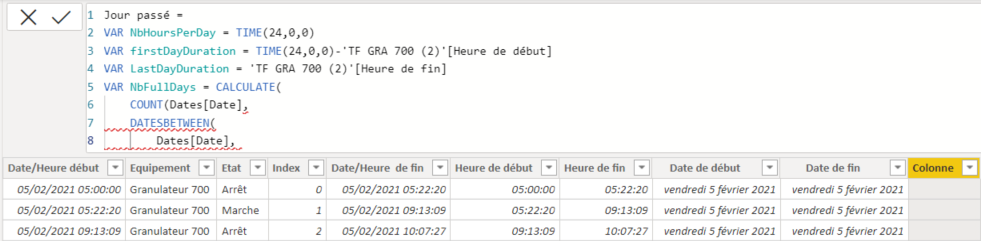
As you can see, I've created 4 columns Heure de début (Start Time), Heure de fin ( End time), Date de début (Start Date) and Date de fin (End date).
So at first everything seems to be ok, but in the DATESBETWEEN, I can't use my Date de début et Date de fin, I'm sure I'm doing something wrong but I don't know what.
Do you have an idea ?
Thanks a lot !
- Mark as New
- Bookmark
- Subscribe
- Mute
- Subscribe to RSS Feed
- Permalink
- Report Inappropriate Content
Hi,
It seems you forgot to close the parenthesis of your COUNT function before the DATESBETWEEN 😉
- Mark as New
- Bookmark
- Subscribe
- Mute
- Subscribe to RSS Feed
- Permalink
- Report Inappropriate Content
My bad 😅
So now, the formula is working, I've just changed the return for :

Also I had to change TIME(24,0,0) to TIME(23,59,59) otherwise it was returning 00:00-Start date and not 24:00 - Start date. Maybe there is a better way ?
On the 05/02/2021, at 14:42:13, it return 2h35m, what apparently is not good because it should be : FirstDayDuration +NbFullDay*NbHoursPerDay+LastDayDuration =
(24-14h42) + 1*24h + 17h17 = 50h34m (approximatively)
So I guess it returns 2h35 because it's 50h35-24h-24h. That means, it goes back to 00h every time it goes to 24h.
Thanks again,
Greg

- Mark as New
- Bookmark
- Subscribe
- Mute
- Subscribe to RSS Feed
- Permalink
- Report Inappropriate Content
If you need help with SUMMARIZE /want to learn it better check this post:
https://www.plainlyresults.com/blog/power-bi-dax-how-to-summarize-data-from-multiple-tables/
- Mark as New
- Bookmark
- Subscribe
- Mute
- Subscribe to RSS Feed
- Permalink
- Report Inappropriate Content
Hi,
You're right, PBI doesn't propose a time format for duration that goes over 24h. But it's quite easy to format it if needed. In your case I don't think so, but otherwise you could use :
//This measure is formatting a time in H M S
VAR HoursCalc=TRUNC(SUM(TabXXX[TotalTime]),0)//Take the whole number part for hours
VAR MinutesCalc=ROUND((SUM(TabXXX[TotalTime])-HoursCalc)*60,0)//Remain is minutes
VAR HourseCalc2=IF(LEN(HourCalc)=1,"0"&HeureCalc,HeureCalc)//Add prefix 0 to H
VAR MinutesCalc2=IF(LEN(MinutesCalc)=1,"0"&MinutesCalc,MinutesCalc)//Add prefix 0 to mn
RETURN
IF(ISBLANK(HoursCalc2),BLANK(),HoursCalc2 & " h ") & IF(ISBLANK(MinutesCalc2),BLANK(),MinutesCalc2 & " mn")
In your case I think you need to create a table dynamically to store your values, with something like this :
CALCULATETABLE(DateTable,
    DATESBETWEEN(DateTable[Date],StartDate,EndDate)
This should create a Date Table with the values you need, and to add to it your column with your calculated time, have a look at :
This should do the trick.
Let us know...
- Mark as New
- Bookmark
- Subscribe
- Mute
- Subscribe to RSS Feed
- Permalink
- Report Inappropriate Content
I'm not sure to understand...
I think here are the limits of my comprehension 🤔
I stripped my pbix of any sensitive data, and uploaded it :
https://we.tl/t-9EYU25IIeB
Could you develop a bit more your idea of the dynamic table and the link your make with the hours per day ?
Thank you !
- Mark as New
- Bookmark
- Subscribe
- Mute
- Subscribe to RSS Feed
- Permalink
- Report Inappropriate Content
Okay with Plainly information, it did something like that :
Var myTable = CALCULATETABLE(
    SUMMARIZE('TF GRA 700 (2)','TF GRA 700 (2)'[Date de début],"Heures par jour", SUM('TF GRA 700 (2)'[Jour passé])),
    DATESBETWEEN(Dates[Date],MIN('TF GRA 700 (2)'[Date de début]),MAX('TF GRA 700 (2)'[Date de fin])), 'TF GRA 700 (2)'[Etat]="Marche"
)

Return myTable
What returns me :
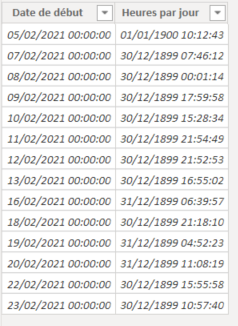
I think the error is from my formula, because I still don't have the missing days...
But it seems we are getting closer, but I don't know in what direction to go...
- Mark as New
- Bookmark
- Subscribe
- Mute
- Subscribe to RSS Feed
- Permalink
- Report Inappropriate Content
Hi,
Your SUMMARIZE function, groups by Date Début.
If you remove it, do you have all required dates ?
Maybe all dates are the same range for any log ?
I'll have a look at the pbix file you sent...
- Mark as New
- Bookmark
- Subscribe
- Mute
- Subscribe to RSS Feed
- Permalink
- Report Inappropriate Content
Yes, I thought it was the groupement to do ? If I remove it, it return only one row, which seems to be the sum of every hour.
But I do agree, I don't see anything in the formula that would help PowerBi to understand what I want 😁
- Mark as New
- Bookmark
- Subscribe
- Mute
- Subscribe to RSS Feed
- Permalink
- Report Inappropriate Content
With this you get all dates required ?
Tables des Dates Intervalles =
VAR DateDebut=MIN('TF GRA 700 (2)'[Date de début])
VAR DateFin=MAX('TF GRA 700 (2)'[Date de début])
VAR TabDates=SELECTCOLUMNS(CALCULATETABLE(Dates,
                DATESBETWEEN(Dates[Date],DateDebut,DateFin)),
                "Dates TF",Dates[Date])
RETURN TabDates
Then you need to add column(s), but depends on what you want.
If you want the total hours per day or make difference by machine...
Next step could be something inspired by that :
Tables des Dates Intervalles =
VAR DateDebut=MIN('TF GRA 700 (2)'[Date de début])
VAR DateFin=MAX('TF GRA 700 (2)'[Date de début])
VAR TabDates=SELECTCOLUMNS(CALCULATETABLE(Dates,
                DATESBETWEEN(Dates[Date],DateDebut,DateFin)),
                "Dates TF",Dates[Date])
VAR TabDates2=CROSSJOIN(TabDates,'TF GRA 700 (2)')
VAR TabDates3=ADDCOLUMNS(TabDates2,"Valeur",IF([Dates TF]>='TF GRA 700 (2)'[Date de début]&&[Dates TF]<='TF GRA 700 (2)'[Date de fin],1,0))
RETURN FILTER(TabDates3,[Valeur]=1)
This could be done with less lines but at least it is step by step.
You should have a table with that with all dates and a column to select only dates you are interested in.
Hope this helps
- Mark as New
- Bookmark
- Subscribe
- Mute
- Subscribe to RSS Feed
- Permalink
- Report Inappropriate Content
You, mister, are a freaking genius 😍
I used your technique and I "just" had to find the right switch function that respect every "time bounderies"
If someone needs it :
TFonctionnement = SWITCH(TRUE(),
'Tables des Dates Intervalles'[Dates TF]='Tables des Dates Intervalles'[Date de début] && 'Tables des Dates Intervalles'[Dates TF] = 'Tables des Dates Intervalles'[Date de fin], 'Tables des Dates Intervalles'[Jour passé],
'Tables des Dates Intervalles'[Dates TF]<'Tables des Dates Intervalles'[Date de fin] && 'Tables des Dates Intervalles'[Dates TF]>'Tables des Dates Intervalles'[Date de début],TIME(23,59,59),
'Tables des Dates Intervalles'[Dates TF]='Tables des Dates Intervalles'[Date de début],TIME(23,59,59)-'Tables des Dates Intervalles'[Heure de début],
'Tables des Dates Intervalles'[Heure de fin])
I now have a total of 23h59m59s per day, and I just have to filter on Marche or Arrêt to have the time in the state per day, like this (filtered on "Marche") :
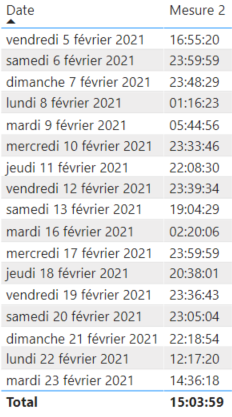
Now, i'll work on how many state change per day etc.
A big thanks for your help huys, really appreciate it !
- Mark as New
- Bookmark
- Subscribe
- Mute
- Subscribe to RSS Feed
- Permalink
- Report Inappropriate Content
Thank you for your reply.
Currently, and maybe for a long time, I don't have acces to the DB. So i'm just working with some csv files exported from this DB. Even if the future goal is to link the report directly to the DB, for now, I will add a file (name_week1, name_2 etc.) each week to a folder so the report will be updated.
Since I can't work on the format of the raw values, I think I have to deal with what I have here.
My colleague tried to help me by doing everything on PowerQuery. His way is not the simplier but it works (I will explain it on my next message if I succeed). But, because of course there is a but, in his case, the "End date" column already exist, not in mine. When I did it the first time, I used :
So the end date of the event n is start date n+1
Do you have any idea about how to do this PowerQuery and keep something "light" ?
Thank you
- Mark as New
- Bookmark
- Subscribe
- Mute
- Subscribe to RSS Feed
- Permalink
- Report Inappropriate Content
Hello,
Above you talk about DB, do you have the chance to make SQL query, is there calendar table available?
With the following structure you can make a new table where are all the dates when a machine was used, and the start and end dates. From that you are likely to get to your end result with some SQL or Power Query with simple operations.
select
dim_calendar.date_id,
event_selection.event_id,
event_selection.event_begin_date,
event_selection.event_end_date
from
event_selection,
dim_calendar
where
event_selection.event_begin_date <= dim_calendar.date_id
AND event_selection.event_end_date >= dim_calendar.date_id
In the end of my blog post: https://www.plainlyresults.com/blog/power-bi-dax-how-to-summarize-data-from-multiple-tables/ I cover when DAX might not be the best tool for the job.

Helpful resources

Power BI Monthly Update - November 2025
Check out the November 2025 Power BI update to learn about new features.

Fabric Data Days
Advance your Data & AI career with 50 days of live learning, contests, hands-on challenges, study groups & certifications and more!

FabCon Atlanta 2026
Join us at FabCon Atlanta, March 16-20, for the ultimate Fabric, Power BI, AI and SQL community-led event. Save $200 with code FABCOMM.


