Advance your Data & AI career with 50 days of live learning, dataviz contests, hands-on challenges, study groups & certifications and more!
Get registeredGet Fabric Certified for FREE during Fabric Data Days. Don't miss your chance! Request now
Good Afternoon,
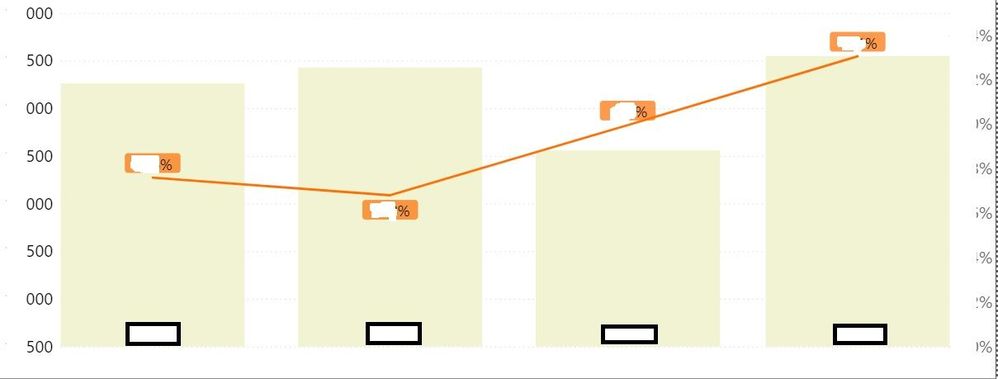
I have a visual below, where I am using seconday Y-axis (in addition to the X and Y axises). The orange line denotes a % (seconday Y-Axis), while the pale yellow columns denote the denominator figure used for the %. Now there is a request that the visual should also now show the numerator for the % too. At present I have added it into Tooltip, but I am still curious to know whether it is possible to construct the visual in a way to also show the numerator (in addition to the % and denominator), without resorting to Tooltip where the value remain hidden unless the user is aware that he/she needs to hover on to the visual to see it.
Kind Advise.
Hi,
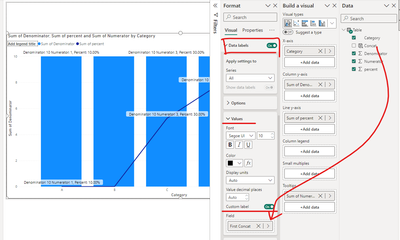
You can use custom label, with all 3 measures concatenated into one.
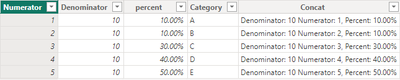
I used this data to recreate your scenario:
where Concat is calculated column and equal to:
Advance your Data & AI career with 50 days of live learning, contests, hands-on challenges, study groups & certifications and more!
Check out the October 2025 Power BI update to learn about new features.