cancel
Showing results for 
Search instead for 
Did you mean: 

View all the Fabric Data Days sessions on demand. View schedule

Reply
vstopp
Helper I
Helper I

There's not enough memory to complete this operation (on NUMERIC Field)

I have many tables joined.  When I add a text field (Persons Name) to the table (from the joined table) everything works fine.  When I try to add a numeric field (RiskScore), I get the error "There's not enough memory to complete this operation."  


It seems strange to me that the text fields work fine, but the numeric field does not?  I tried with two different numeric fields and both failed.


Any suggestions or insight?


Thank you in advance

5 REPLIES 5
Anonymous
Not applicable

Hi @vstopp,

How much system resources available on your device? What version of power bi do you test? (32bit or 64bit)  If you are working on 32bit, I'd like to suggest you change to 64 bit that allows using more memory resources for calculation.

Memory limits of 32-bit application running on 64-bit OS (Windows 2008 server 64-bit) 
Is there any nested iterator function used in your formulas? Can you please share the DAX formula you used in your report?
They may cause duplicate calculations that cost more system resources. You can take a look at following links to know more about these:

Optimizing nested iterators in DAX 

Power BI performance best practices 

Regards,

Xiaoxin Sheng

I don't have any calculations.  Just the joins.  I'm using Windows 10 Pro, I7 cpu @34.4 ghz, 16 gig ram.  I'm using 64bit Power BI.  My CostUtilization table has 1.6M records, CostUtilization_LOS has 700K records, and ACOBeneficiaries_Uniq has 16000 records.


Valerie

Anonymous
Not applicable

Hi @vstopp,

I think they should be related to your data amount, maybe you can take a look at following links about tips if they suitable for your scenario:

There's Not Enough Memory To Complete This Operation 

Since power bi data model records are stored in SSAS instance, you can also refer to the below document about SSAS 'not enough memory' issue:

SSAS error “The operation has been cancelled because there is not enough memory for the application”... 

Regards,

Xiaoxin Sheng

amitchandak
Super User
Super User

Can you share both calculations?

Also, increase the virtual RAM of your system and try.

Share with Power BI Enthusiasts: Full Power BI Video (20 Hours) YouTube
Microsoft Fabric Series 60+ Videos YouTube
Microsoft Fabric Hindi End to End YouTube

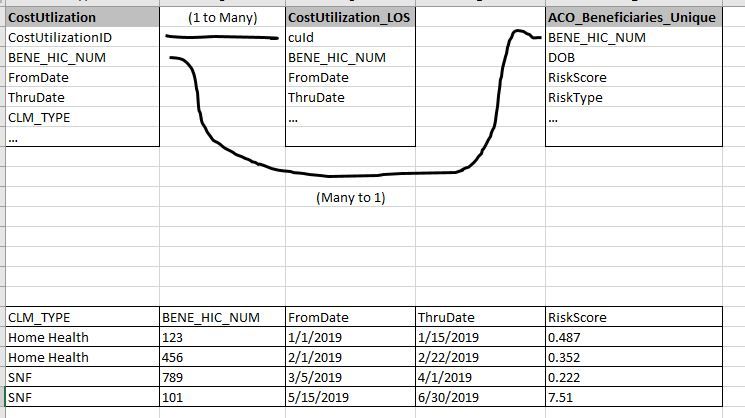
There aren't any calculations.   I imported the three main tables into a new Power BI, and here is what I found out.  The risk score displays fine, but when I select "Average" I still get the out of memory error.  Here is a layout of my tables.  


Capture.JPG


Helpful resources

Announcements
November Power BI Update Carousel

Power BI Monthly Update - November 2025

Check out the November 2025 Power BI update to learn about new features.

Fabric Data Days Carousel

Fabric Data Days

Advance your Data & AI career with 50 days of live learning, contests, hands-on challenges, study groups & certifications and more!

FabCon Atlanta 2026 carousel

FabCon Atlanta 2026

Join us at FabCon Atlanta, March 16-20, for the ultimate Fabric, Power BI, AI and SQL community-led event. Save $200 with code FABCOMM.

Top Solution Authors
Top Kudoed Authors