I need help in resolving a consistent error that i am receiving. I am sure this issue is faced by a number of users and i have googled for a favourable resolution but haven't found one.
My system configuration is :
- OS : Windows 10 (64 bit)
- Memory : 8 GB RAM
- MSOffice : Office 2016 Pro (64 bit)
- 109 GB Free out of 236 GB Storage.
and i have performed all these steps:
- Page File Size (Minimum MB) : 12888 MB
- Page File Size (Maximum MB) : 49152 MB
- "Disable Hardware Graphics Accelaration" is checked.
- "Ignore other applications that use Dynamic Data Exchange (DDE)" is checked.
- repaired Office 2016 Pro.
- reduced number of columns from 300 to only 10 columns.
- removed all unique columns like ID columns etc.
I am using PowerQuery to import 1.12 GB of external CSV data from multiple CSV files. After transforming that data by removing unnecessary columns, changing formats etc and adding to PowerPivot Data Model, the size is now reduced from 1.12 GB to 700 MB and now to 200 MB now.
When i use normal Pivot in-built calculations like Counta, DistinctCount, Sum etc the powerpivot works fine, but when i try using DAX expressions, the powerpivot or Excel gives me the following error:

e.g. as simple as a :
ISFILTERED(dDate[Year])
OR
UniquesCount:=

// get unique Char values
VAR _Chars = VALUES ( fData[Char Value] )

// Filter fData table based on only the unique Char values
VAR _CharsAll =
 CALCULATETABLE (
	fData,
	_Chars,
	ALL ( dDate[Year] ),
	ALL ( dDate[Date] ),
	ALL ( dCountry[Country] ),
	ALL ( dCategory[Category] ),
	ALL ( dBrandOwner[BrandOwner] ),
	ALL ( dBrand[Brand] ),
	ALL ( dSubBrand[SubBrand] ),
	ALL ( dInnType[InnType] ),
	ALL ( dInnSubType[InnSubType] ),
	ALL ( dCharDescription[CharDescription] )
)

//
VAR _CharsSummary =
	GROUPBY (
		_CharsAll,
		fData[Char Value],
		"MaxYear", MAXX ( CURRENTGROUP (), RELATED ( dDate[Year] ) ),
		"MinYear", MINX ( CURRENTGROUP (), RELATED ( dDate[Year] ) ),
		"NrOfChars", COUNTAX( CURRENTGROUP (), fData[Char Value] )
 )

//
VAR _SameYearChars = FILTER ( _CharsSummary, [MaxYear] = [MinYear] )

RETURN SUMX( _SameYearChars, [NrOfChars] )
If i also try to create Hierarchies in Relationship pane between columns in my Facts table, i get the following memory error:
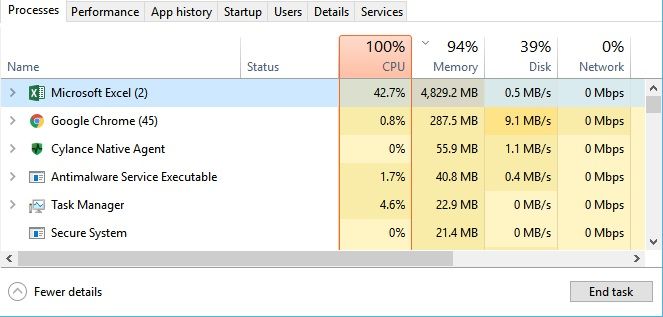 task manager
 memory error message
My disk and/or memory usage spike to 100% when this error results and Excel RESTARTS. Should this be happening in the 1st place and how can this be resolved correctly so i can use the measures?


