FabCon is coming to Atlanta
Join us at FabCon Atlanta from March 16 - 20, 2026, for the ultimate Fabric, Power BI, AI and SQL community-led event. Save $200 with code FABCOMM.
Register now!- Power BI forums
- Get Help with Power BI
- Desktop
- Service
- Report Server
- Power Query
- Mobile Apps
- Developer
- DAX Commands and Tips
- Custom Visuals Development Discussion
- Health and Life Sciences
- Power BI Spanish forums
- Translated Spanish Desktop
- Training and Consulting
- Instructor Led Training
- Dashboard in a Day for Women, by Women
- Galleries
- Data Stories Gallery
- Themes Gallery
- Contests Gallery
- QuickViz Gallery
- Quick Measures Gallery
- Visual Calculations Gallery
- Notebook Gallery
- Translytical Task Flow Gallery
- TMDL Gallery
- R Script Showcase
- Webinars and Video Gallery
- Ideas
- Custom Visuals Ideas (read-only)
- Issues
- Issues
- Events
- Upcoming Events
The Power BI Data Visualization World Championships is back! Get ahead of the game and start preparing now! Learn more
- Power BI forums
- Forums
- Get Help with Power BI
- Desktop
- Re: The percentage calculating incorrectly
- Subscribe to RSS Feed
- Mark Topic as New
- Mark Topic as Read
- Float this Topic for Current User
- Bookmark
- Subscribe
- Printer Friendly Page

- Mark as New
- Bookmark
- Subscribe
- Mute
- Subscribe to RSS Feed
- Permalink
- Report Inappropriate Content
The percentage calculating incorrectly
Dear All,
I have economic activities, for example, activity 1, ..., activity n. Further, activities contain X number of companies. Profit of the activity is formed by the sum of profits of companies that belongs to this activity. So currently I need to calculate the share of companies within the economic activity.
I am using the following measure:
Share company= 100*(DIVIDE((SUM(Powerbi[Profit])),CALCULATE(SUM(Powerbi[Profit]), Powerbi[Company], Powerbi[Economic activities])))
Unfortunately this calculating company shares from the total profit of all economic activities. So, total profit 5 000 000, while total profit for activity 1 is equal to 4 000 000. Therefore, the share of companies that belongs to activity 1 is calculating from 5 000 000 not 4 000 000. Where is my mistake?
Solved! Go to Solution.
- Mark as New
- Bookmark
- Subscribe
- Mute
- Subscribe to RSS Feed
- Permalink
- Report Inappropriate Content
Hi @Anonymous
I see your latest screenshot. Do you have two tables in your data model? There should be key columns like [Economic Activity] in both tables. Or you couldn't relate two tables in your calcualte.
Activity Table:

Company Table:
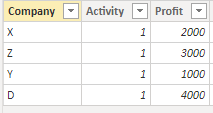
Measure:
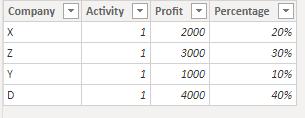
Percentage =
VAR _Total = CALCULATE(SUM(Activity[Profit]),FILTER(Activity,Activity[Economic activities] = EARLIER(Company[Activity])))
RETURN
DIVIDE(Company[Profit],_Total)
Result:
Best Regards,
Rico Zhou
If this post helps, then please consider Accept it as the solution to help the other members find it more quickly.


- Mark as New
- Bookmark
- Subscribe
- Mute
- Subscribe to RSS Feed
- Permalink
- Report Inappropriate Content
Hi manap
Click here to download a solution
Please leave kudos if it solves your problem
It is best practive to breakdown complex DAX measure into easy chunks that you can test and reuse ....
I have created 3 measures and used a % format rather than multiply by 100
Profits =
-- get the profits
SUM(Sales[Profit])
Profit for all companies =
-- get profit for all companies within the current context.
-- The ALL command with keep the row Activity context but changes the row Company context to all.
CALCULATE(
[Profits],
ALL(Sales[Company])
)
% profit of all activity =
-- get the % of profits for all the activity
DIVIDE( [Profits] , [Profit for all companies] )
- Mark as New
- Bookmark
- Subscribe
- Mute
- Subscribe to RSS Feed
- Permalink
- Report Inappropriate Content
I have tried your method, but it resulted 1 for all companies
- Mark as New
- Bookmark
- Subscribe
- Mute
- Subscribe to RSS Feed
- Permalink
- Report Inappropriate Content
Hi @Anonymous
I see your latest screenshot. Do you have two tables in your data model? There should be key columns like [Economic Activity] in both tables. Or you couldn't relate two tables in your calcualte.
Activity Table:
Company Table:
Measure:
Percentage =
VAR _Total = CALCULATE(SUM(Activity[Profit]),FILTER(Activity,Activity[Economic activities] = EARLIER(Company[Activity])))
RETURN
DIVIDE(Company[Profit],_Total)
Result:
Best Regards,
Rico Zhou
If this post helps, then please consider Accept it as the solution to help the other members find it more quickly.

- Mark as New
- Bookmark
- Subscribe
- Mute
- Subscribe to RSS Feed
- Permalink
- Report Inappropriate Content
Please provide sample data or a PBIX file and a depiction of the expected outcome
Did I answer your question? Mark my post as a solution!
In doing so, you are also helping me. Thank you!
Proud to be a Super User!
Paul on Linkedin.
- Mark as New
- Bookmark
- Subscribe
- Mute
- Subscribe to RSS Feed
- Permalink
- Report Inappropriate Content
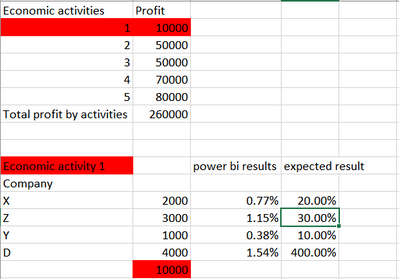
Here is a screenshort
- Mark as New
- Bookmark
- Subscribe
- Mute
- Subscribe to RSS Feed
- Permalink
- Report Inappropriate Content
We are going to need sample data of the actual structure of the tables. The depiction you have provided does not allow to establish a relationship between the two tables shown.
Did I answer your question? Mark my post as a solution!
In doing so, you are also helping me. Thank you!
Proud to be a Super User!
Paul on Linkedin.
- Mark as New
- Bookmark
- Subscribe
- Mute
- Subscribe to RSS Feed
- Permalink
- Report Inappropriate Content
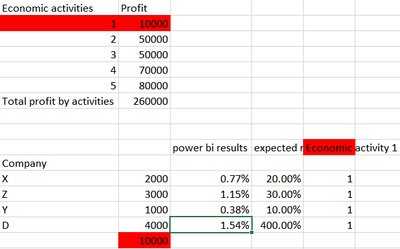
What about this
- Mark as New
- Bookmark
- Subscribe
- Mute
- Subscribe to RSS Feed
- Permalink
- Report Inappropriate Content
@Anonymous try this:
Share company=var CurrentActivity=Powerbi[Economic activities]
return DIVIDE(SUM(Powerbi[Profit]),SUMX(FILTER(Powerbi,Powerbi[Economic activities]=CurrentActivity),Powerbi[Profit]))*100
- Mark as New
- Bookmark
- Subscribe
- Mute
- Subscribe to RSS Feed
- Permalink
- Report Inappropriate Content
how to create this var CurrentActivity=Powerbi[Economic activities] if I have a column.
- Mark as New
- Bookmark
- Subscribe
- Mute
- Subscribe to RSS Feed
- Permalink
- Report Inappropriate Content
@Anonymous wrap the column into VALUES(), that is:
var CurrentActivity=VALUES(Powerbi[Economic activities])
Helpful resources

Power BI Dataviz World Championships
The Power BI Data Visualization World Championships is back! Get ahead of the game and start preparing now!

Power BI Monthly Update - December 2025
Check out the December 2025 Power BI Holiday Recap!

FabCon Atlanta 2026
Join us at FabCon Atlanta, March 16-20, for the ultimate Fabric, Power BI, AI and SQL community-led event. Save $200 with code FABCOMM.

| User | Count |
|---|---|
| 41 | |
| 38 | |
| 36 | |
| 30 | |
| 28 |


| User | Count |
|---|---|
| 128 | |
| 88 | |
| 79 | |
| 67 | |
| 62 |


