cancel
Showing results for 
Search instead for 
Did you mean: 

The Power BI Data Visualization World Championships is back! Get ahead of the game and start preparing now! Learn more

Reply
Mitt
Regular Visitor

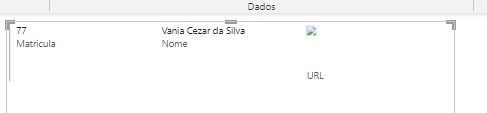
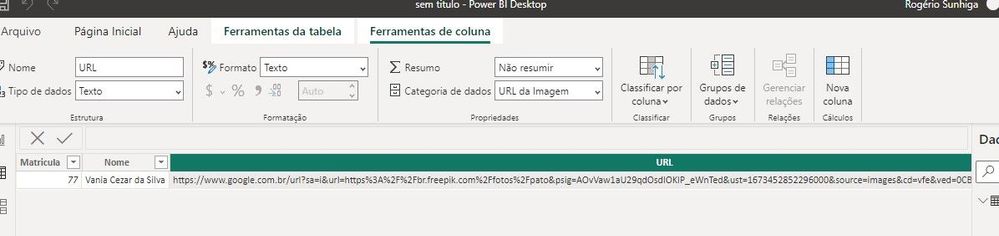
The image does not appear in the table report

What could i be forgetting to do?


1.jpg

2.jpg


Regards!

2 REPLIES 2
Mitt
Regular Visitor

Hi @v-jingzhang 
The only way it worked, was converting thes images to base64.

I don't understand why this behavior, tried to reinstall Power BI Desktop, but no results.

Sad 😞

Greetings.

v-jingzhang
Community Support
Community Support

Hi @Mitt 


The setting looks good. It seems this image is a public image and is anonymously accessible. Can you share its URL link so I can have a test with it in Power BI Desktop? In addition, have you tried displaying it in a table or matrix visual?


Another consideration is that the image needs to be in one of these file formats: .bmp, .jpg, .jpeg, .gif, .png, or .svg. Please check whether it is in the supported file format. 


Best Regards,
Community Support Team _ Jing
If this post helps, please Accept it as Solution to help other members find it.

Helpful resources

Announcements
Power BI DataViz World Championships

Power BI Dataviz World Championships

The Power BI Data Visualization World Championships is back! Get ahead of the game and start preparing now!

November Power BI Update Carousel

Power BI Monthly Update - November 2025

Check out the November 2025 Power BI update to learn about new features.

FabCon Atlanta 2026 carousel

FabCon Atlanta 2026

Join us at FabCon Atlanta, March 16-20, for the ultimate Fabric, Power BI, AI and SQL community-led event. Save $200 with code FABCOMM.