Fabric Data Days starts November 4th!
Advance your Data & AI career with 50 days of live learning, dataviz contests, hands-on challenges, study groups & certifications and more!
Get registered- Power BI forums
- Get Help with Power BI
- Desktop
- Service
- Report Server
- Power Query
- Mobile Apps
- Developer
- DAX Commands and Tips
- Custom Visuals Development Discussion
- Health and Life Sciences
- Power BI Spanish forums
- Translated Spanish Desktop
- Training and Consulting
- Instructor Led Training
- Dashboard in a Day for Women, by Women
- Galleries
- Data Stories Gallery
- Themes Gallery
- Contests Gallery
- QuickViz Gallery
- Quick Measures Gallery
- Visual Calculations Gallery
- Notebook Gallery
- Translytical Task Flow Gallery
- TMDL Gallery
- R Script Showcase
- Webinars and Video Gallery
- Ideas
- Custom Visuals Ideas (read-only)
- Issues
- Issues
- Events
- Upcoming Events
Get Fabric Certified for FREE during Fabric Data Days. Don't miss your chance! Request now
- Power BI forums
- Forums
- Get Help with Power BI
- Desktop
- Re: Text to time
- Subscribe to RSS Feed
- Mark Topic as New
- Mark Topic as Read
- Float this Topic for Current User
- Bookmark
- Subscribe
- Printer Friendly Page

- Mark as New
- Bookmark
- Subscribe
- Mute
- Subscribe to RSS Feed
- Permalink
- Report Inappropriate Content
Text to time
Looking for the best way to convert a text column to a time column, allowing me to calculate the sum, average, ...
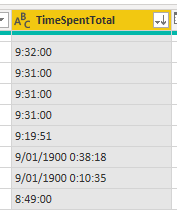
Data comes in looking like time, but is formatted as text. For most only the time is visible, for those going over 24 hours, you'll see the days as well.
Solved! Go to Solution.


- Mark as New
- Bookmark
- Subscribe
- Mute
- Subscribe to RSS Feed
- Permalink
- Report Inappropriate Content
Hey @hansbogaert
this was something new for me and I thank you for making me discover it.
Here are the steps:
let's say your column looks like this in your DB

You need to add a custom column and convert that column to Sum of seconds
here is the formula Duration.TotalSeconds([Duration] - #datetime(1899,12,31,0,0,0))
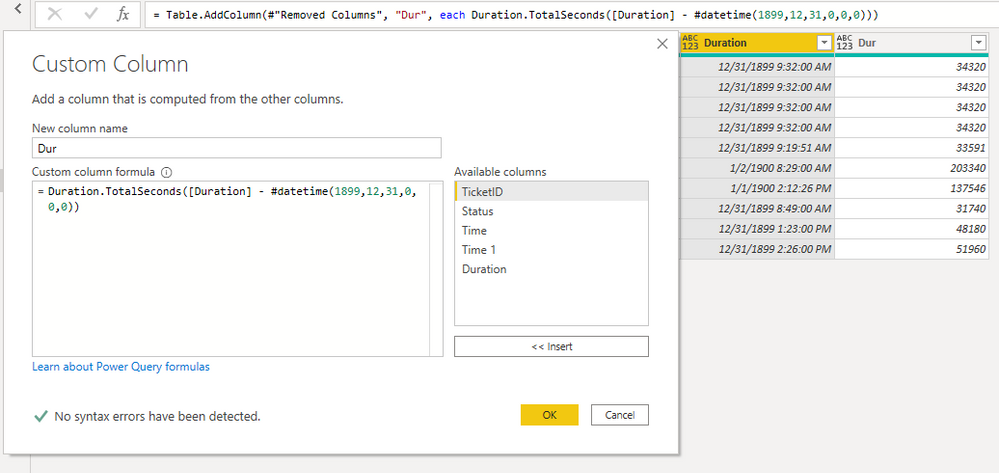
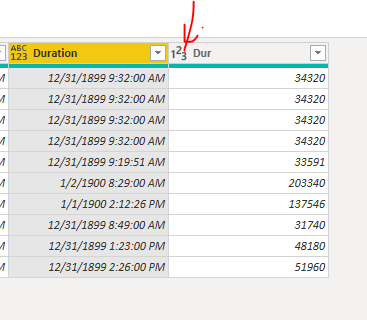
Change the Column Type to number
Then add a Dax formula like this:
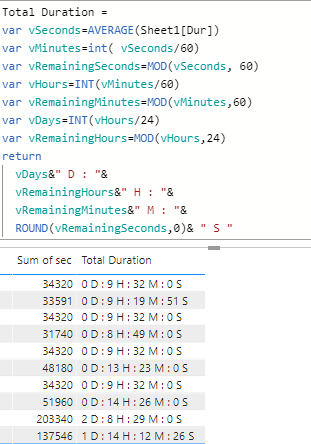
And here is the DAX
Hope it works for you.
Attached the Sample Pbix
https://drive.google.com/file/d/1wU_VFfS69XSIPeYkT2v12-r1s84QQb3G/view?usp=sharing
Regards
Amine Jerbi
If I answered your question, please mark this thread as accepted
and you can follow me on
My Website, LinkedIn and Facebook
- Mark as New
- Bookmark
- Subscribe
- Mute
- Subscribe to RSS Feed
- Permalink
- Report Inappropriate Content
Hi @hansbogaert
change the type of the column to Date/Time, then change it into Time...In Power query
Regards
Amine Jerbi
If I answered your question, please mark this thread as accepted
and you can follow me on
My Website, LinkedIn and Facebook
- Mark as New
- Bookmark
- Subscribe
- Mute
- Subscribe to RSS Feed
- Permalink
- Report Inappropriate Content
Hi @aj1973 ,
Thanks for your fast reaction.
When I try to do this, I get the message that I need to convert my data to Import Mode instead of DirectQuery.
- Mark as New
- Bookmark
- Subscribe
- Mute
- Subscribe to RSS Feed
- Permalink
- Report Inappropriate Content
Oh yes, you can't do it in DQ mode connection. you need to do the cleaning directly to the source. Is the source an excel file?
Regards
Amine Jerbi
If I answered your question, please mark this thread as accepted
and you can follow me on
My Website, LinkedIn and Facebook
- Mark as New
- Bookmark
- Subscribe
- Mute
- Subscribe to RSS Feed
- Permalink
- Report Inappropriate Content
It's linked to a huge SQL database.
I imported it, and indeed the steps work, but with an error. For those who go over 24 hours. They are indicated with the date:
One row looks like this: 2/01/1900 8:15:00
After converting it to Date/Time it stays the same
And when I move to Time again, it is 8:15:00, but it should be 56:15:00
- Mark as New
- Bookmark
- Subscribe
- Mute
- Subscribe to RSS Feed
- Permalink
- Report Inappropriate Content
"but it should be 56:15:00" why!? is this a Duration type?
Regards
Amine Jerbi
If I answered your question, please mark this thread as accepted
and you can follow me on
My Website, LinkedIn and Facebook
- Mark as New
- Bookmark
- Subscribe
- Mute
- Subscribe to RSS Feed
- Permalink
- Report Inappropriate Content
Yes, it is in fact the amount of time people followed a training (classroom + self study). The idea is to get a sum or average per department/team/...
- Mark as New
- Bookmark
- Subscribe
- Mute
- Subscribe to RSS Feed
- Permalink
- Report Inappropriate Content
Sorry but I don't really understand how 8:15:00 should be 56:15:00?
Do you have a column for start time and another column for end time in your table?
Regards
Amine Jerbi
If I answered your question, please mark this thread as accepted
and you can follow me on
My Website, LinkedIn and Facebook
- Mark as New
- Bookmark
- Subscribe
- Mute
- Subscribe to RSS Feed
- Permalink
- Report Inappropriate Content
No, it's an automatic report containing the learning time from our platform. It contains the time a person has been learning a specific course. Can be classroom or e-learning.
For some topics this is over 24 hours and in the automatic report it is, just like in Excel, converted to a date/time format. 25 hours = 01/01/1900 01:00:00. But imported in the SQL it defines it as text (tried to change, but doesn't work well, probably because the fields are different, some with the date, others without - depending if >24)
In Excel you can easily say [h]:mm:ss to calculate over 24 hours, but doesn't seem to be an option in PowerBI


- Mark as New
- Bookmark
- Subscribe
- Mute
- Subscribe to RSS Feed
- Permalink
- Report Inappropriate Content
Hi @hansbogaert ,
Does your problem have been solved? If it is solved, please mark a reply which is helpful to you.
If the problem is still not resolved, please provide detailed error information or the expected result you expect. Let me know immediately, looking forward to your reply.
Best Regards,
Winniz
- Mark as New
- Bookmark
- Subscribe
- Mute
- Subscribe to RSS Feed
- Permalink
- Report Inappropriate Content
Hey @hansbogaert
this was something new for me and I thank you for making me discover it.
Here are the steps:
let's say your column looks like this in your DB
You need to add a custom column and convert that column to Sum of seconds
here is the formula Duration.TotalSeconds([Duration] - #datetime(1899,12,31,0,0,0))
Change the Column Type to number
Then add a Dax formula like this:
And here is the DAX
Hope it works for you.
Attached the Sample Pbix
https://drive.google.com/file/d/1wU_VFfS69XSIPeYkT2v12-r1s84QQb3G/view?usp=sharing
Regards
Amine Jerbi
If I answered your question, please mark this thread as accepted
and you can follow me on
My Website, LinkedIn and Facebook

Helpful resources

Fabric Data Days
Advance your Data & AI career with 50 days of live learning, contests, hands-on challenges, study groups & certifications and more!

Power BI Monthly Update - October 2025
Check out the October 2025 Power BI update to learn about new features.

FabCon Atlanta 2026
Join us at FabCon Atlanta, March 16-20, for the ultimate Fabric, Power BI, AI and SQL community-led event. Save $200 with code FABCOMM.


