Join us at FabCon Atlanta from March 16 - 20, 2026, for the ultimate Fabric, Power BI, AI and SQL community-led event. Save $200 with code FABCOMM.
Register now!Get Fabric Certified for FREE during Fabric Data Days. Don't miss your chance! Request now
Hi All,
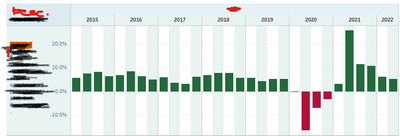
Is there any way to create Matrix type Visual in Power BI like this
Bar chart height is changed for each Category column.
Thanks for inputs!
Solved! Go to Solution.
Since didn't find any solution yet, I have put table on left side of Bar Visual so that user can select a row to filter Bar accordingly.
Thanks @amitchandak for quick response! yes, this is useful. However, I have category description as well to show matrix like view.
Y -axis : Categories Description
X - axis : Year and Quarter ( Your solution resolves this part)
Cell Values are represented as Bar Chart with conditional formatting
Do you think it's possible to achieve this? Thanks!
Since didn't find any solution yet, I have put table on left side of Bar Visual so that user can select a row to filter Bar accordingly.
@abpgupta , I doubt excat. But two Axis with concatenate label off and sort of axis.
or small multiples
Concatenate Label off : https://youtu.be/QgI0vIGIOOk
From Sep-2022 ownward this feature is default
Check out the November 2025 Power BI update to learn about new features.
Advance your Data & AI career with 50 days of live learning, contests, hands-on challenges, study groups & certifications and more!