
cancel
Showing results for 
Search instead for 
Did you mean: 

Get Fabric Certified for FREE during Fabric Data Days. Don't miss your chance! Request now

Reply
Anonymous
Not applicable

Table that shows data only for last month (unless the user want otherwise)

Hello,


I have 2 tables:
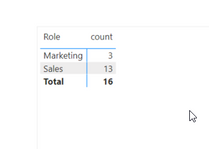
1) Table with a list of roles and employee number attached to them.

TomaszB_1-1613566941145.png 

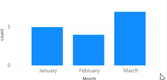
2) Chart with dates 

  TomaszB_2-1613566998528.png

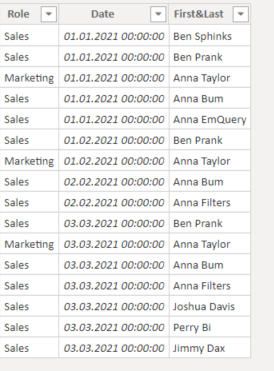
Every person is attached to a different date (they are taken from excel- there is a difference between specific days but it is not the case) 

TomaszB_4-1613567143834.png

TomaszB_3-1613567120883.png


Difficulty is:
I want this first graph to show on a default nr of employee only for the actual month (March in this case)

TomaszB_5-1613567303341.png

But it is summing up all the employees for all the months, unless I click particular month. 


I was thinking about adding to this visual a filter with date, but then interaction with the date graph no longer works.


Do you have any idea how to do it?


1 ACCEPTED SOLUTION
ryan_mayu
Super User
Super User

@Anonymous 

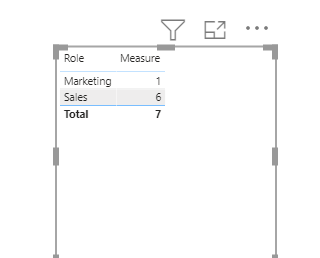
please try to create a measure

Measure = 
VAR maxdate=max('Table'[Date])
return CALCULATE(count('Table'[First&Last]),FILTER('Table',YEAR('Table'[Date])=year(maxdate)&&MONTH('Table'[Date])=month(maxdate)))

1.PNG

Below is the attachment


Did I answer your question? Mark my post as a solution!

Proud to be a Super User!


View solution in original post

5 REPLIES 5
ryan_mayu
Super User
Super User

@Anonymous 

please try to create a measure

Measure = 
VAR maxdate=max('Table'[Date])
return CALCULATE(count('Table'[First&Last]),FILTER('Table',YEAR('Table'[Date])=year(maxdate)&&MONTH('Table'[Date])=month(maxdate)))

1.PNG

Below is the attachment


Did I answer your question? Mark my post as a solution!

Proud to be a Super User!


Anonymous
Not applicable

Thanks sooo much !

you are welcome


Did I answer your question? Mark my post as a solution!

Proud to be a Super User!


Greg_Deckler
Community Champion
Community Champion

@Anonymous Well you could create a measure that returns 1 for only the most current month and 0 otherwise and filter on that. But if I understand your second question, you would want a way for users to disable this, correct? Perhaps you could use something like HASONEVALUE to check if the user has selected something in the date graph and if so, return 1. If a check confirms that nothing has been selected, then you could implement returning 1 for the current month only and 0 otherwise.


Follow on LinkedIn
@ me in replies or I'll lose your thread!!!
Instead of a Kudo, please vote for this idea
Become an expert!: Enterprise DNA
External Tools: MSHGQM
YouTube Channel!: Microsoft Hates Greg
Latest book!:
DAX For Humans

DAX is easy, CALCULATE makes DAX hard...
Anonymous
Not applicable

@Greg_Deckler 

Thanks for quick reply.


Is there no simpler way to do it?

I am not soo good at DAX


Helpful resources

Announcements
November Power BI Update Carousel

Power BI Monthly Update - November 2025

Check out the November 2025 Power BI update to learn about new features.

Fabric Data Days Carousel

Fabric Data Days

Advance your Data & AI career with 50 days of live learning, contests, hands-on challenges, study groups & certifications and more!

FabCon Atlanta 2026 carousel

FabCon Atlanta 2026

Join us at FabCon Atlanta, March 16-20, for the ultimate Fabric, Power BI, AI and SQL community-led event. Save $200 with code FABCOMM.

Top Solution Authors
Top Kudoed Authors