Forum Discussion

Table not reflecting changes in new data from another table

 7 years ago
Hi Anonymous ,
Enter into Query Editor, click on all Day# column such as Day#15 -Day#17 at the same time, then choose "Unpivot Columns", rename this result column "Attribute" with "Day#" . Don't forget to click the "Close & Apply" button.
Then you can create measure like DAX below to get sum value for per Resource# and per Day# .
Measure1= CALCULATE(SUM(Table1[Value]),FILTER(ALLSELECTED(Table1),Table1[Resource#] =MAX(Table1[Resource#])&&Table1[Day#] =MAX(Table1[Day#])))
Best Regards,
Amy
If this post helps, then please consider Accept it as the solution to help the other members find it more quickly.
Hi Parry, simply put, I'd like to know how I can properly link the Resource# columns between the two tables, such that any addition of data in the column would also be reflected in the linked table.

 Super User
Anonymous what is day #12, 13, 14 in linked table? Your question is not very clear, can you explain waht you are looking for final result? How does your raw data looks like?
- Anonymous7 years agoNot applicable
Ah right. Apologies for ommiting that out.
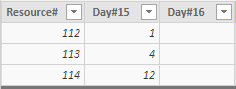
Here's what I have: A table that displays decimals for each particular day (Day#15...etc). What I'd like to do is summarize each of these days, filtered by the Resource#, (hence the new table).
The desired output would be a table that displays each sum per Day# according to its resource, of which I have managed to do using the formula below. (Example for Day#15)
CALCULATE(SUM(Sub_Table[Day#15]),FILTERS(Sub_Table[Resource#]))
So while this is achievable for Resources#112-114, the table does not seem to be able to detect the others (Resources#115-120).
The desired output would be as follows:
Appreciate your input :)
- parry2k7 years ago
Anonymous so you have only one table in power query the one you showed in the image? Better approach here is to unpvior your table as better model. Read this post to get your answer quickly.
https://community.powerbi.com/t5/Community-Blog/How-to-Get-Your-Question-Answered-Quickly/ba-p/38490