cancel
Showing results for 
Search instead for 
Did you mean: 

We've captured the moments from FabCon & SQLCon that everyone is talking about, and we are bringing them to the community, live and on-demand. Starts on April 14th. Register now

Reply
agagnon
Frequent Visitor

Table Summary Showing Incorrect Total

Hello,


I have been trying to create a measure that will allow me to look at a data source (actual revenues & expenses) and return the total if there is data for that month and otherwise return the budget for that month.  Said differently I am trying to project the rest of the year based on what I know has happened thus far and then taking the budget for the rest of the year.  


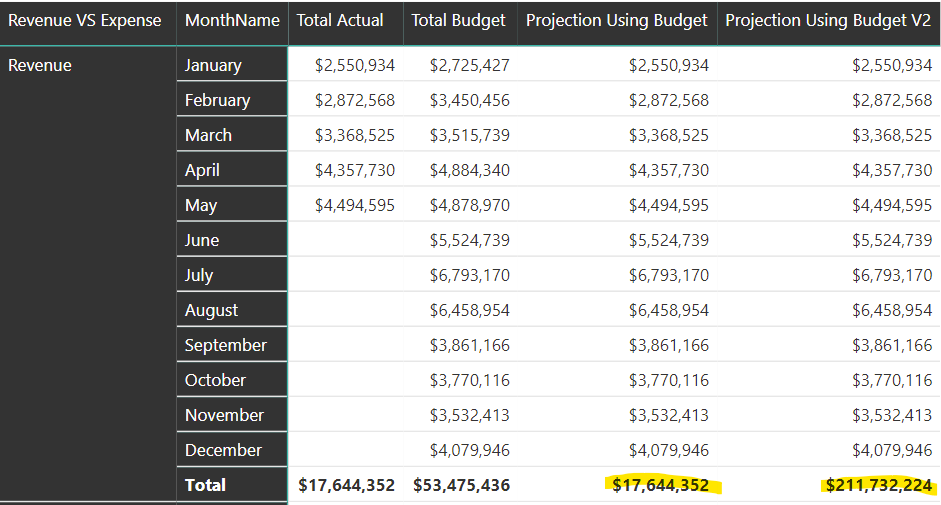
The code below does do this but I cannot for the life of me get the total to be correct for this measure in particular.  It seems to give the same total as the actual column.  I have several slicers on the page that allow me to filter the data by year, by month, by department etc.  The only slicer currently active is the year however I need the total to reflect accurately regardless of what is selected in the slicers.  


Any thoughts on how to get the total correct and achieve this functionality?


Projection Using Budget = 
VAR BudgetOrActual = IF(ISBLANK([Total Actual]),[Total Budget],[Total Actual])
VAR BudgetOrActualTotal = SUMMARIZE(VALUES(Dates[MonthName]), "Monthly Amount", BudgetOrActual )

RETURN
IF( HASONEVALUE(Dates[MonthName]),
    BudgetOrActual,
        SUMX(BudgetOrActualTotal,[Monthly Amount]))
        

Screenshot.png

1 ACCEPTED SOLUTION
Anonymous
Not applicable

I belive this is a data lineage problem. Once you reference the BudgetOrActualTotal table you've created, it doesn't seems to identify the original column on the data model to filter your measure. I think you could try the following:


Projection Using Budget = 
VAR BudgetOrActual = IF( ISBLANK( [Total Actual] ), [Total Budget], [Total Actual] )

RETURN
IF( HASONEVALUE( Dates[MonthName] ),
    BudgetOrActual,
        SUMX( VALUES(Dates[MonthName] ), IF( ISBLANK( [Total Actual] ), [Total Budget], [Total Actual] ) ) )

View solution in original post

3 REPLIES 3
Anonymous
Not applicable

I belive this is a data lineage problem. Once you reference the BudgetOrActualTotal table you've created, it doesn't seems to identify the original column on the data model to filter your measure. I think you could try the following:


Projection Using Budget = 
VAR BudgetOrActual = IF( ISBLANK( [Total Actual] ), [Total Budget], [Total Actual] )

RETURN
IF( HASONEVALUE( Dates[MonthName] ),
    BudgetOrActual,
        SUMX( VALUES(Dates[MonthName] ), IF( ISBLANK( [Total Actual] ), [Total Budget], [Total Actual] ) ) )

@Anonymous This is perfect!  After a few quick tests my total is adding up exactly as I expected it would.  Thank you so much for the quick response!!!

agagnon
Frequent Visitor

I have also tried the follow code which provided a different but also incorrect result.  In the first result it appears the SUMX formula is summing total actual.  In the second result it looks like SUMX is calculating everything but then doing it over and over for each month.  For example, if I use my slicer to show only 1 month everything works.  If I use my slicer to show 2 months the total is as shown  below which is adding the total for each month together twice.  If I add a 3rd month it adds each month togehter three times.  I hope that makes sense!


Projection Using Budget V2 = 
VAR BudgetOrActual = IF(ISBLANK([Total Actual]),[Total Budget],[Total Actual])
VAR BudgetOrActualTotal = SUMMARIZE(Dates,Dates[MonthName],"Monthly Amount", BudgetOrActual )

RETURN
IF( HASONEVALUE(Dates[MonthName]),BudgetOrActual,SUMX(BudgetOrActualTotal,[Monthly Amount]))
        
Screenshot2.pngScreenshot3.png

Helpful resources

Announcements
New to Fabric survey Carousel

New to Fabric Survey

If you have recently started exploring Fabric, we'd love to hear how it's going. Your feedback can help with product improvements.

Power BI DataViz World Championships carousel

Power BI DataViz World Championships - June 2026

A new Power BI DataViz World Championship is coming this June! Don't miss out on submitting your entry.

Join our Fabric User Panel

Join our Fabric User Panel

Share feedback directly with Fabric product managers, participate in targeted research studies and influence the Fabric roadmap.

March Power BI Update Carousel

Power BI Community Update - March 2026

Check out the March 2026 Power BI update to learn about new features.