cancel
Showing results for 
Search instead for 
Did you mean: 

Vote for your favorite vizzies from the Power BI Dataviz World Championship submissions. Vote now!

Reply
wooand
Helper II
Helper II

TOPN without changing the data

Hello.


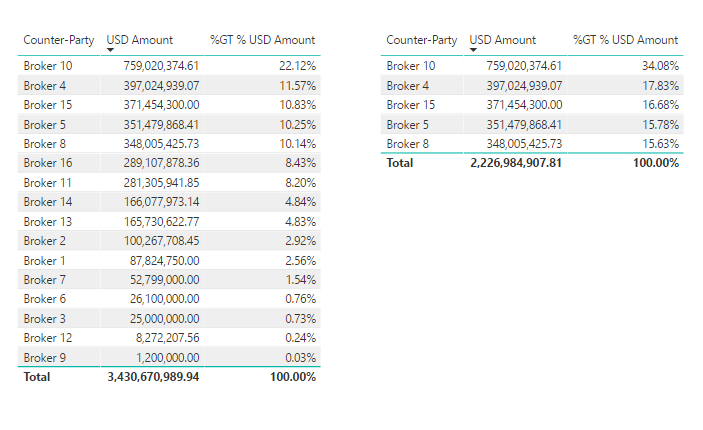
I have a column of Brokers that I need to rank by volume.  Easy enough.  I then need to show the top 5 only, but retain the percentages as per the original calculation, rather than calculating the percentages based on the filtered universe.    Can anyone help me please?  Please see the attached screenshot.  Essentially I would like the TOPN %GT filtered values in the visualisation on the right to be the same as the one on the left!


Thank you in advance.

BI Q.PNG


1 ACCEPTED SOLUTION
Datatouille
Solution Sage
Solution Sage

Hi,


I guess you applied a Top 5 visual-level filter on [USD Amount] for your matrix on the right.


Try the following measures:

Total Amt = Sum( YourTable[USD Amount] )


Pct GT USD Amount = Divide ( [Total Amount] , Calculate( [Total Amt] , All(YourTable[Counter-Party] ) )

Format Pct GT USD Amount as % and use to replace your current % measure on your matrix on the right.

View solution in original post

2 REPLIES 2
Datatouille
Solution Sage
Solution Sage

Hi,


I guess you applied a Top 5 visual-level filter on [USD Amount] for your matrix on the right.


Try the following measures:

Total Amt = Sum( YourTable[USD Amount] )


Pct GT USD Amount = Divide ( [Total Amount] , Calculate( [Total Amt] , All(YourTable[Counter-Party] ) )

Format Pct GT USD Amount as % and use to replace your current % measure on your matrix on the right.

Spot on.  Very kind of you, and many thanks.

Helpful resources

Announcements
Power BI DataViz World Championships

Power BI Dataviz World Championships

Vote for your favorite vizzies from the Power BI World Championship submissions!

Sticker Challenge 2026 Carousel

Join our Community Sticker Challenge 2026

If you love stickers, then you will definitely want to check out our Community Sticker Challenge!

January Power BI Update Carousel

Power BI Monthly Update - January 2026

Check out the January 2026 Power BI update to learn about new features.

FabCon Atlanta 2026 carousel

FabCon Atlanta 2026

Join us at FabCon Atlanta, March 16-20, for the ultimate Fabric, Power BI, AI and SQL community-led event. Save $200 with code FABCOMM.