Join us at FabCon Atlanta from March 16 - 20, 2026, for the ultimate Fabric, Power BI, AI and SQL community-led event. Save $200 with code FABCOMM.
Register now!The Power BI Data Visualization World Championships is back! Get ahead of the game and start preparing now! Learn more
Hi, I am new to this community and am trying to advance my DAX knowledge for my job. Could someone tell me what the numbers below the columns represent?
Thank you!
VAR __SomeVariable =
TOPN(
502,
__SomeTable,
[Column1],
0,
[Column2],
0,
'Product'[Column3],
1,
'Location'[Column4],
1,
'Location'[Column5],
1
)
Solved! Go to Solution.
Hi @TechoGirl0 ,
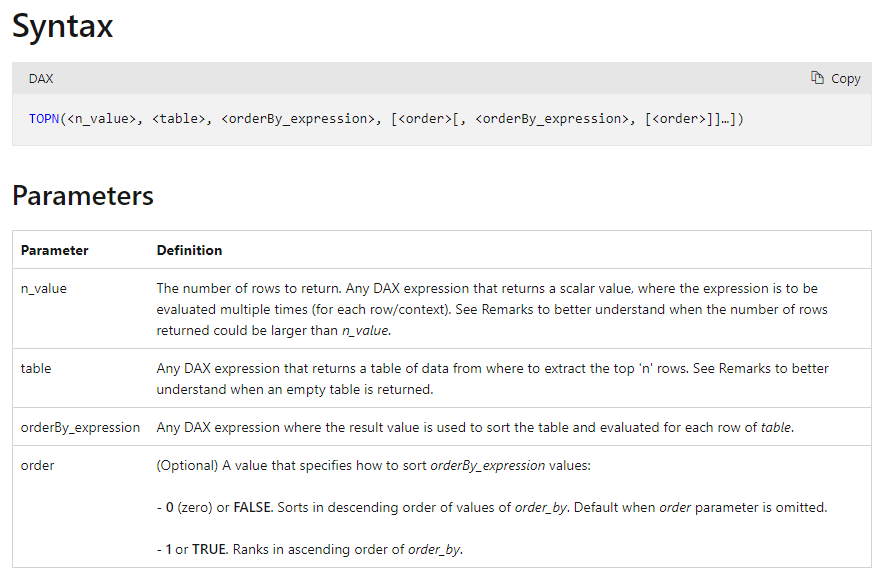
If you look at the syntax of TopN ,
- 502 is the number of rows to return
- 1 or 0 is the order to be applied. 0/FALSE/DESC – descending; 1/TRUE/ASC – ascending.
Syntax =
TOPN(<n_value>, <table>, <orderBy_expression>, [<order>[, <orderBy_expression>, [<order>]]…])
Thanks,
Samarth
Best Regards,
Samarth
If this post helps, please consider accepting it as the solution to help the other members find it more quickly.
Appreciate your Kudos!!
Connect on Linkedin
Hi, @TechoGirl0
Here is the related document, hope it can help you.
https://docs.microsoft.com/dax/topn-function-dax
Best Regards,
Community Support Team _Charlotte
If this post helps, then please consider Accept it as the solution to help the other members find it more quickly.
Hi, @TechoGirl0
Here is the related document, hope it can help you.
https://docs.microsoft.com/dax/topn-function-dax
Best Regards,
Community Support Team _Charlotte
If this post helps, then please consider Accept it as the solution to help the other members find it more quickly.
Hi @TechoGirl0 ,
If you look at the syntax of TopN ,
- 502 is the number of rows to return
- 1 or 0 is the order to be applied. 0/FALSE/DESC – descending; 1/TRUE/ASC – ascending.
Syntax =
TOPN(<n_value>, <table>, <orderBy_expression>, [<order>[, <orderBy_expression>, [<order>]]…])
Thanks,
Samarth
Best Regards,
Samarth
If this post helps, please consider accepting it as the solution to help the other members find it more quickly.
Appreciate your Kudos!!
Connect on Linkedin
The Power BI Data Visualization World Championships is back! Get ahead of the game and start preparing now!
| User | Count |
|---|---|
| 53 | |
| 42 | |
| 34 | |
| 34 | |
| 21 |
| User | Count |
|---|---|
| 143 | |
| 125 | |
| 100 | |
| 81 | |
| 63 |