cancel
Showing results for 
Search instead for 
Did you mean: 

Learn from the best! Meet the four finalists headed to the FINALS of the Power BI Dataviz World Championships! Register now

Reply
lherbert501
Post Partisan
Post Partisan

Synoptic Panel Help

Hi there,


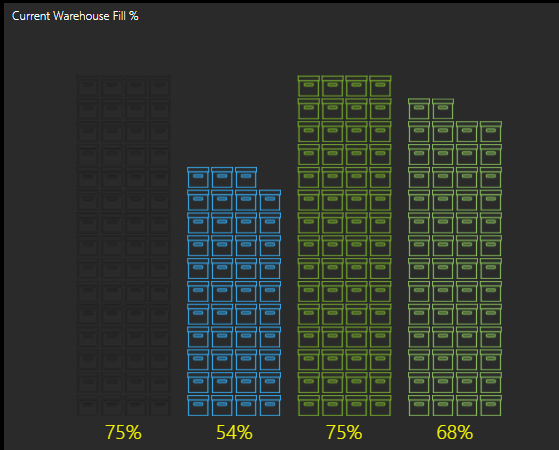
I'm trying to do something similar to the image attached with images increasing with percentage, but I can't seem to find out how to do it.


I can see on the templates on Synoptic Designer for Power BI it show's how to do e.g. a shop map where products are sold, but not anything on the % level with images increasing.


Does anybody know how this would work, or could point me to a guide that would be great?


Warehouse.PNG


Thanks in advance


Liam

1 ACCEPTED SOLUTION
KerKol
Power Participant
Power Participant

You'll find Inforgraphic Designer custom visual more useful...

#37 Easily create infographics in Power BI with infographics desginer - Bing video


Did I answer your question? Mark my post as a solution!

Proud to be a Super User!


View solution in original post

2 REPLIES 2
KerKol
Power Participant
Power Participant

You'll find Inforgraphic Designer custom visual more useful...

#37 Easily create infographics in Power BI with infographics desginer - Bing video


Did I answer your question? Mark my post as a solution!

Proud to be a Super User!


Thankyou so much @KerKol  !

Helpful resources

Announcements
Power BI DataViz World Championships carousel

Power BI DataViz World Championships - June 2026

A new Power BI DataViz World Championship is coming this June! Don't miss out on submitting your entry.

Join our Fabric User Panel

Join our Fabric User Panel

Share feedback directly with Fabric product managers, participate in targeted research studies and influence the Fabric roadmap.

March Power BI Update Carousel

Power BI Community Update - March 2026

Check out the March 2026 Power BI update to learn about new features.