FabCon is coming to Atlanta
Join us at FabCon Atlanta from March 16 - 20, 2026, for the ultimate Fabric, Power BI, AI and SQL community-led event. Save $200 with code FABCOMM.
Register now!- Power BI forums
- Get Help with Power BI
- Desktop
- Service
- Report Server
- Power Query
- Mobile Apps
- Developer
- DAX Commands and Tips
- Custom Visuals Development Discussion
- Health and Life Sciences
- Power BI Spanish forums
- Translated Spanish Desktop
- Training and Consulting
- Instructor Led Training
- Dashboard in a Day for Women, by Women
- Galleries
- Data Stories Gallery
- Themes Gallery
- Contests Gallery
- QuickViz Gallery
- Quick Measures Gallery
- Visual Calculations Gallery
- Notebook Gallery
- Translytical Task Flow Gallery
- TMDL Gallery
- R Script Showcase
- Webinars and Video Gallery
- Ideas
- Custom Visuals Ideas (read-only)
- Issues
- Issues
- Events
- Upcoming Events
The Power BI Data Visualization World Championships is back! Get ahead of the game and start preparing now! Learn more
- Power BI forums
- Forums
- Get Help with Power BI
- Desktop
- Re: Sumx total in each row & total
- Subscribe to RSS Feed
- Mark Topic as New
- Mark Topic as Read
- Float this Topic for Current User
- Bookmark
- Subscribe
- Printer Friendly Page


- Mark as New
- Bookmark
- Subscribe
- Mute
- Subscribe to RSS Feed
- Permalink
- Report Inappropriate Content
Sumx total in each row & total
Hi,
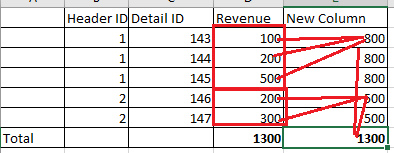
In the following image, How can i get the total for a new column as 1300 (Sum of 800+500) but individual row as 800, 500 group by header id (see image below)?
Thanks in advance!
Solved! Go to Solution.


- Mark as New
- Bookmark
- Subscribe
- Mute
- Subscribe to RSS Feed
- Permalink
- Report Inappropriate Content
Hey @sb991986 ,
for a measure and also for a calculated column the following formula should work:
New Column =
CALCULATE(
    SUM( myTable[Revenue] ),
    ALLEXCEPT( myTable, myTable[Header ID] )
)


- Mark as New
- Bookmark
- Subscribe
- Mute
- Subscribe to RSS Feed
- Permalink
- Report Inappropriate Content
Hi @sb991986
Try meausre as:
Measure =
var _sum=
SUMX(
    FILTER(
        ALL('Table'),
        'Table'[Header ID]=MAX('Table'[Header ID])
    ),
    'Table'[Revenue]
)
return
IF(
    HASONEVALUE('Table'[Revenue]),
    _sum,
    SUM('Table'[Revenue])
    )
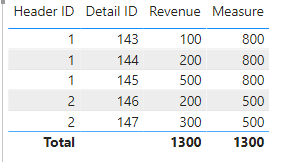
Here is the output:
The pbix is attached.
Best Regards,
Link
Is that the answer you're looking for? If this post helps, then please consider Accept it as the solution. Really appreciate!
- Mark as New
- Bookmark
- Subscribe
- Mute
- Subscribe to RSS Feed
- Permalink
- Report Inappropriate Content
Hey @sb991986 ,
for a measure and also for a calculated column the following formula should work:
New Column =
CALCULATE(
    SUM( myTable[Revenue] ),
    ALLEXCEPT( myTable, myTable[Header ID] )
)
- Mark as New
- Bookmark
- Subscribe
- Mute
- Subscribe to RSS Feed
- Permalink
- Report Inappropriate Content
Hi,
In the above example, I would need total as 1300 but individual row as 800, 500 by header id & detail id. Thank you

- Mark as New
- Bookmark
- Subscribe
- Mute
- Subscribe to RSS Feed
- Permalink
- Report Inappropriate Content
- Mark as New
- Bookmark
- Subscribe
- Mute
- Subscribe to RSS Feed
- Permalink
- Report Inappropriate Content
Hi,
In the above example, I would need total as 1300 but individual row as 800, 500 by header id & detail id
- Mark as New
- Bookmark
- Subscribe
- Mute
- Subscribe to RSS Feed
- Permalink
- Report Inappropriate Content
@sb991986 , Try like
sumx(values(Table[Header ID]), calculate(sum(Table[revenue]), filter(allselected(Table), Table[Header ID] = max(Table[Header ID]))))
- Mark as New
- Bookmark
- Subscribe
- Mute
- Subscribe to RSS Feed
- Permalink
- Report Inappropriate Content
I tried your logic but it didn't work. Thank you fro your help

Helpful resources

Power BI Monthly Update - November 2025
Check out the November 2025 Power BI update to learn about new features.

Fabric Data Days
Advance your Data & AI career with 50 days of live learning, contests, hands-on challenges, study groups & certifications and more!

FabCon Atlanta 2026
Join us at FabCon Atlanta, March 16-20, for the ultimate Fabric, Power BI, AI and SQL community-led event. Save $200 with code FABCOMM.


