cancel
Showing results for 
Search instead for 
Did you mean: 

The Power BI Data Visualization World Championships is back! Get ahead of the game and start preparing now! Learn more

Reply
GM17
Frequent Visitor

Sum of Average

Hi All,


I have a column in a table with below expression

AVERAGEX(VALUES('VW_PRS_LifeCycleState2'[LifeCycleState]),CALCULATE(AVERAGE(VW_PRS_LifeCycleState2[Target_Round2])))


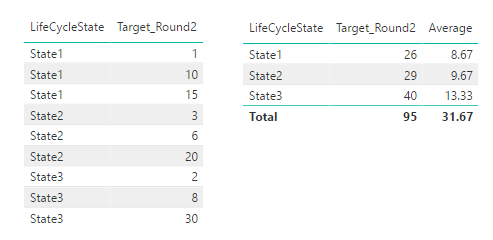
I need to have the total displayed with SUM of "Average" of all the detail rows. The above expression is working fine for Average in detail rows while total is not correct. Currently total as well is doing the average while i need the SUM of averages.


Please suggest?


Thanks

Gaurav

1 ACCEPTED SOLUTION
v-yulgu-msft
Microsoft Employee
Microsoft Employee

Hi @GM17,


Please create a measure with below formula:

Average =
SUMX (
    VALUES ( 'VW_PRS_LifeCycleState2'[LifeCycleState] ),
    AVERAGE ( VW_PRS_LifeCycleState2[Target_Round2] )
)

1.PNG


Best regards,
Yuliana Gu


Community Support Team _ Yuliana Gu
If this post helps, then please consider Accept it as the solution to help the other members find it more quickly.

View solution in original post

4 REPLIES 4
v-yulgu-msft
Microsoft Employee
Microsoft Employee

Hi @GM17,


Please create a measure with below formula:

Average =
SUMX (
    VALUES ( 'VW_PRS_LifeCycleState2'[LifeCycleState] ),
    AVERAGE ( VW_PRS_LifeCycleState2[Target_Round2] )
)

1.PNG


Best regards,
Yuliana Gu


Community Support Team _ Yuliana Gu
If this post helps, then please consider Accept it as the solution to help the other members find it more quickly.

Hi


strange, but for some reason it works here is such a formula


Measure = AVERAGEX(VALUES('table'[name]);SUM('table'[values]))

Hi Yuliana Gu,


i am also looking for the similar type of solution , i have tried but no luck .can you please have a look on it.


https://community.powerbi.com/t5/Desktop/Sum-of-Average/m-p/288894#M127118


thanks,


chethan
Resolver III
Resolver III

@GM17 go to the data 


Create the New Column & Enter the Function 


SumofAverage =AVERAGEX(VALUES('VW_PRS_LifeCycleState2'[LifeCycleState]),CALCULATE(AVERAGE(VW_PRS_LifeCycleState2[Target_Round2])))

Create New Column 


Column =  [SumofAverage ]

if you find any difficulty share the sample data


Regards,

Chetan K

Helpful resources

Announcements
Power BI DataViz World Championships

Power BI Dataviz World Championships

The Power BI Data Visualization World Championships is back! Get ahead of the game and start preparing now!

December 2025 Power BI Update Carousel

Power BI Monthly Update - December 2025

Check out the December 2025 Power BI Holiday Recap!

FabCon Atlanta 2026 carousel

FabCon Atlanta 2026

Join us at FabCon Atlanta, March 16-20, for the ultimate Fabric, Power BI, AI and SQL community-led event. Save $200 with code FABCOMM.