cancel
Showing results for 
Search instead for 
Did you mean: 

Vote for your favorite vizzies from the Power BI Dataviz World Championship submissions. Vote now!

Reply
sparkymark75
Frequent Visitor

Sum count of rows for prior date range

I have data which when I can get into this form using a summarize;
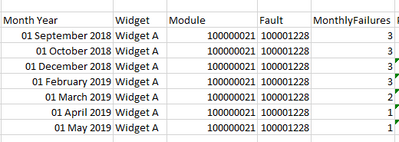
 

2019-05-31_14-57-59.png


VAR Product = SELECTEDVALUE(Products[GenericDescription])
VAR Module = SELECTEDVALUE(ModuleFaults[new_moduletype])
VAR FailType = SELECTEDVALUE(ModuleFaults[new_fault])

VAR FailuresGrouped = SUMMARIZE(
                ALL('ModuleFaults'),
                Incident[CompletedMonthYear],
                Incident[ITMGEDSC],
                ModuleFaults[new_moduletype],
                ModuleFaults[new_fault],
                "MonthlyFailures",
                COUNTROWS(ModuleFaults)
            )


I'm trying to create a measure which will show a sum of the MonthlyFailures column (per Widget, Module, Fault) for each MonthYear row for the previous 3 months. So the output should look like so...
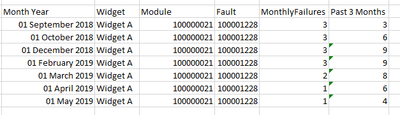

2019-05-31_15-01-02.png


I've tried doing a SUMX but I just keep getting the total number of rows back.


VAR FailCountByType = SUMX(
        FILTER(FailuresGrouped,
            Incident[CompletedMonthYear] >= FIRSTDATE(DATEADD('Incident'[CompletedMonthYear], -3, MONTH)) &&
            Incident[CompletedMonthYear] <= EOMONTH(Incident[CompletedMonthYear], 0) &&
            ModuleFaults[new_moduletype] = Module &&
            ModuleFaults[new_fault] = FailType &&
            Incident[ITMGEDSC] = Product
        ),
    [MonthlyFailures]
)


3 REPLIES 3
v-frfei-msft
Community Support
Community Support

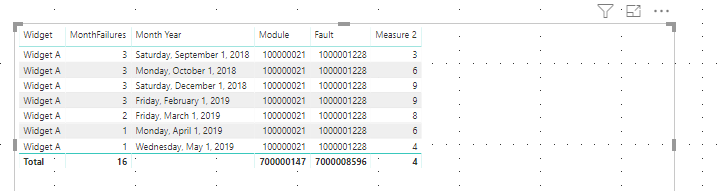
Hi @sparkymark75 ,


One sample for your reference. Please check the following steps as below.


1. To create a calculated column in your summrized table.

rank = 
RANKX ( ALL ( 'Table1' ), Table1[Month Year],, ASC, DENSE )

2. To create a measure to get the excepted result we need.

Measure 2 = 
VAR ran =
    MAX ( Table1[rank] ) - 2
RETURN
    CALCULATE (
        SUM ( Table1[MonthFailures] ),
        FILTER (
            ALLSELECTED ( Table1 ),
            Table1[rank] >= ran
                && Table1[rank] <= MAX ( Table1[rank] )
        )
    )

Capture.PNG

Pbix as attached.


Community Support Team _ Frank
If this post helps, then please consider Accept it as the solution to help the others find it more quickly.

Thanks for replying. I'm guessing I didn't word my question as clearly as I should have. The summary table is calculated inline in the measure as a variable, e.g.


VAR FailuresGrouped = SUMMARIZE(
                FILTER(ALL('ModuleFaults'), ModuleFaults[CaseCompletedOn] <> BLANK()),
                Incident[CompletedMonthYear],
                Incident[ITMGEDSC],
                ModuleFaults[new_moduletype],
                ModuleFaults[new_fault],
                "MonthlyFailures",
                COUNTROWS(ModuleFaults)
            )

Is it possible to use the RANKX on a table in a variable and then the subsequent measure code you have? 

Hi @sparkymark75 ,


ADDCOLUMNS should work, please have a try. Could you please share your sample data to me ?
 
Community Support Team _ Frank
If this post helps, then please consider Accept it as the solution to help the others find it more quickly.

Helpful resources

Announcements
Sticker Challenge 2026 Carousel

Join our Community Sticker Challenge 2026

If you love stickers, then you will definitely want to check out our Community Sticker Challenge!

January Power BI Update Carousel

Power BI Monthly Update - January 2026

Check out the January 2026 Power BI update to learn about new features.

FabCon Atlanta 2026 carousel

FabCon Atlanta 2026

Join us at FabCon Atlanta, March 16-20, for the ultimate Fabric, Power BI, AI and SQL community-led event. Save $200 with code FABCOMM.