Forum Discussion

Sum by month
Hi everyone,
I have a problem to do something very simple on excel but so hard on power BI
I have a project table with my project Name, starting date, excepted ending date and ending date
So I'd like to nake some calculation with these data so this is an example, I'd like by month all the project which start at month M and which finished at M+1
So to do that, I built a second table: Month in it I put the month for I want to make the count
With these screenshots, I think everything will be easier for you
So I have two table one project and one month
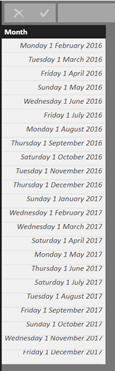
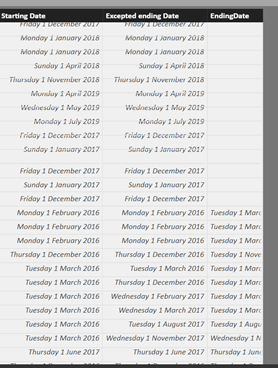
I built a relationship between the both table:
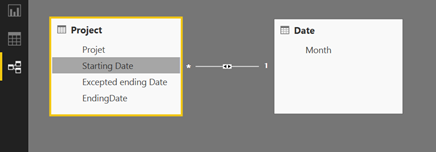
After that, I'd like to count with a measure(or a column) my project which start the same month than the month in my date table and which are finished one month later so I thought to do that with:
Measure = CALCULATE(COUNT(Project[Starting Date]);('Date'[Month]= 'Project'[starting Date]);((DATEADD('Date'[Month];1;MONTH)='Project'[ending Date])))
I aslo tried it with a new column:
Column = CALCULATE(COUNT(Project[Starting Date]);('Date'[Month]= 'Project'[starting Date]);((DATEADD('Date'[Month];1;MONTH)='Project'[ending Date])))
But nothing worked
Any idea of what I could do?
6 Replies
- jdobrzenAdvocate III
If you're trying to figure out the difference between Starting Date and Ending Date where the difference is 1 month, could you solve that with a calculated column and then a mesure to count the instances?
+1M Indicator Column = IF(DATEDIFF(Starting Date, EndingDate, month) = 1, TRUE(), FALSE())
Count +1M Finish = COUNTROWS(FILTER(myTable, +1M Indicator Column = TRUE()))
 domiowaFrequent Visitor
Thanks for your answer but the problem is I'll have other calculation to do so the difference won't be all the time one month
- jdobrzenAdvocate III
I'll take one more shot :)
If you need it to be dynamic so it has to be a measure, then maybe you can leverage a parameter table. It looks like you might already be trying to do that with your seperate Month table.
https://www.daxpatterns.com/parameter-table/
= IF (HASONEVALUE ( myParmTable[myParm] ),
COUNTROWS(FILTER(myTable, DATEDIFF(Starting Date, EndingDate, month) = VALUES(myParmTable[myParm])))
,0
)
 v-jiascu-msftMicrosoft Employee
Hi domiowa,
Try out these two measues please. You also can check it out in this file.
Measure 1 =
SUMX (
    SUMMARIZE (
        'Project',
        'Project'[Project],
        Project[Starting Date],
        Project[EndingDate],
        "Months", DATEDIFF ( Project[Starting Date], Project[EndingDate], MONTH )
    ),
    IF ( [Months] = 1, 1, BLANK () )
)
Measure 2 = CALCULATE ( COUNTROWS ( 'Project' ), FILTER ( 'Project', MONTH ( 'Project'[EndingDate] ) - MONTH ( Project[Starting Date] ) = 1 ) )Best Regards,
Dale
- v-jiascu-msftMicrosoft Employee
