cancel
Showing results for 
Search instead for 
Did you mean: 

The Power BI Data Visualization World Championships is back! It's time to submit your entry. Live now!

Reply
Anonymous
Not applicable

Sum 3 years Rolling Months

Good day, I'm trying to make a function to calculate the sum of 3 Rolling years, Iam in a Azure model, then i only can create calculate measures, this a little example that what I try to get, for Novembre I want to sum the previous years in the same period Oct, Nov the next month (Dec) the sum will be Oct, Nov, Dec, I would greatly appreciate your help on how to tell me how to do it


Table                 Name Fields
Calendario        Fiscal Year y Fiscal Year Month
Facturacion       Amount


Fiscal Year      Fiscal Year Month        Amount

2018                FY2018 Oct                  2,500,000.00
2018                FY2018 Nov                1,000,000.00
2018                FY2018 Dec                 3,000,000.00
2019                FY2019 Oct                 1,500,000.00
2019                FY2019 Nov                  500,000.00
2019                FY2019 Dec                 4,000,000.00
2020                FY2020 Oct                  5,000,000.00
2020                FY2020 Nov                 1,000,000.00
2020                FY2020 Dec                    500,000.00
2021                FY2021 Oct                  1,000,000.00
2021                FY2021 Nov                    100,000.00


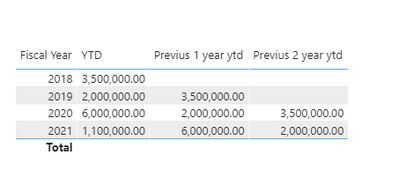
RESULTS:

FISCAL YEAR        YTD                   Previus 1 year ytd             Previus 2 Year ytd
2018                  3,500,000.00
2019                  2,000,000.00        3,500,000.00
2020                  6,000,000.00        2,000,000.00                    3,500,000.00
2021                  1,100,000.00        6,000,000.00                    2,000,000.00

1 ACCEPTED SOLUTION
Anonymous
Not applicable

Hi @Anonymous ,


Based on your description, you can do some steps as follows.

  1. Create a Fiscal Year Month column.


Fiscal_Year_month =

var a=RIGHT([Fiscal Year Month],3)

return

SWITCH(

    a,

    "Dec",12,

    "Nov",11,

    "Oct",10

    )


  1. Createa a today’s month measure.


today_month = MONTH(TODAY())


  1. Create three required measures.


YTD = SUMX(FILTER(ALL(TABLE5),table5[Fiscal_Year_month]<=[today_month]&&[Fiscal Year]=SELECTEDVALUE('table5'[Fiscal Year])),'table5'[Amount])

Previus 1 year ytd = MAXX(FILTER(ALL('table5'),'table5'[Fiscal Year]=SELECTEDVALUE('table5'[Fiscal Year])-1),[YTD])

Previus 2 year ytd = MAXX(FILTER(ALL('table5'),'table5'[Fiscal Year]=SELECTEDVALUE('table5'[Fiscal Year])-2),[YTD])


  1. Create a table visual.

v-yuaj-msft_0-1606289975101.png


Result:

v-yuaj-msft_1-1606289975105.png


Hope that's what you were looking for.

Best Regards,

Yuna


If this post helps, then please consider Accept it as the solution to help the other members find it more quickly.

View solution in original post

2 REPLIES 2
Anonymous
Not applicable

Hi @Anonymous ,


Based on your description, you can do some steps as follows.

  1. Create a Fiscal Year Month column.


Fiscal_Year_month =

var a=RIGHT([Fiscal Year Month],3)

return

SWITCH(

    a,

    "Dec",12,

    "Nov",11,

    "Oct",10

    )


  1. Createa a today’s month measure.


today_month = MONTH(TODAY())


  1. Create three required measures.


YTD = SUMX(FILTER(ALL(TABLE5),table5[Fiscal_Year_month]<=[today_month]&&[Fiscal Year]=SELECTEDVALUE('table5'[Fiscal Year])),'table5'[Amount])

Previus 1 year ytd = MAXX(FILTER(ALL('table5'),'table5'[Fiscal Year]=SELECTEDVALUE('table5'[Fiscal Year])-1),[YTD])

Previus 2 year ytd = MAXX(FILTER(ALL('table5'),'table5'[Fiscal Year]=SELECTEDVALUE('table5'[Fiscal Year])-2),[YTD])


  1. Create a table visual.

v-yuaj-msft_0-1606289975101.png


Result:

v-yuaj-msft_1-1606289975105.png


Hope that's what you were looking for.

Best Regards,

Yuna


If this post helps, then please consider Accept it as the solution to help the other members find it more quickly.

amitchandak
Super User
Super User

@Anonymous ,you have a date. if yes , you can try measures like

YTD Sales = CALCULATE(SUM(Sales[Sales Amount]),DATESYTD('Date'[Date],"12/31"))
Last YTD Sales = CALCULATE(SUM(Sales[Sales Amount]),DATESYTD(dateadd('Date'[Date],-1,Year),"12/31"))

2nd last YTD Sales = CALCULATE(SUM(Sales[Sales Amount]),DATESYTD(dateadd('Date'[Date],-2,Year),"12/31"))
This year Sales = CALCULATE(SUM(Sales[Sales Amount]),DATESYTD(ENDOFYEAR('Date'[Date]),"12/31"))
Last year Sales = CALCULATE(SUM(Sales[Sales Amount]),DATESYTD(ENDOFYEAR(dateadd('Date'[Date],-1,Year)),"12/31"))


Forced YTD

YTD QTY forced=
var _max = today()
return
if(max('Date'[Date])<=_max, calculate(Sum('order'[Qty]),DATESYTD('Date'[Date])), blank())
//or
//calculate(Sum('order'[Qty]),DATESYTD('Date'[Date]),filter('Date','Date'[Date]<=_max))
//calculate(TOTALYTD(Sum('order'[Qty]),'Date'[Date]),filter('Date','Date'[Date]<=_max))


LYTD QTY forced=
var _max = date(year(today())-1,month(today()),day(today()))
return
if(max('Date'[Date])<=_max, CALCULATE(Sum('order'[Qty]),DATESYTD(dateadd('Date'[Date],-1,year)),'Date'[Date]<=_max), blank())
//OR
//CALCULATE(Sum('order'[Qty]),DATESYTD(dateadd('Date'[Date],-1,year)),'Date'[Date]<=_max)


without time intelligence

Year Rank = RANKX(all('Date'),'Date'[Year Start date],,ASC,Dense)
This Year = CALCULATE(sum('order'[Qty]), FILTER(ALL('Date'),'Date'[Year Rank]=max('Date'[Year Rank])))
Last Year = CALCULATE(sum('order'[Qty]), FILTER(ALL('Date'),'Date'[Year Rank]=max('Date'[Year Rank])-1))

2nd last year = CALCULATE(sum('order'[Qty]), FILTER(ALL('Date'),'Date'[Year Rank]=max('Date'[Year Rank])-2))


YTD will month level


YTD= CALCULATE(sum('order'[Qty]), FILTER(ALL('Date'),'Date'[Year]=max('Date'[Year]) && 'Date'[Month] <= Max('Date'[Month]) ))
LYTD = CALCULATE(sum('order'[Qty]), FILTER(ALL('Date'),'Date'[Year]=max('Date'[Year])-1 && 'Date'[Month] <= Max('Date'[Month])))


Power BI — Year on Year with or Without Time Intelligence
https://medium.com/@amitchandak.1978/power-bi-ytd-questions-time-intelligence-1-5-e3174b39f38a


To get the best of the time intelligence function. Make sure you have a date calendar and it has been marked as the date in model view. Also, join it with the date column of your fact/s. Refer :radacad sqlbi My Video Series Appreciate your Kudos.


Last to last YTD Sales = CALCULATE(SUM(Sales[Sales Amount]),DATESYTD(dateadd('Date'[Date],-2,Year),"12/31"))
Year behind Sales = CALCULATE(SUM(Sales[Sales Amount]),dateadd('Date'[Date],-1,Year))

Share with Power BI Enthusiasts: Full Power BI Video (20 Hours) YouTube
Microsoft Fabric Series 60+ Videos YouTube
Microsoft Fabric Hindi End to End YouTube

Helpful resources

Announcements
Power BI DataViz World Championships

Power BI Dataviz World Championships

The Power BI Data Visualization World Championships is back! It's time to submit your entry.

December 2025 Power BI Update Carousel

Power BI Monthly Update - December 2025

Check out the December 2025 Power BI Holiday Recap!

FabCon Atlanta 2026 carousel

FabCon Atlanta 2026

Join us at FabCon Atlanta, March 16-20, for the ultimate Fabric, Power BI, AI and SQL community-led event. Save $200 with code FABCOMM.