- Power BI forums
- Updates
- News & Announcements
- Get Help with Power BI
- Desktop
- Service
- Report Server
- Power Query
- Mobile Apps
- Developer
- DAX Commands and Tips
- Custom Visuals Development Discussion
- Health and Life Sciences
- Power BI Spanish forums
- Translated Spanish Desktop
- Power Platform Integration - Better Together!
- Power Platform Integrations (Read-only)
- Power Platform and Dynamics 365 Integrations (Read-only)
- Training and Consulting
- Instructor Led Training
- Dashboard in a Day for Women, by Women
- Galleries
- Community Connections & How-To Videos
- COVID-19 Data Stories Gallery
- Themes Gallery
- Data Stories Gallery
- R Script Showcase
- Webinars and Video Gallery
- Quick Measures Gallery
- 2021 MSBizAppsSummit Gallery
- 2020 MSBizAppsSummit Gallery
- 2019 MSBizAppsSummit Gallery
- Events
- Ideas
- Custom Visuals Ideas
- Issues
- Issues
- Events
- Upcoming Events
- Community Blog
- Power BI Community Blog
- Custom Visuals Community Blog
- Community Support
- Community Accounts & Registration
- Using the Community
- Community Feedback
Register now to learn Fabric in free live sessions led by the best Microsoft experts. From Apr 16 to May 9, in English and Spanish.
- Power BI forums
- Forums
- Get Help with Power BI
- Desktop
- Re: Sum 2 columns in matrix table
- Subscribe to RSS Feed
- Mark Topic as New
- Mark Topic as Read
- Float this Topic for Current User
- Bookmark
- Subscribe
- Printer Friendly Page

- Mark as New
- Bookmark
- Subscribe
- Mute
- Subscribe to RSS Feed
- Permalink
- Report Inappropriate Content
Sum 2 columns in matrix table
Hi is it posible to sum 2 columns from 14 in matrix view as a extra column in the same view.
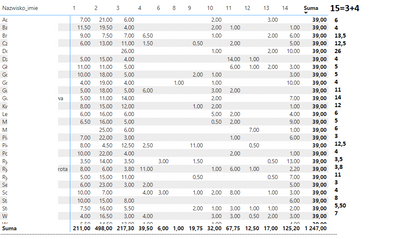
This is list of person nad summary work time for certain topics i need in this matrix extra sum of time spend on 2 topix together.
I want to add 1 extra column to this matrix with number 15 and the valu for this column will be sum of col 3 and 4.
Solved! Go to Solution.


- Mark as New
- Bookmark
- Subscribe
- Mute
- Subscribe to RSS Feed
- Permalink
- Report Inappropriate Content
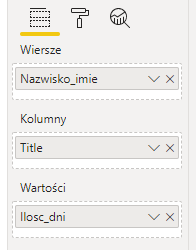
It's possible but not simple. The problem is that you currently have one measure (llosc_dni) computed against two dimensions (Nazwisko_imie and Title) but you want to add a new measure that acts as an extra Title dimension value. Measures get evaluated in the context generated by the dimensions you put on the rows and columns, which is why if you add a new measure, it shows up under each number 1-14.
To do what you want, there are two approaches I can think of:
- Remove the Title dimension from columns and create separate measures for each number you want to show.
- Alter the existing table or create a new table to use as your header that includes 15 and define a measure that switches calculations accordingly.
Here's an example of the second approach for a similar but more complex situation:
https://stackoverflow.com/questions/52632713/custom-aggregate-column-in-power-bi-matrix
- Mark as New
- Bookmark
- Subscribe
- Mute
- Subscribe to RSS Feed
- Permalink
- Report Inappropriate Content
It's possible but not simple. The problem is that you currently have one measure (llosc_dni) computed against two dimensions (Nazwisko_imie and Title) but you want to add a new measure that acts as an extra Title dimension value. Measures get evaluated in the context generated by the dimensions you put on the rows and columns, which is why if you add a new measure, it shows up under each number 1-14.
To do what you want, there are two approaches I can think of:
- Remove the Title dimension from columns and create separate measures for each number you want to show.
- Alter the existing table or create a new table to use as your header that includes 15 and define a measure that switches calculations accordingly.
Here's an example of the second approach for a similar but more complex situation:
https://stackoverflow.com/questions/52632713/custom-aggregate-column-in-power-bi-matrix
- Mark as New
- Bookmark
- Subscribe
- Mute
- Subscribe to RSS Feed
- Permalink
- Report Inappropriate Content
Thank you very much. You saved me.

- Mark as New
- Bookmark
- Subscribe
- Mute
- Subscribe to RSS Feed
- Permalink
- Report Inappropriate Content
How did you manage to get it right?
- Mark as New
- Bookmark
- Subscribe
- Mute
- Subscribe to RSS Feed
- Permalink
- Report Inappropriate Content
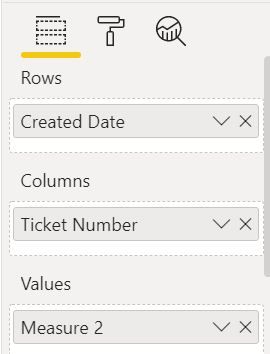
@swartor Kindly share the Column name you want to add? Or simply share the screen shot like below:
Please take a quick glance at newly created dashboards : Restaurant Management Dashboard , HR Analytics Report , Hotel Management Report, Sales Analysis Report , Fortune 500 Companies Analysis , Revenue Tracking Dashboard
- Mark as New
- Bookmark
- Subscribe
- Mute
- Subscribe to RSS Feed
- Permalink
- Report Inappropriate Content
- Mark as New
- Bookmark
- Subscribe
- Mute
- Subscribe to RSS Feed
- Permalink
- Report Inappropriate Content
@swartor Try this:
= Calculate(SUM(Ilosc_dni),Title IN {3,4})
OR
= CALCULATE(SUM(Ilosc_dni), Title=3 || Title =4)
Please take a quick glance at newly created dashboards : Restaurant Management Dashboard , HR Analytics Report , Hotel Management Report, Sales Analysis Report , Fortune 500 Companies Analysis , Revenue Tracking Dashboard
- Mark as New
- Bookmark
- Subscribe
- Mute
- Subscribe to RSS Feed
- Permalink
- Report Inappropriate Content
Sry for this question but i dont know where to add this.
Do i hav to create a new measure and insert it to columns or hav to make some code editing but dont know where.
- Mark as New
- Bookmark
- Subscribe
- Mute
- Subscribe to RSS Feed
- Permalink
- Report Inappropriate Content
@swartor Just create a new Measure with that given code.
MEASURE= CALCULATE(SUM(Ilosc_dni), Title=3 || Title =4)
Please take a quick glance at newly created dashboards : Restaurant Management Dashboard , HR Analytics Report , Hotel Management Report, Sales Analysis Report , Fortune 500 Companies Analysis , Revenue Tracking Dashboard
- Mark as New
- Bookmark
- Subscribe
- Mute
- Subscribe to RSS Feed
- Permalink
- Report Inappropriate Content
Ok i create it like this

Do i hav to make separate measure for every column i want and then add one by one to Values?

Helpful resources

Microsoft Fabric Learn Together
Covering the world! 9:00-10:30 AM Sydney, 4:00-5:30 PM CET (Paris/Berlin), 7:00-8:30 PM Mexico City

Power BI Monthly Update - April 2024
Check out the April 2024 Power BI update to learn about new features.

Fabric Community Update - April 2024
Find out what's new and trending in the Fabric Community.

| User | Count |
|---|---|
| 96 | |
| 95 | |
| 82 | |
| 71 | |
| 64 |


| User | Count |
|---|---|
| 115 | |
| 105 | |
| 95 | |
| 79 | |
| 72 |


