FabCon is coming to Atlanta
Join us at FabCon Atlanta from March 16 - 20, 2026, for the ultimate Fabric, Power BI, AI and SQL community-led event. Save $200 with code FABCOMM.
Register now!- Power BI forums
- Get Help with Power BI
- Desktop
- Service
- Report Server
- Power Query
- Mobile Apps
- Developer
- DAX Commands and Tips
- Custom Visuals Development Discussion
- Health and Life Sciences
- Power BI Spanish forums
- Translated Spanish Desktop
- Training and Consulting
- Instructor Led Training
- Dashboard in a Day for Women, by Women
- Galleries
- Data Stories Gallery
- Themes Gallery
- Contests Gallery
- QuickViz Gallery
- Quick Measures Gallery
- Visual Calculations Gallery
- Notebook Gallery
- Translytical Task Flow Gallery
- TMDL Gallery
- R Script Showcase
- Webinars and Video Gallery
- Ideas
- Custom Visuals Ideas (read-only)
- Issues
- Issues
- Events
- Upcoming Events
Get Fabric Certified for FREE during Fabric Data Days. Don't miss your chance! Request now
- Power BI forums
- Forums
- Get Help with Power BI
- Desktop
- Re: Subsets with measures
- Subscribe to RSS Feed
- Mark Topic as New
- Mark Topic as Read
- Float this Topic for Current User
- Bookmark
- Subscribe
- Printer Friendly Page


- Mark as New
- Bookmark
- Subscribe
- Mute
- Subscribe to RSS Feed
- Permalink
- Report Inappropriate Content
Subsets with measures
I want to calcualte only sum Shipment Quantity when there was a return.
| Customer | Shipment Quantity | Return Quantity | Return % |
| A | 50 | 35 | 70% |
| B | 100 | 5 | 5% |
| C | 340 | 0 | 0% |
| D | 270 | 25 | 9.25% |
| Total | 760 | 65 | 8.55% |
So Overall Shipment Quantity is 760 (50+100+340+270)
Overall Return is 65 (35+5+25)
So return % is: 65/760 = 8.55% which is easy to calculate.
Now, the problem is: If I only want to calculate % of shipment, if there is a return, then it will be:
420/760 = 55% (exclude the customer which didn't have any returns).
where 420 = 50 +100 +270 (A, B and D)
overall shipment 760 = 50 + 100 + 340 + 270
How do I calculate this?
Here are my formulas:
Shipment Quantity =
VAR TotalSales =
    CALCULATE (
        SUM ( 'Sales Order Detail'[Custom Quantity] ),
        'Order Type'[Order Type Transaction Group] = "Sales"
    )
RETURN
    TotalSales
Return Quantity =
VAR TotalReturns =
CALCULATE (
SUM ( 'Sales Order Detail'[Custom Quantity] ),
'Order Type'[Order Type Transaction Group] = "Return/Dump"
)
RETURN
TotalReturnsReturn % =
VAR TotalReturnDump =
CALCULATE (
SUM ( 'Sales Order Detail'[Custom Quantity] ),
'Order Type'[Order Type Transaction Group] = "Return/Dump"
)
VAR TotalSales =
CALCULATE (
SUM ( 'Sales Order Detail'[Custom Quantity] ),
'Order Type'[Order Type Transaction Group] = "Sales"
)
RETURN
ABS ( DIVIDE ( TotalReturnDump, TotalSales, BLANK () ) )
I created this measure as well:
Brand Product Line Return Flag =
IF ( ISBLANK ( [Return Quantity] ), "NO", "YES" )
But I can't use this in Filter function as this is a measure.
Any help?
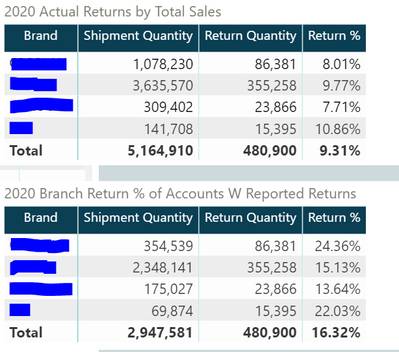
Like in the picture below,
First table gives me all the Shipments and their Return values.
2nd table gives me only Shipments where Returns happen.
Both the tables have same Return quantity. Only Shipment numbers are changing due to our logic.
And I want to calculate 3,54,539 /1,078230 and so on and so forth....
Thanks,
Ritesh


- Mark as New
- Bookmark
- Subscribe
- Mute
- Subscribe to RSS Feed
- Permalink
- Report Inappropriate Content
Please try an expression like this:
New % Measure =
VAR __totalshipment =
    SUM ( Table[Shipment Quantity] )
VAR __withreturns =
    CALCULATE ( SUM ( Table[Shipment Quantity] ), Table[Returned] > 0 )
RETURN
    DIVIDE ( __withreturns, __totalshipment )
If this works for you, please mark it as the solution. Kudos are appreciated too. Please let me know if not.
Regards,
Pat
Did I answer your question? Mark my post as a solution! Kudos are also appreciated!
To learn more about Power BI, follow me on Twitter or subscribe on YouTube.
@mahoneypa HoosierBI on YouTube
- Mark as New
- Bookmark
- Subscribe
- Mute
- Subscribe to RSS Feed
- Permalink
- Report Inappropriate Content
New % Measure =
VAR _totalShipment =
    CALCULATE (
        SUM ( 'Sales Order Detail'[Custom Quantity] ),
        'Order Type'[Order Type Transaction Group] = "Sales"
    )
VAR __withreturns =
    CALCULATE (
        SUM ( 'Sales Order Detail'[Custom Quantity] ),
        'Order Type'[Order Type Transaction Group] = "Sales",
        ( 'Sales Order Detail'[Custom Quantity] ),
        'Order Type'[Order Type Transaction Group] = "Return/Dump"
    ) > 0
RETURN
    DIVIDE ( __withreturns, _totalShipment )
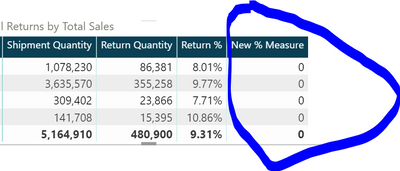
No luck.
- Mark as New
- Bookmark
- Subscribe
- Mute
- Subscribe to RSS Feed
- Permalink
- Report Inappropriate Content
That is not the same as the measure I suggested. Your example had a column for return quantity. I don't see that column mentioned in your adapted measure. There needs to be a filter on the column to exclude 0 values. Is Return Quantity a measure?
Regards,
Pat
Did I answer your question? Mark my post as a solution! Kudos are also appreciated!
To learn more about Power BI, follow me on Twitter or subscribe on YouTube.
@mahoneypa HoosierBI on YouTube
- Mark as New
- Bookmark
- Subscribe
- Mute
- Subscribe to RSS Feed
- Permalink
- Report Inappropriate Content
Yes, Return Quantity is a measure as well.
- Mark as New
- Bookmark
- Subscribe
- Mute
- Subscribe to RSS Feed
- Permalink
- Report Inappropriate Content
Sorry, for the confusion but the return quantity is calculated like this:
( 'Sales Order Detail'[Custom Quantity] ),
        'Order Type'[Order Type Transaction Group] = "Return/Dump"
Bascially, 1 filter is for Sales, 1 is for "Return/Dump" using the same "Order Type Transaction Group.
Do you think the solution could be done with calculated table? I have never used it but looking into it.
Thanks,
Ritesh
- Mark as New
- Bookmark
- Subscribe
- Mute
- Subscribe to RSS Feed
- Permalink
- Report Inappropriate Content
Thanks for the additional info. That does not look like a complete expression. In any case, you need to filter down to the Brands (for that visual) that have no returns. Here is a modified measure that should do that. I don't know which table has your Brand column, so you'll need to replace Table with that name.
New % Measure =
VAR _totalShipment =
    CALCULATE (
        SUM ( 'Sales Order Detail'[Custom Quantity] ),
        'Order Type'[Order Type Transaction Group] = "Sales"
    )
VAR __withreturns =
    CALCULATE (
        SUM ( 'Sales Order Detail'[Custom Quantity] ),
        'Order Type'[Order Type Transaction Group] = "Sales",
        FILTER (
            ALLSELECTED ( Table[Brand] ),
            CALCULATE (
                SUM ( 'Sales Order Detail'[Custom Quantity] ),
                'Order Type'[Order Type Transaction Group] = "Return/Dump"
            ) > 0
        )
    )
RETURN
    DIVIDE ( __withreturns, _totalShipment )
If this works for you, please mark it as the solution. Kudos are appreciated too. Please let me know if not.
Regards,
Pat
Did I answer your question? Mark my post as a solution! Kudos are also appreciated!
To learn more about Power BI, follow me on Twitter or subscribe on YouTube.
@mahoneypa HoosierBI on YouTube
- Mark as New
- Bookmark
- Subscribe
- Mute
- Subscribe to RSS Feed
- Permalink
- Report Inappropriate Content
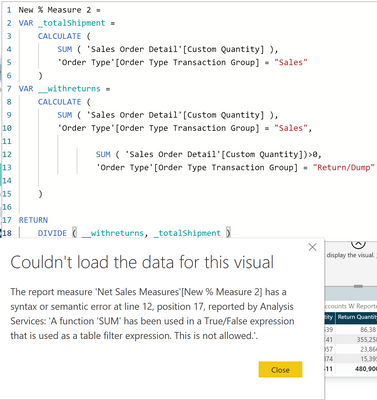
New % Measure 2 =
VAR _totalShipment =
    CALCULATE (
        SUM ( 'Sales Order Detail'[Custom Quantity] ),
        'Order Type'[Order Type Transaction Group] = "Sales"
    )
VAR __withreturns =
    CALCULATE (
        SUM ( 'Sales Order Detail'[Custom Quantity] ),
        'Order Type'[Order Type Transaction Group] = "Sales",
        FILTER (
            ALLSELECTED ( 'Product'[Product Marketing Brand] ),
            CALCULATE (
                SUM ( 'Sales Order Detail'[Custom Quantity] ),
                'Order Type'[Order Type Transaction Group] = "Return/Dump"
            ) > 0
        )
    )
RETURN
    DIVIDE ( __withreturns, _totalShipment )
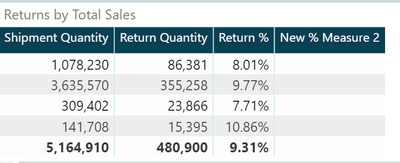
@mahoneypatIt comes blank.
- Mark as New
- Bookmark
- Subscribe
- Mute
- Subscribe to RSS Feed
- Permalink
- Report Inappropriate Content
Ok. Thanks for trying it. I am obviously missing something about your model. One thing I did notice is that your original post had Customer in the example table and it was a later pic that had Brand. If those are different columns, it is the Customer column that should be in the ALLSELECTED(). You can try one more thing by replacing the FILTER() part with the below code. It uses your Return Quantity measure too.
FILTER (
            ALLSELECTED ( Table[Customer] ),
            [Return Quantity] > 0
        )
Regards,
Pat
Did I answer your question? Mark my post as a solution! Kudos are also appreciated!
To learn more about Power BI, follow me on Twitter or subscribe on YouTube.
@mahoneypa HoosierBI on YouTube
- Mark as New
- Bookmark
- Subscribe
- Mute
- Subscribe to RSS Feed
- Permalink
- Report Inappropriate Content
@mahoneypat Thanks, it is Brand. Customer was just an example I was trying to give to state the problem.
Can somehow I can create a custom table and pick and choose columns from the table I posted earlier? It seems so easy but looks like needs to go through lot of hoops.
thanks for your help.
- Mark as New
- Bookmark
- Subscribe
- Mute
- Subscribe to RSS Feed
- Permalink
- Report Inappropriate Content
You can make a calculated table, but you would likely run into same issue. Basically, we are trying to make the right virtual table as part of this measure. If you are willing to share your pbix (with mock data or send a link through private message), I can figure it out. Someone else may have an idea too.
Regards,
Pat
Did I answer your question? Mark my post as a solution! Kudos are also appreciated!
To learn more about Power BI, follow me on Twitter or subscribe on YouTube.
@mahoneypa HoosierBI on YouTube
- Mark as New
- Bookmark
- Subscribe
- Mute
- Subscribe to RSS Feed
- Permalink
- Report Inappropriate Content
https://drive.google.com/file/d/184S_Tvmit3RT4w0vb-RyGDy86gi-T_6o/view?usp=sharing
Here is the file.
What I am looking for is:
354539/1078230
This is the example of just 1 brand. I could have 10 brands so looking for that in a table.
Again, thanks for your help.
- Mark as New
- Bookmark
- Subscribe
- Mute
- Subscribe to RSS Feed
- Permalink
- Report Inappropriate Content
Thanks for sending the pbix. This measure returns the desired result of 32.17%. Also below is a pic with one of your tables, and a new table I made with just Brand and this measure. Note that the measure returns 100% for each row on your existing table, as each row either has returns or not (so the two variables are the same when there are returns).
% With Returns =
VAR __totalqty =
    SUM ( '2020 Actual Returns by Total Sales'[Shipment Quantity] )
VAR __totalwreturns =
    CALCULATE (
        SUM ( '2020 Actual Returns by Total Sales'[Shipment Quantity] ),
        '2020 Actual Returns by Total Sales'[Return Quantity] > 0
    )
RETURN
    DIVIDE ( __totalwreturns, __totalqty )
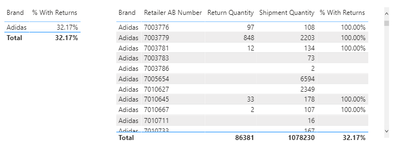
If this works for you, please mark it as the solution. Kudos are appreciated too. Please let me know if not.
Regards,
Pat
Did I answer your question? Mark my post as a solution! Kudos are also appreciated!
To learn more about Power BI, follow me on Twitter or subscribe on YouTube.
@mahoneypa HoosierBI on YouTube
- Mark as New
- Bookmark
- Subscribe
- Mute
- Subscribe to RSS Feed
- Permalink
- Report Inappropriate Content
- Mark as New
- Bookmark
- Subscribe
- Mute
- Subscribe to RSS Feed
- Permalink
- Report Inappropriate Content
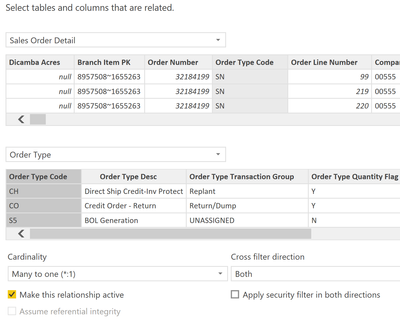
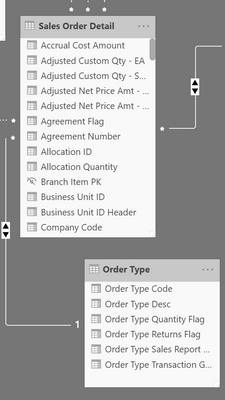
The pbix you sent had a single table while the measure in your screen shot has multiple tables, so it wasn't represetative of your data model. If you can't send the actual pbix file, please provide a screen shot of the diagram view/data model, so we can see the relationships between these tables.
Regars,
Pat
Did I answer your question? Mark my post as a solution! Kudos are also appreciated!
To learn more about Power BI, follow me on Twitter or subscribe on YouTube.
@mahoneypa HoosierBI on YouTube
- Mark as New
- Bookmark
- Subscribe
- Mute
- Subscribe to RSS Feed
- Permalink
- Report Inappropriate Content
- Mark as New
- Bookmark
- Subscribe
- Mute
- Subscribe to RSS Feed
- Permalink
- Report Inappropriate Content
Not sure if there is a record for the most back and forths, but, since the returns and sales are on different rows, we need some way to filter out the sales rows that have >0 returns. You did that in the visual with a filter on the Returns measure, and I tried to do that with the FILTER(ALLSELECTED( ) on Product Brand (to replicate what you did in the visual). What else do the rows have in common? Is there a parent sale ID or something that associates them?
Signing off soon for the night. I will pick it up tomorrow, if someone else doesn't give a solution first.
Regards,
Pat
Did I answer your question? Mark my post as a solution! Kudos are also appreciated!
To learn more about Power BI, follow me on Twitter or subscribe on YouTube.
@mahoneypa HoosierBI on YouTube

Helpful resources

Power BI Monthly Update - November 2025
Check out the November 2025 Power BI update to learn about new features.

Fabric Data Days
Advance your Data & AI career with 50 days of live learning, contests, hands-on challenges, study groups & certifications and more!

FabCon Atlanta 2026
Join us at FabCon Atlanta, March 16-20, for the ultimate Fabric, Power BI, AI and SQL community-led event. Save $200 with code FABCOMM.


