cancel
Showing results for 
Search instead for 
Did you mean: 

View all the Fabric Data Days sessions on demand. View schedule

Reply
admineblatest
Regular Visitor

Struggle with Matrix

Hello 


Is there anyway to create a matrix that looks like this?

Product       Expected      Qtr1Qtr2Qtr3Qtr4Total
A1013239
B1521137

i dont have data source i can just fill the data manually for time beeing, so i'm open for any tabel design that can produce this matrix 


Any idea? 


Thanks!

1 ACCEPTED SOLUTION
selimovd
Super User
Super User

Hey @admineblatest ,


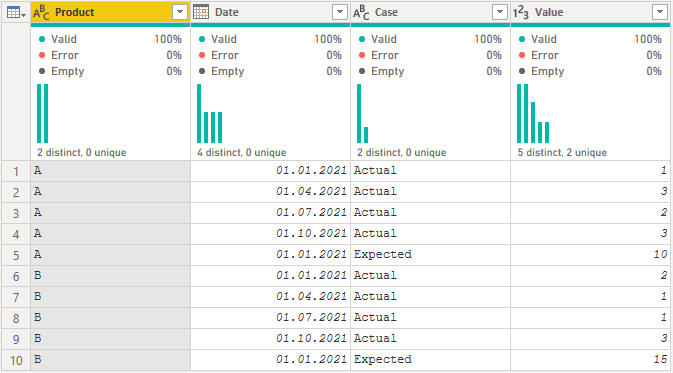
that would be possible with a few measures and the following data structure:

selimovd_0-1623709213762.png


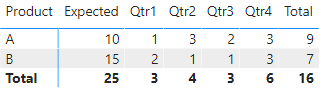
The result would look like this:

selimovd_1-1623709257764.png


Then you only need the measures for the matrix to display what they should. For example:

Expected = CALCULATE( SUM(myTable[Value]), myTable[Case] = "Expected" )


And for the Quarters:

Qtr1 =
CALCULATE(
    SUM( myTable[Value] ),
    myTable[Case] = "Actual",
    MONTH( myTable[Date] )
        IN {
        1,
        2,
        3
    }
)


And the Total:

Total = CALCULATE( SUM(myTable[Value]), myTable[Case] = "Actual" )


Please find my demo file here:

https://www.swisstransfer.com/d/54f2c59d-20b4-4e38-a5ca-3eac46a96ff8


If you need any help please let me know.
If I answered your question I would be happy if you could mark my post as a solution ✔️ and give it a thumbs up 👍
 
Best regards
Denis
 

View solution in original post

1 REPLY 1
selimovd
Super User
Super User

Hey @admineblatest ,


that would be possible with a few measures and the following data structure:

selimovd_0-1623709213762.png


The result would look like this:

selimovd_1-1623709257764.png


Then you only need the measures for the matrix to display what they should. For example:

Expected = CALCULATE( SUM(myTable[Value]), myTable[Case] = "Expected" )


And for the Quarters:

Qtr1 =
CALCULATE(
    SUM( myTable[Value] ),
    myTable[Case] = "Actual",
    MONTH( myTable[Date] )
        IN {
        1,
        2,
        3
    }
)


And the Total:

Total = CALCULATE( SUM(myTable[Value]), myTable[Case] = "Actual" )


Please find my demo file here:

https://www.swisstransfer.com/d/54f2c59d-20b4-4e38-a5ca-3eac46a96ff8


If you need any help please let me know.
If I answered your question I would be happy if you could mark my post as a solution ✔️ and give it a thumbs up 👍
 
Best regards
Denis
 

Helpful resources

Announcements
November Power BI Update Carousel

Power BI Monthly Update - November 2025

Check out the November 2025 Power BI update to learn about new features.

Fabric Data Days Carousel

Fabric Data Days

Advance your Data & AI career with 50 days of live learning, contests, hands-on challenges, study groups & certifications and more!

FabCon Atlanta 2026 carousel

FabCon Atlanta 2026

Join us at FabCon Atlanta, March 16-20, for the ultimate Fabric, Power BI, AI and SQL community-led event. Save $200 with code FABCOMM.

Top Solution Authors
Top Kudoed Authors