Forum Discussion

KKarlsson's avatar
KKarlsson
New Member
6 years ago
Solved

Start date from end date

Hi.   I did my best to wade through the board but could not find, or at least did not understand a way to solve my problem. I am using a GANTT chart for project follow up and would need to create ...
  • Sujit_Thakur's avatar
    6 years ago

    Dear KKarlsson ,
    try this 

    Measure=
    CALCULATE(
    MAXX(Table1,Table1[End date])
    ,FILTER(Table1,Table1[End date] < EARLIER(Table1[End date])
    && Table1[Project_split] = Earlier[Project_split]
    ))

    keep in mind that you split your project name from project name and gate name 
    for this you can go in transform data tab 
    dublicate that column and split it and name it as Proj_split


    Please give kudos to keep me motivated 
    and do accept as solution if you got your answers

    ask if any more doubt

    Regards 
    Sujit
  • Anonymous's avatar
    Anonymous
    5 years ago

    HI KKarlsson,

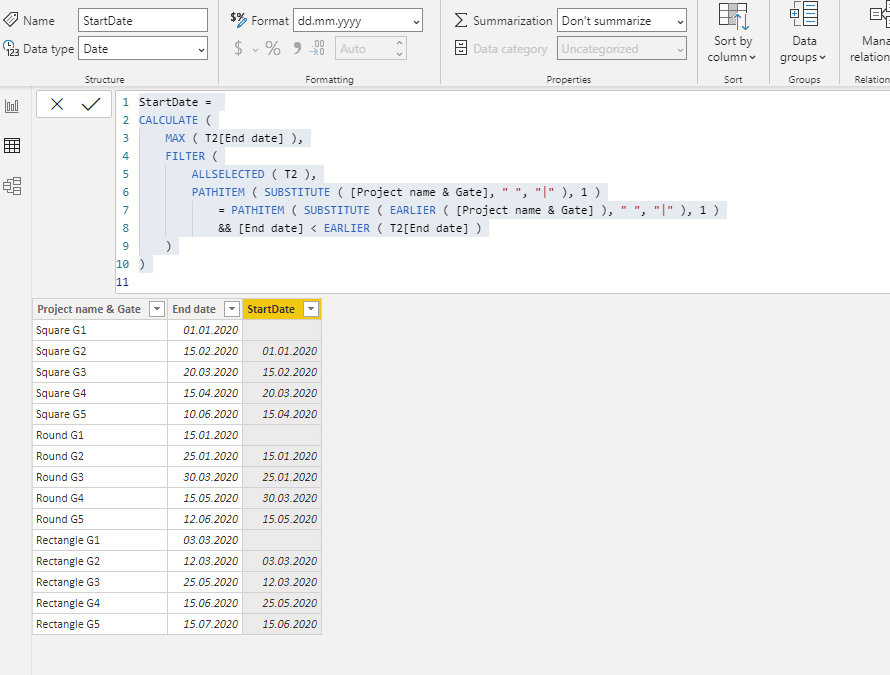
    You can try to use following calculate column to extract value from your column as category and lookup the previous date.

    StartDate = 
    CALCULATE (
        MAX ( T2[End date] ),
        FILTER (
            ALLSELECTED ( T2 ),
            PATHITEM ( SUBSTITUTE ( [Project name & Gate], " ", "|" ), 1 )
                = PATHITEM ( SUBSTITUTE ( EARLIER ( [Project name & Gate] ), " ", "|" ), 1 )
                && [End date] < EARLIER ( T2[End date] )
        )
    )
    

    Notice: end date should be a date type field or the above formula will get the wrong result. you can use custom format on the date field to setting display format.
    Regards,

    Xiaoxin Sheng