Get certified for free when you join Fabric Data Days 2026 and dive into Fabric, Power BI, SQL, AI, and other essential data skills.
Join nowTry your skills in the Power BI Dataviz World Championship! Round one ends June 26. Join now
Hi,
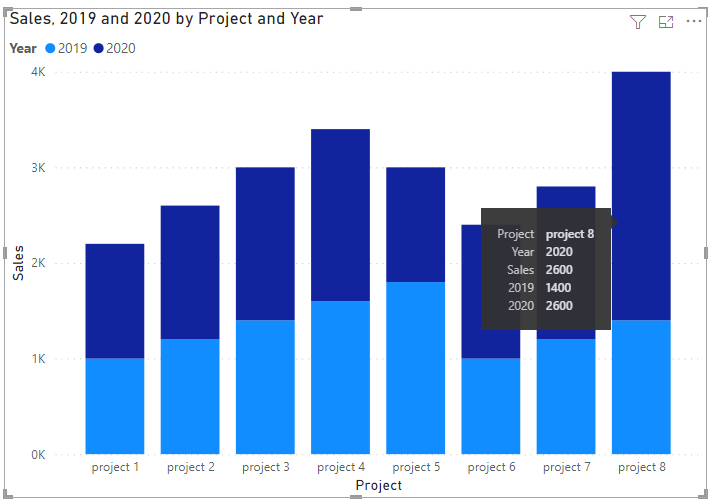
I've created simple stacked column chart. I've got two values: sales in 2019 and sales in 2020.
Dark part of visual are sales in 2020 and lighter in 2019.
If I hover over darker part of chart in tooltip I get only value of sales in 2020. But I'd like to get value of 2019's sales too. How do I do that? It isn't just simple draging sales in 2019 to tooltip cause if I hover over values in 2019 and get these values double.
Also, is there a way to remove title "Dates Day" which appears in tooltip? I just want to see date without, no legend next to it.
How do I achive what I want?
It's so simple yet I'm stuck.
Solved! Go to Solution.
HI @piotr_gor
Check these links:
https://docs.microsoft.com/en-us/power-bi/create-reports/desktop-custom-tooltips
https://docs.microsoft.com/en-us/power-bi/create-reports/desktop-tooltips
If this post helps, please consider accepting it as the solution to help the other members find it more quickly.
Appreciate your Kudos!!
LinkedIn: www.linkedin.com/in/vahid-dm/
Hi, @piotr_gor
You can try the following methods.
Measure:
2019 =
CALCULATE (
SUM ( 'Table'[Sales] ),
FILTER (
ALL ( 'Table' ),
YEAR ( [Date] ) = 2019
&& [Project] = SELECTEDVALUE ( 'Table'[Project] )
)
)2019 =
CALCULATE (
SUM ( 'Table'[Sales] ),
FILTER (
ALL ( 'Table' ),
YEAR ( [Date] ) = 2019
&& [Project] = SELECTEDVALUE ( 'Table'[Project] )
)
)
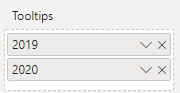
Put the two measures in the tooltip bar.
Does this match your expected output? Also you can't delete "Dates Day" if you want to, because it is part of the view.
Best Regards,
Community Support Team _Charlotte
If this post helps, then please consider Accept it as the solution to help the other members find it more quickly.
HI @piotr_gor
Check these links:
https://docs.microsoft.com/en-us/power-bi/create-reports/desktop-custom-tooltips
https://docs.microsoft.com/en-us/power-bi/create-reports/desktop-tooltips
If this post helps, please consider accepting it as the solution to help the other members find it more quickly.
Appreciate your Kudos!!
LinkedIn: www.linkedin.com/in/vahid-dm/
It helped. Thanks.
Don't miss out on Data Days, June 15 through August 7. Learn Fabric, Power BI, SQL, AI and more.
Check out the May 2026 Power BI update to learn about new features.
| User | Count |
|---|---|
| 24 | |
| 22 | |
| 21 | |
| 20 | |
| 14 |
| User | Count |
|---|---|
| 59 | |
| 53 | |
| 41 | |
| 31 | |
| 31 |