Join us at FabCon Atlanta from March 16 - 20, 2026, for the ultimate Fabric, Power BI, AI and SQL community-led event. Save $200 with code FABCOMM.
Register now!Vote for your favorite vizzies from the Power BI Dataviz World Championship submissions. Vote now!
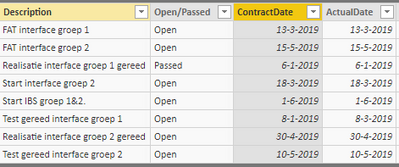
For a project that i'm currently working on I need to create a stacked bar chart with dates as values (example below).
The Y-axis doesn't have any values and it is ordered by the dates.
Does anyone have an idea how to realise this? To my knowledge, in Power Bi there is no option to place the values like this. Is there a custom visualisation I can use?
Thank you in advance.
Dataset
Hi @Anonymous,
Based on my test, it is not possible to meet your requirement currently.You can come up a new idea about that and add your comments there to improve Power BI and make this feature coming sooner.
https://ideas.powerbi.com/forums/265200-power-bi-ideas
Regards,
Frank
Hi @Anonymous ,
Does that make sense? If so, kindly mark my answer as the solution to close the case please. Thanks in advance.
Regards,
Frank
Vote for your favorite vizzies from the Power BI World Championship submissions!
If you love stickers, then you will definitely want to check out our Community Sticker Challenge!
Check out the January 2026 Power BI update to learn about new features.
| User | Count |
|---|---|
| 57 | |
| 55 | |
| 42 | |
| 16 | |
| 16 |
| User | Count |
|---|---|
| 113 | |
| 106 | |
| 38 | |
| 35 | |
| 26 |