cancel
Showing results for 
Search instead for 
Did you mean: 

Get Fabric Certified for FREE during Fabric Data Days. Don't miss your chance! Request now

Reply
aishak12
Helper IV
Helper IV

Stacked Bar Chart Tooltip show inside bar

All, 


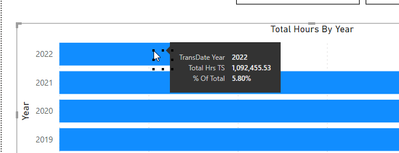
I have a stacked bar chart and want the field in my "Tooltips" field to show inside the barchart. I don't want the user to have to scroll on the bar. 

So when I print a PDF I want the percentage of Total to show inside the Bar. Is this possible ? 

Thanks 


aishak12_1-1651853564163.png


1 ACCEPTED SOLUTION
MFelix
Super User
Super User

Hi @aishak12 ,


On the bar an column charts you cannot use any other label options than the ones you have on the Y-Axis (values) of the chart, so any other field that you use on the tooltips will not be available to be show.


You have two options:

  • Overlay two vizualizations like a card or something similar
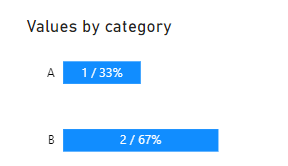
  • Create a charticulator chart that will allow to add multiple text labels has you need

Example in charticulator:

MFelix_0-1651857362899.png


Regards

Miguel Félix


Did I answer your question? Mark my post as a solution!

Proud to be a Super User!

Check out my blog: Power BI em Português


View solution in original post

2 REPLIES 2
MFelix
Super User
Super User

Hi @aishak12 ,


On the bar an column charts you cannot use any other label options than the ones you have on the Y-Axis (values) of the chart, so any other field that you use on the tooltips will not be available to be show.


You have two options:

  • Overlay two vizualizations like a card or something similar
  • Create a charticulator chart that will allow to add multiple text labels has you need

Example in charticulator:

MFelix_0-1651857362899.png


Regards

Miguel Félix


Did I answer your question? Mark my post as a solution!

Proud to be a Super User!

Check out my blog: Power BI em Português


speedramps
Super User
Super User

Hi aishak12


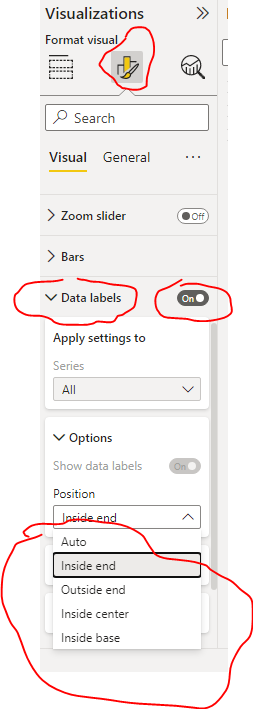
Click on the the visual and then click on the Format your visual button.

Scroll down and set Data Labels on.

You can alter the position, size, and font.

See my screen shot below


Please click the thumbs up and accept as solution buttons. Thank you 😀


speedramps_0-1651856952649.png


Helpful resources

Announcements
November Power BI Update Carousel

Power BI Monthly Update - November 2025

Check out the November 2025 Power BI update to learn about new features.

Fabric Data Days Carousel

Fabric Data Days

Advance your Data & AI career with 50 days of live learning, contests, hands-on challenges, study groups & certifications and more!

FabCon Atlanta 2026 carousel

FabCon Atlanta 2026

Join us at FabCon Atlanta, March 16-20, for the ultimate Fabric, Power BI, AI and SQL community-led event. Save $200 with code FABCOMM.

Top Solution Authors
Top Kudoed Authors