Fabric Data Days starts November 4th!
Advance your Data & AI career with 50 days of live learning, dataviz contests, hands-on challenges, study groups & certifications and more!
Get registered- Power BI forums
- Get Help with Power BI
- Desktop
- Service
- Report Server
- Power Query
- Mobile Apps
- Developer
- DAX Commands and Tips
- Custom Visuals Development Discussion
- Health and Life Sciences
- Power BI Spanish forums
- Translated Spanish Desktop
- Training and Consulting
- Instructor Led Training
- Dashboard in a Day for Women, by Women
- Galleries
- Data Stories Gallery
- Themes Gallery
- Contests Gallery
- QuickViz Gallery
- Quick Measures Gallery
- Visual Calculations Gallery
- Notebook Gallery
- Translytical Task Flow Gallery
- TMDL Gallery
- R Script Showcase
- Webinars and Video Gallery
- Ideas
- Custom Visuals Ideas (read-only)
- Issues
- Issues
- Events
- Upcoming Events
Get Fabric Certified for FREE during Fabric Data Days. Don't miss your chance! Request now
- Power BI forums
- Forums
- Get Help with Power BI
- Desktop
- Re: Splitting dates and time in 2 rows
- Subscribe to RSS Feed
- Mark Topic as New
- Mark Topic as Read
- Float this Topic for Current User
- Bookmark
- Subscribe
- Printer Friendly Page


- Mark as New
- Bookmark
- Subscribe
- Mute
- Subscribe to RSS Feed
- Permalink
- Report Inappropriate Content
Splitting dates and time in 2 rows
Hi all,
I have the "start date and time" that begins in one date and sometimes ends in next day. For this cases I'd like to split in two
rows from "start date" time XX:XX until same date up to 23:59 and continue in next row the next date from 00:00 until end hour. And for the cases where "start date" and "end date" is the same, then only split date and time in one row.
This is the input in power Bi format
let
    Source = Table.FromRows(Json.Document(Binary.Decompress(Binary.FromText("TcrBCcAwDAPAVYrfgViyTUCrBO+/RiEtpd/j9jb4REw6eTGUKZSNo/mq6AKsx8nML2Mp+OSf1lKWdd8=", BinaryEncoding.Base64), Compression.Deflate)), let _t = ((type nullable text) meta [Serialized.Text = true]) in type table [#"Start Date & Time" = _t, #"End Date & Time" = _t]),
    #"Changed Type" = Table.TransformColumnTypes(Source,{{"Start Date & Time", type datetime}, {"End Date & Time", type datetime}})
in
    #"Changed Type"
Below is the input 2 columns with blue headers and output I'd like to get in green headers, with date in that format.

Thanks for any help.
Solved! Go to Solution.


- Mark as New
- Bookmark
- Subscribe
- Mute
- Subscribe to RSS Feed
- Permalink
- Report Inappropriate Content
I've realized you needed more columns for the time. Here's the revised M code:

let
    Source = Table.FromRows(Json.Document(Binary.Decompress(Binary.FromText("TcrBCcAwDAPAVYrfgViyTUCrBO+/RiEtpd/j9jb4REw6eTGUKZSNo/mq6AKsx8nML2Mp+OSf1lKWdd8=", BinaryEncoding.Base64), Compression.Deflate)), let _t = ((type nullable text) meta [Serialized.Text = true]) in type table [#"Start Date & Time" = _t, #"End Date & Time" = _t]),
    #"Parsed Date" = Table.TransformColumns(Source,{{"Start Date & Time", each DateTime.From(_, "en-us"), type date}}),
    #"Parsed Date1" = Table.TransformColumns(#"Parsed Date",{{"End Date & Time", each DateTime.From(_, "en-us"), type date}}),
    #"Added Custom" = Table.AddColumn(#"Parsed Date1", "CompleteDates", each let
start = Date.From([#"Start Date & Time"]),
end = Date.From([#"End Date & Time"]),
count = Duration.Days(end-start) +1
in List.Dates ( start, count, #duration(1,0,0,0) ), type list),
    #"Expanded CompleteDates" = Table.ExpandListColumn(#"Added Custom", "CompleteDates"),
    #"Changed Type" = Table.TransformColumnTypes(#"Expanded CompleteDates",{{"CompleteDates", type date}}),
    #"Renamed Columns" = Table.RenameColumns(#"Changed Type",{{"CompleteDates", "StartDate"}}),
    #"Added Custom1" = Table.AddColumn(#"Renamed Columns", "StartTime", each let start = [#"Start Date & Time"],
starttime = Time.From([#"Start Date & Time"])
in if Date.From([#"Start Date & Time"]) =  [StartDate] then starttime else #time(0,0,0), Time.Type),
    #"Added Custom2" = Table.AddColumn(#"Added Custom1", "EndTime", each let end = [#"End Date & Time"],
endtime = Time.From(end)
in if Date.From(end) <> [StartDate] then #time(23,59,59) else endtime, Time.Type),
    #"Duplicated Column" = Table.DuplicateColumn(#"Added Custom2", "StartDate", "EndDate"),
    #"Reordered Columns" = Table.ReorderColumns(#"Duplicated Column",{"Start Date & Time", "End Date & Time", "StartDate", "StartTime", "EndDate", "EndTime"})
in
    #"Reordered Columns"
You need to format the time columns accordingly in the report builder.
Dane Belarmino | Microsoft MVP | Proud to be a Super User!
Did I answer your question? Mark my post as a solution!
"Tell me and I’ll forget; show me and I may remember; involve me and I’ll understand."
Need Power BI consultation, get in touch with me on LinkedIn or hire me on UpWork.
Learn with me on YouTube @DAXJutsu or follow my page on Facebook @DAXJutsuPBI.

- Mark as New
- Bookmark
- Subscribe
- Mute
- Subscribe to RSS Feed
- Permalink
- Report Inappropriate Content
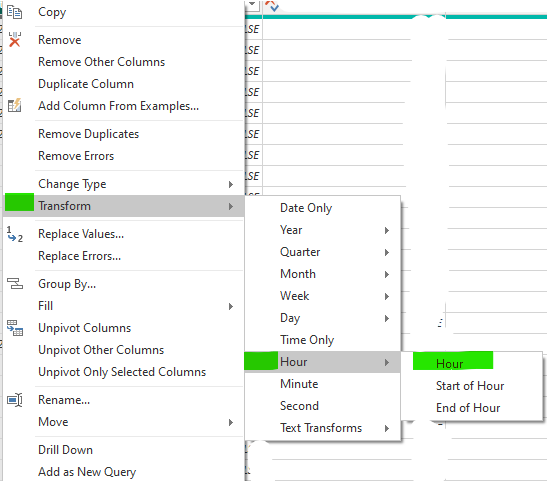
Duplicate Column, then Transform New Column and Select Hour. Repeat as needed for other time segments. Keeping data in a single row may be simpler for calculating time difference.


- Mark as New
- Bookmark
- Subscribe
- Mute
- Subscribe to RSS Feed
- Permalink
- Report Inappropriate Content
I think this will be the best solution for your case. It's a combination of my first answer after some improvements based on a solution that @danextian propose in his answer.
Step 1. Create a funtion. Let's call it: SplittingDatesFunctions
let getParameters = (StartDate as datetime, EndDate as datetime) =>

    let
        Start = Date.From(StartDate),
        End = Date.From(EndDate),
        CountDays = Duration.Days(End-Start) +1,
        DateList = List.Dates(Start, CountDays, #duration(1, 0, 0, 0)),
        #"Converted to Table" = Table.FromList(DateList, Splitter.SplitByNothing(), {"Start Date"}, null, ExtraValues.Error),
        #"Add Custom Start Time" = Table.AddColumn(#"Converted to Table", "Start Time", each if [Start Date] = Start then Time.From(StartDate) else #time(0,0,0)),
        #"Add End Date" = Table.AddColumn(#"Add Custom Start Time", "End Date", each [Start Date]),
        #"Add Custom End Time" = Table.AddColumn(#"Add End Date", "End Time", each if [Start Date] = End then Time.From(EndDate) else #time(23,59,59)),
        FinishedDateList = Table.TransformColumnTypes(#"Add Custom End Time",{{"Start Date", type date}, {"Start Time", type time}, {"End Date", type date}, {"End Time", type time}})

    in
        #"FinishedDateList"

in
    getParameters
Step 2. Prepare some table with Start and End DateTime fields.
let
    Source = Table.FromRows(Json.Document(Binary.Decompress(Binary.FromText("TcrBCcAwDAPAVYrfgViyTUCrBO+/RiEtpd/j9jb4REw6eTGUKZSNo/mq6AKsx8nML2Mp+OSf1lKWdd8=", BinaryEncoding.Base64), Compression.Deflate)), let _t = ((type nullable text) meta [Serialized.Text = true]) in type table [#"Start Date & Time" = _t, #"End Date & Time" = _t]),
    #"Parsed Start Date" = Table.TransformColumns(Source,{{"Start Date & Time", each DateTime.From(_, "en-us"), type date}}),
    #"Parsed End Date" = Table.TransformColumns(#"Parsed Start Date",{{"End Date & Time", each DateTime.From(_, "en-us"), type date}})
in
    #"Parsed End Date"
It should looks like this:
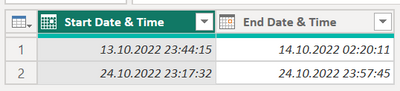
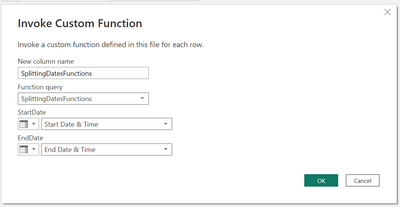
Step 3. Add Column with "Invoke Custom Function"
Name the new colum as you want, select function that you have added and set up parameters to the fields that we have in table
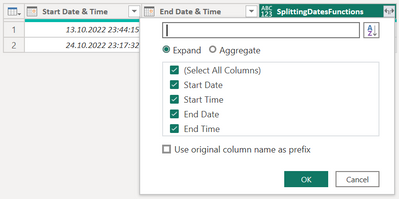
Step 4. Expand new columns

Step 5. Delete old columns

Step 6. Leave a Kudos for me and @danextian 🙂
Full steps based on SplittingDatesFunctions function.
let
    Source = Table.FromRows(Json.Document(Binary.Decompress(Binary.FromText("TcrBCcAwDAPAVYrfgViyTUCrBO+/RiEtpd/j9jb4REw6eTGUKZSNo/mq6AKsx8nML2Mp+OSf1lKWdd8=", BinaryEncoding.Base64), Compression.Deflate)), let _t = ((type nullable text) meta [Serialized.Text = true]) in type table [#"Start Date & Time" = _t, #"End Date & Time" = _t]),
    #"Parsed Start Date" = Table.TransformColumns(Source,{{"Start Date & Time", each DateTime.From(_, "en-us"), type date}}),
    #"Parsed End Date" = Table.TransformColumns(#"Parsed Start Date",{{"End Date & Time", each DateTime.From(_, "en-us"), type date}}),
    #"Invoked Custom Function" = Table.AddColumn(#"Parsed End Date", "SplittingDatesFunctions", each SplittingDatesFunctions([#"Start Date & Time"], [#"End Date & Time"])),
    #"Expanded SplittingDatesFunctions" = Table.ExpandTableColumn(#"Invoked Custom Function", "SplittingDatesFunctions", {"Start Date", "Start Time", "End Date", "End Time"}, {"Start Date", "Start Time", "End Date", "End Time"}),
    #"Removed Columns" = Table.RemoveColumns(#"Expanded SplittingDatesFunctions",{"Start Date & Time", "End Date & Time"}),
    #"Changed Type" = Table.TransformColumnTypes(#"Removed Columns",{{"Start Date", type date}, {"Start Time", type time}, {"End Date", type date}, {"End Time", type time}})
in
    #"Changed Type"
Did I answer your question? Mark my post as a solution!
Proud to be a Super User!
- Mark as New
- Bookmark
- Subscribe
- Mute
- Subscribe to RSS Feed
- Permalink
- Report Inappropriate Content
Hi @cgkas ,
Based on your screenshots, creating custom column with a list of dates from existing date columns should do.
let
start = Date.From([#"Start Date & Time"]),
end = Date.From([#"End Date & Time"]),
count = Duration.Days(end-start) +1
in List.Dates ( start, count, #duration(1,0,0,0) )
The above will create a column of lists which you can then expand into rows.


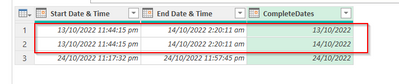
Try this in a blank query
let
    Source = Table.FromRows(Json.Document(Binary.Decompress(Binary.FromText("TcrBCcAwDAPAVYrfgViyTUCrBO+/RiEtpd/j9jb4REw6eTGUKZSNo/mq6AKsx8nML2Mp+OSf1lKWdd8=", BinaryEncoding.Base64), Compression.Deflate)), let _t = ((type nullable text) meta [Serialized.Text = true]) in type table [#"Start Date & Time" = _t, #"End Date & Time" = _t]),
    #"Parsed Date" = Table.TransformColumns(Source,{{"Start Date & Time", each DateTime.From(_, "en-us"), type date}}),
    #"Parsed Date1" = Table.TransformColumns(#"Parsed Date",{{"End Date & Time", each DateTime.From(_, "en-us"), type date}}),
    #"Added Custom" = Table.AddColumn(#"Parsed Date1", "CompleteDates", each let
start = Date.From([#"Start Date & Time"]),
end = Date.From([#"End Date & Time"]),
count = Duration.Days(end-start) +1
in List.Dates ( start, count, #duration(1,0,0,0) ), type list),
    #"Expanded CompleteDates" = Table.ExpandListColumn(#"Added Custom", "CompleteDates"),
    #"Changed Type" = Table.TransformColumnTypes(#"Expanded CompleteDates",{{"CompleteDates", type date}})
in
    #"Changed Type"
Dane Belarmino | Microsoft MVP | Proud to be a Super User!
Did I answer your question? Mark my post as a solution!
"Tell me and I’ll forget; show me and I may remember; involve me and I’ll understand."
Need Power BI consultation, get in touch with me on LinkedIn or hire me on UpWork.
Learn with me on YouTube @DAXJutsu or follow my page on Facebook @DAXJutsuPBI.
- Mark as New
- Bookmark
- Subscribe
- Mute
- Subscribe to RSS Feed
- Permalink
- Report Inappropriate Content
I've realized you needed more columns for the time. Here's the revised M code:
let
    Source = Table.FromRows(Json.Document(Binary.Decompress(Binary.FromText("TcrBCcAwDAPAVYrfgViyTUCrBO+/RiEtpd/j9jb4REw6eTGUKZSNo/mq6AKsx8nML2Mp+OSf1lKWdd8=", BinaryEncoding.Base64), Compression.Deflate)), let _t = ((type nullable text) meta [Serialized.Text = true]) in type table [#"Start Date & Time" = _t, #"End Date & Time" = _t]),
    #"Parsed Date" = Table.TransformColumns(Source,{{"Start Date & Time", each DateTime.From(_, "en-us"), type date}}),
    #"Parsed Date1" = Table.TransformColumns(#"Parsed Date",{{"End Date & Time", each DateTime.From(_, "en-us"), type date}}),
    #"Added Custom" = Table.AddColumn(#"Parsed Date1", "CompleteDates", each let
start = Date.From([#"Start Date & Time"]),
end = Date.From([#"End Date & Time"]),
count = Duration.Days(end-start) +1
in List.Dates ( start, count, #duration(1,0,0,0) ), type list),
    #"Expanded CompleteDates" = Table.ExpandListColumn(#"Added Custom", "CompleteDates"),
    #"Changed Type" = Table.TransformColumnTypes(#"Expanded CompleteDates",{{"CompleteDates", type date}}),
    #"Renamed Columns" = Table.RenameColumns(#"Changed Type",{{"CompleteDates", "StartDate"}}),
    #"Added Custom1" = Table.AddColumn(#"Renamed Columns", "StartTime", each let start = [#"Start Date & Time"],
starttime = Time.From([#"Start Date & Time"])
in if Date.From([#"Start Date & Time"]) =  [StartDate] then starttime else #time(0,0,0), Time.Type),
    #"Added Custom2" = Table.AddColumn(#"Added Custom1", "EndTime", each let end = [#"End Date & Time"],
endtime = Time.From(end)
in if Date.From(end) <> [StartDate] then #time(23,59,59) else endtime, Time.Type),
    #"Duplicated Column" = Table.DuplicateColumn(#"Added Custom2", "StartDate", "EndDate"),
    #"Reordered Columns" = Table.ReorderColumns(#"Duplicated Column",{"Start Date & Time", "End Date & Time", "StartDate", "StartTime", "EndDate", "EndTime"})
in
    #"Reordered Columns"
You need to format the time columns accordingly in the report builder.
Dane Belarmino | Microsoft MVP | Proud to be a Super User!
Did I answer your question? Mark my post as a solution!
"Tell me and I’ll forget; show me and I may remember; involve me and I’ll understand."
Need Power BI consultation, get in touch with me on LinkedIn or hire me on UpWork.
Learn with me on YouTube @DAXJutsu or follow my page on Facebook @DAXJutsuPBI.
- Mark as New
- Bookmark
- Subscribe
- Mute
- Subscribe to RSS Feed
- Permalink
- Report Inappropriate Content
It seems it works just fine now. Thanks so much for your help.
- Mark as New
- Bookmark
- Subscribe
- Mute
- Subscribe to RSS Feed
- Permalink
- Report Inappropriate Content
Hi @danextian, thanks for your helo. Your solution splits the column and expands dates, still missing the part where splits the hours accordingly.
- Mark as New
- Bookmark
- Subscribe
- Mute
- Subscribe to RSS Feed
- Permalink
- Report Inappropriate Content
Please see my other reply.
Dane Belarmino | Microsoft MVP | Proud to be a Super User!
Did I answer your question? Mark my post as a solution!
"Tell me and I’ll forget; show me and I may remember; involve me and I’ll understand."
Need Power BI consultation, get in touch with me on LinkedIn or hire me on UpWork.
Learn with me on YouTube @DAXJutsu or follow my page on Facebook @DAXJutsuPBI.
- Mark as New
- Bookmark
- Subscribe
- Mute
- Subscribe to RSS Feed
- Permalink
- Report Inappropriate Content
I hope that this function will help you.
Step 1. Add a new function. Let's call it SplittingDates
let getParameters = (StartDate as date, StartTime as time, EndDate as date, EndTime as time) =>

    let
        _DifferentDays = StartDate <> EndDate,
        _CustomEndDate = if _DifferentDays then StartDate else EndDate,
        _CustomEndTime = if _DifferentDays then #time(23,59,59) else EndTime,
        _CustomStartDate = if _DifferentDays then EndDate else StartDate,
        _CustomStartTime = if _DifferentDays then #time(0,0,0) else StartTime,
        #"NewRows" = #table(
            type table
                [
                    #"Start Date"=date,
                    #"Start Time"=time,
                    #"End Date"=date,
                    #"End Time"=time
                ],
            {
            {StartDate,StartTime,_CustomEndDate,_CustomEndTime},
            {_CustomStartDate,_CustomStartTime,EndDate,EndTime}
            }
    ),
    #"Distinct" = Table.Distinct(NewRows)
    in
        #"Distinct"
in
    getParameters
2. Prepare basic table
What I understood is that you can create a table like this:

If no, you can use my code:
let
    Source = Table.FromRows(Json.Document(Binary.Decompress(Binary.FromText("TcrBCcAwDAPAVYrfgViyTUCrBO+/RiEtpd/j9jb4REw6eTGUKZSNo/mq6AKsx8nML2Mp+OSf1lKWdd8=", BinaryEncoding.Base64), Compression.Deflate)), let _t = ((type nullable text) meta [Serialized.Text = true]) in type table [#"Start Date & Time" = _t, #"End Date & Time" = _t]),
    #"Add Start Date" = Table.AddColumn(Source, "Start Date", each Text.Combine({Text.Middle([#"Start Date & Time"], 3, 3), Text.Start([#"Start Date & Time"], 2), Text.Middle([#"Start Date & Time"], 5, 5)}), type text),
    #"Add Start Time" = Table.AddColumn(#"Add Start Date", "Start Time", each Text.AfterDelimiter([#"Start Date & Time"], " "), type text),
    #"Add End Date" = Table.AddColumn(#"Add Start Time", "End Date", each Text.Combine({Text.Middle([#"End Date & Time"], 3, 3), Text.Start([#"End Date & Time"], 2), Text.Middle([#"End Date & Time"], 5, 5)}), type text),
    #"Add End Time" = Table.AddColumn(#"Add End Date", "End Time", each Text.AfterDelimiter([#"End Date & Time"], " "), type text),
    #"Removed Oryginal Columns" = Table.RemoveColumns(#"Add End Time",{"Start Date & Time", "End Date & Time"}),
    #"Changed Type" = Table.TransformColumnTypes(#"Removed Oryginal Columns",{{"Start Date", type date}, {"Start Time", type time}, {"End Date", type date}, {"End Time", type time}})
in
    #"Changed Type"
3. Invoke function
Add Column > Invoke Custom Funtion and select column that matches Start and End Date/Time.
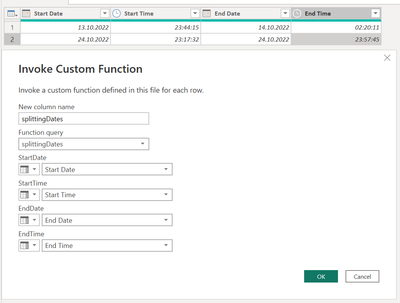
4. Expand new data
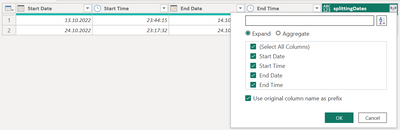
5. Delete old columns
6. Rename new one (if needed)

Whole code:
let
    Source = Table.FromRows(Json.Document(Binary.Decompress(Binary.FromText("TcrBCcAwDAPAVYrfgViyTUCrBO+/RiEtpd/j9jb4REw6eTGUKZSNo/mq6AKsx8nML2Mp+OSf1lKWdd8=", BinaryEncoding.Base64), Compression.Deflate)), let _t = ((type nullable text) meta [Serialized.Text = true]) in type table [#"Start Date & Time" = _t, #"End Date & Time" = _t]),
    #"Add Start Date" = Table.AddColumn(Source, "Start Date", each Text.Combine({Text.Middle([#"Start Date & Time"], 3, 3), Text.Start([#"Start Date & Time"], 2), Text.Middle([#"Start Date & Time"], 5, 5)}), type text),
    #"Add Start Time" = Table.AddColumn(#"Add Start Date", "Start Time", each Text.AfterDelimiter([#"Start Date & Time"], " "), type text),
    #"Add End Date" = Table.AddColumn(#"Add Start Time", "End Date", each Text.Combine({Text.Middle([#"End Date & Time"], 3, 3), Text.Start([#"End Date & Time"], 2), Text.Middle([#"End Date & Time"], 5, 5)}), type text),
    #"Add End Time" = Table.AddColumn(#"Add End Date", "End Time", each Text.AfterDelimiter([#"End Date & Time"], " "), type text),
    #"Removed Oryginal Columns" = Table.RemoveColumns(#"Add End Time",{"Start Date & Time", "End Date & Time"}),
    #"Changed Type" = Table.TransformColumnTypes(#"Removed Oryginal Columns",{{"Start Date", type date}, {"Start Time", type time}, {"End Date", type date}, {"End Time", type time}}),
    #"Invoked Custom Function" = Table.AddColumn(#"Changed Type", "splittingDates", each splittingDates([Start Date], [Start Time], [End Date], [End Time])),
    #"Expanded splittingDates" = Table.ExpandTableColumn(#"Invoked Custom Function", "splittingDates", {"Start Date", "Start Time", "End Date", "End Time"}, {"splittingDates.Start Date", "splittingDates.Start Time", "splittingDates.End Date", "splittingDates.End Time"}),
    #"Removed Columns" = Table.RemoveColumns(#"Expanded splittingDates",{"Start Date", "Start Time", "End Date", "End Time"})
in
    #"Removed Columns"
Did I answer your question? Mark my post as a solution!
Proud to be a Super User!
- Mark as New
- Bookmark
- Subscribe
- Mute
- Subscribe to RSS Feed
- Permalink
- Report Inappropriate Content
Hi @bolfri , thanks for your answer. I've tried but I'm getting error in column "Start Date" and "End Date" in step #"Change Type"
- Mark as New
- Bookmark
- Subscribe
- Mute
- Subscribe to RSS Feed
- Permalink
- Report Inappropriate Content
@cgkas Try this one.
let
    Source = Table.FromRows(Json.Document(Binary.Decompress(Binary.FromText("TcrBCcAwDAPAVYrfgViyTUCrBO+/RiEtpd/j9jb4REw6eTGUKZSNo/mq6AKsx8nML2Mp+OSf1lKWdd8=", BinaryEncoding.Base64), Compression.Deflate)), let _t = ((type nullable text) meta [Serialized.Text = true]) in type table [#"Start Date & Time" = _t, #"End Date & Time" = _t]),
    #"Parsed Start Date" = Table.TransformColumns(Source,{{"Start Date & Time", each DateTime.From(_, "en-us"), type date}}),
    #"Parsed End Date" = Table.TransformColumns(#"Parsed Start Date",{{"End Date & Time", each DateTime.From(_, "en-us"), type date}}),
    #"Inserted Start Date" = Table.AddColumn(#"Parsed End Date", "_Start Date", each DateTime.Date([#"Start Date & Time"]), type date),
    #"Inserted Start Time" = Table.AddColumn(#"Inserted Start Date", "_Start Time", each Time.From([#"Start Date & Time"]), type time),
    #"Inserted End Date" = Table.AddColumn(#"Inserted Start Time", "_End Date", each DateTime.Date([#"End Date & Time"]), type date),
    #"Inserted End Time" = Table.AddColumn(#"Inserted End Date", "_End Time", each Time.From([#"End Date & Time"]), type time),
    #"Removed Columns" = Table.RemoveColumns(#"Inserted End Time",{"Start Date & Time", "End Date & Time"}),
    #"Invoked Custom Function" = Table.AddColumn(#"Removed Columns", "SplittingDates", each SplittingDates([_Start Date], [_Start Time], [_End Date], [_End Time])),
    #"Expanded SplittingDates" = Table.ExpandTableColumn(#"Invoked Custom Function", "SplittingDates", {"Start Date", "Start Time", "End Date", "End Time"}, {"Start Date", "Start Time", "End Date", "End Time"}),
    #"Removed Old Columns" = Table.RemoveColumns(#"Expanded SplittingDates",{"_Start Date", "_Start Time", "_End Date", "_End Time"})
in
    #"Removed Old Columns"
Did I answer your question? Mark my post as a solution!
Proud to be a Super User!
- Mark as New
- Bookmark
- Subscribe
- Mute
- Subscribe to RSS Feed
- Permalink
- Report Inappropriate Content
I think it's because I am using date like dd/mm/rrrr and you propobly using mm/dd/rrrr. Is that correct? If then then to check if this code works for you simly change the source date from json from 10/13/2022 to 13/10/2022. Code will do the rest. If the code works for you and you will receive what you want - i will change the type detection for you to different format type.
Maybe the pbix file will help: https://we.tl/t-cgKwLuSr2j
Did I answer your question? Mark my post as a solution!
Proud to be a Super User!
- Mark as New
- Bookmark
- Subscribe
- Mute
- Subscribe to RSS Feed
- Permalink
- Report Inappropriate Content
Thanks for your help. It seems to work changing the format manually. Thanks for your help and time.


- Mark as New
- Bookmark
- Subscribe
- Mute
- Subscribe to RSS Feed
- Permalink
- Report Inappropriate Content
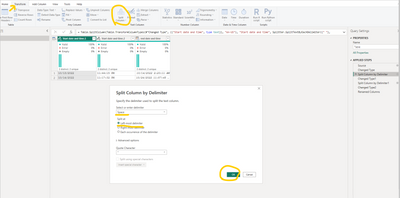
Not sure if your final ask easily do-able, to my knowledge. However, I do have a suggested that was not listed above, in regards to splitting up your columns:
- In PQ, with the initial date column selected: go to "Add Column"
- Select the Date drop down, and choose "Date Only"
- Follow the same steps, but use the Time option (and "Time Only) instead of Date.
The above should assist in breaking up the column up into date and time. Question--What's the purpose of breaking out these dates/times in such a way? This context might help others by knowing what your end goal is.
- Mark as New
- Bookmark
- Subscribe
- Mute
- Subscribe to RSS Feed
- Permalink
- Report Inappropriate Content
@igrandey89 Thanks for your suggestion. Following your steps is not selectable the option "date only". I'm able to split the columns, the issue is how to dynamically add a second row when "start date" and "end date" are differents. The purporse to do this is because the origin data has different start/end dates and is needed to enter this data in a form that only accepts that start date = end date.


- Mark as New
- Bookmark
- Subscribe
- Mute
- Subscribe to RSS Feed
- Permalink
- Report Inappropriate Content
- Mark as New
- Bookmark
- Subscribe
- Mute
- Subscribe to RSS Feed
- Permalink
- Report Inappropriate Content
Hi guys, thanks for your answers, but is not that simple to split the column by space. Is to expand in 2 rows when Start and End Date are different. And split in first row from XX:XX until 23:59 of start date and in next row split from 00:00 until YY:YY of end date. With output date in format YYYY-MM-DD. I hope make sense. Thanks for any help.

- Mark as New
- Bookmark
- Subscribe
- Mute
- Subscribe to RSS Feed
- Permalink
- Report Inappropriate Content
Hello,
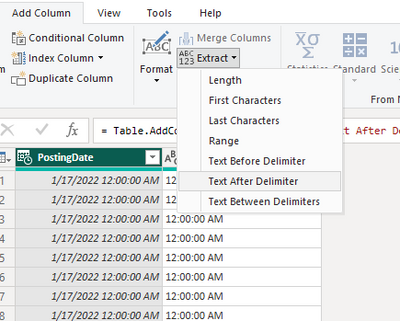
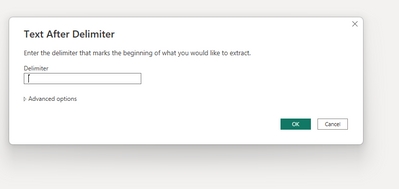
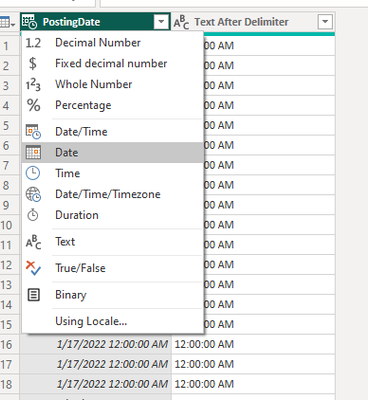
you go to power query and click on the date & time column then in the tab you go to add column => extract => Text after delimiter=> and in the delimeter you put spaceand enter and it will split it in another column then you change the datatype of the date& time as date.
If I answered your question, please mark my post as solution, Appreciate your Kudos 👍
Proud to be a Super User! |  |


