FabCon is coming to Atlanta
Join us at FabCon Atlanta from March 16 - 20, 2026, for the ultimate Fabric, Power BI, AI and SQL community-led event. Save $200 with code FABCOMM.
Register now!- Power BI forums
- Get Help with Power BI
- Desktop
- Service
- Report Server
- Power Query
- Mobile Apps
- Developer
- DAX Commands and Tips
- Custom Visuals Development Discussion
- Health and Life Sciences
- Power BI Spanish forums
- Translated Spanish Desktop
- Training and Consulting
- Instructor Led Training
- Dashboard in a Day for Women, by Women
- Galleries
- Data Stories Gallery
- Themes Gallery
- Contests Gallery
- QuickViz Gallery
- Quick Measures Gallery
- Visual Calculations Gallery
- Notebook Gallery
- Translytical Task Flow Gallery
- TMDL Gallery
- R Script Showcase
- Webinars and Video Gallery
- Ideas
- Custom Visuals Ideas (read-only)
- Issues
- Issues
- Events
- Upcoming Events
Get Fabric Certified for FREE during Fabric Data Days. Don't miss your chance! Request now
- Power BI forums
- Forums
- Get Help with Power BI
- Desktop
- Re: Split monthly values to daily values
- Subscribe to RSS Feed
- Mark Topic as New
- Mark Topic as Read
- Float this Topic for Current User
- Bookmark
- Subscribe
- Printer Friendly Page


- Mark as New
- Bookmark
- Subscribe
- Mute
- Subscribe to RSS Feed
- Permalink
- Report Inappropriate Content
Split monthly values to daily values
Hi guys,
this my problem:
I got the following table:
| Month | Value |
| May | 300 |
| June | 600 |
| ... | ... |
I would like to divide the value of the month equally on every day, so for example:
June: 600 / 30days = 20
Result should be like:
| Date | Value |
| 1 June | 20 |
| 2 June | 20 |
| 3 June | 20 |
| ... | ... |
for every month
Any solutions for this?
Thank you very much! 🙂
Solved! Go to Solution.


- Mark as New
- Bookmark
- Subscribe
- Mute
- Subscribe to RSS Feed
- Permalink
- Report Inappropriate Content
Then this scenario will be much more complicated because the date needs to mutiply the product number.
my solution is a little complicated.
1. add month column into your datetime table
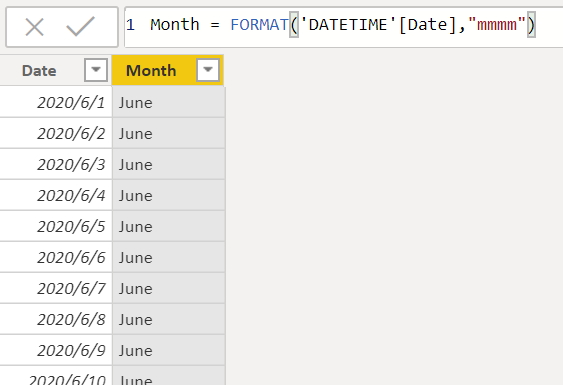
2. Then create a new table
new table =
VAR TBL1=ADDCOLUMNS(SUMMARIZE(DATETIME,DATETIME[Date]),"_month",MAXX(FILTER('DATETIME','DATETIME'[Date]=EARLIER(DATETIME[Date])),'DATETIME'[Month]))
VAR TBL2=ADDCOLUMNS(SUMMARIZE('Table','Table'[Item],'Table'[Month],'Table'[VALUE]),"_month",MAXX(FILTER('Table','Table'[Month]=EARLIER('Table'[Month])),'Table'[Month]))
RETURN  NATURALLEFTOUTERJOIN(TBL1,TBL2)
3. create a new column in the new table.
average =
var day= CALCULATE(DISTINCTCOUNT('new table'[Date]),FILTER('new table','new table'[_month]=EARLIER('new table'[_month])))
return 'new table'[VALUE]/day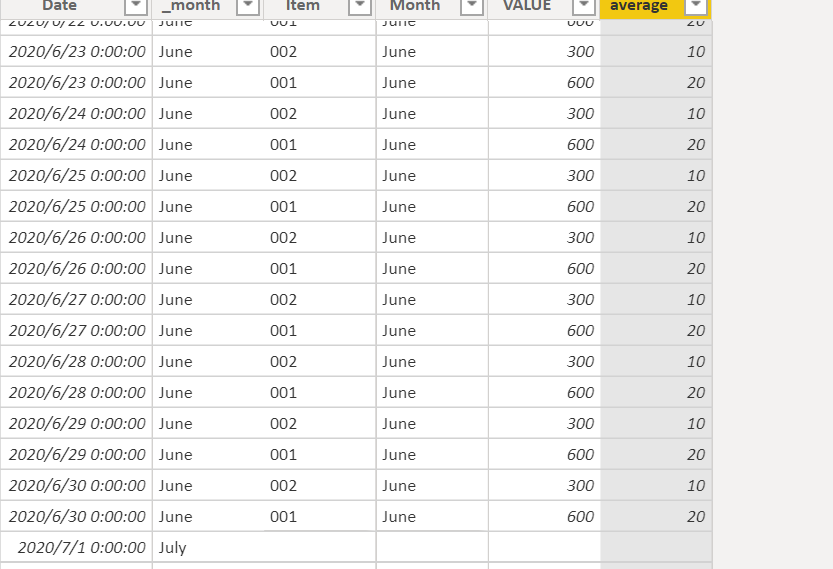
I am not sure if this is the best solution for you. Let's see if anyone else can provide a better one.
Hope this is helpful.
Did I answer your question? Mark my post as a solution!
Proud to be a Super User!
- Mark as New
- Bookmark
- Subscribe
- Mute
- Subscribe to RSS Feed
- Permalink
- Report Inappropriate Content
I think you need to create a full date table , then create a column
Column =
VAR monthvalue=LOOKUPVALUE('Table (2)'[value],'Table (2)'[month],FORMAT('result'[Date],"mmmm"))
var days=COUNTX(FILTER(result,month('result'[Date])=month(EARLIER('result'[Date]))),'result'[Date])
return monthvalue/days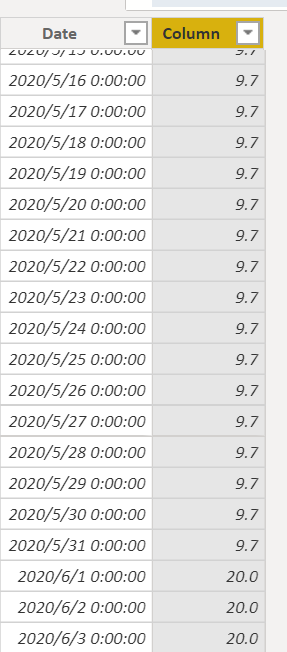
Did I answer your question? Mark my post as a solution!
Proud to be a Super User!

- Mark as New
- Bookmark
- Subscribe
- Mute
- Subscribe to RSS Feed
- Permalink
- Report Inappropriate Content
@ryan_mayu , refer if this file can help
https://www.dropbox.com/s/fnq82ksdzk1lqs3/Target_allocation_daily.pbix?dl=0
- Mark as New
- Bookmark
- Subscribe
- Mute
- Subscribe to RSS Feed
- Permalink
- Report Inappropriate Content
Thanks Ryan!
is the'result' table the date table?
When I add a column:
- Mark as New
- Bookmark
- Subscribe
- Mute
- Subscribe to RSS Feed
- Permalink
- Report Inappropriate Content
What's the month value in your table?
Why I use FORMAT('Date'[Date],"mmmm"))? It's because your sample data was May, June. That transfer date type to long month name.
In my result table, I change the date to long month name , then lookup for May and June.
Please make sure these two columns are the same data type.
'DemandForecastEntries'[ForecastStartDate],FORMAT('Date'[Date],"mmmm")
Did I answer your question? Mark my post as a solution!
Proud to be a Super User!
- Mark as New
- Bookmark
- Subscribe
- Mute
- Subscribe to RSS Feed
- Permalink
- Report Inappropriate Content
@amitchandak Unfortunately no.
I know why your approach didnt work now.
I have multiple values for each date with different ItemNumbers:
| Date | Item number | Value |
| June | 001 | 600 |
| June | 002 | 300 |
| July | .... | ... |
So my result should look like:
| Date | Item number | Value |
| 1 June | 001 | 20 |
| 1 June | 002 | 10 |
| 2 June | 001 | 20 |
| 2 June | 002 | 10 |
| ... | ... | ... |
I think I just have to add a second criteria into LOOKUPVALUE?
Thank you!
- Mark as New
- Bookmark
- Subscribe
- Mute
- Subscribe to RSS Feed
- Permalink
- Report Inappropriate Content
Then this scenario will be much more complicated because the date needs to mutiply the product number.
my solution is a little complicated.
1. add month column into your datetime table
2. Then create a new table
new table =
VAR TBL1=ADDCOLUMNS(SUMMARIZE(DATETIME,DATETIME[Date]),"_month",MAXX(FILTER('DATETIME','DATETIME'[Date]=EARLIER(DATETIME[Date])),'DATETIME'[Month]))
VAR TBL2=ADDCOLUMNS(SUMMARIZE('Table','Table'[Item],'Table'[Month],'Table'[VALUE]),"_month",MAXX(FILTER('Table','Table'[Month]=EARLIER('Table'[Month])),'Table'[Month]))
RETURN  NATURALLEFTOUTERJOIN(TBL1,TBL2)
3. create a new column in the new table.
average =
var day= CALCULATE(DISTINCTCOUNT('new table'[Date]),FILTER('new table','new table'[_month]=EARLIER('new table'[_month])))
return 'new table'[VALUE]/day
I am not sure if this is the best solution for you. Let's see if anyone else can provide a better one.
Hope this is helpful.
Did I answer your question? Mark my post as a solution!
Proud to be a Super User!


- Mark as New
- Bookmark
- Subscribe
- Mute
- Subscribe to RSS Feed
- Permalink
- Report Inappropriate Content
How would you go about this with more than 1 year of budget numbers?
- Mark as New
- Bookmark
- Subscribe
- Mute
- Subscribe to RSS Feed
- Permalink
- Report Inappropriate Content
could you pls provide the sample data and expected output?
Since this post has been solved, it's better to create a new post for your question.
Did I answer your question? Mark my post as a solution!
Proud to be a Super User!
- Mark as New
- Bookmark
- Subscribe
- Mute
- Subscribe to RSS Feed
- Permalink
- Report Inappropriate Content
Thank you Ryan. This was very helpful. I am still trying to understand the complete formula but it works actually.
But I am getting the right values just for one month:
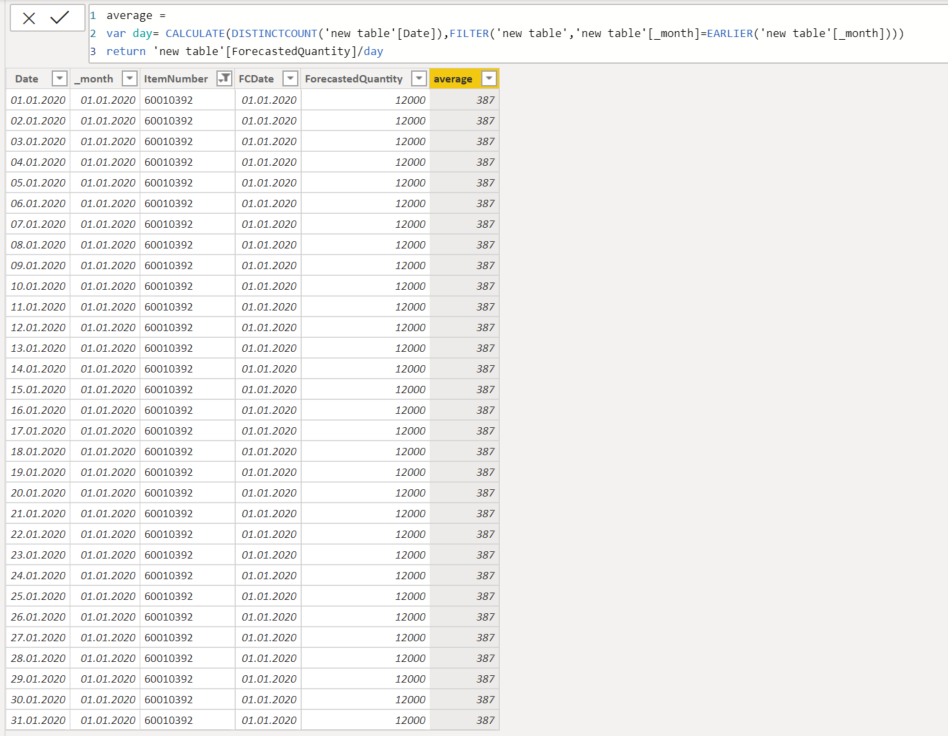
But I need the same average values for all other months:
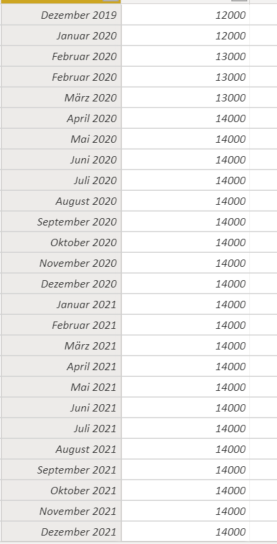
Do you have a solution for this?
Thank you!
- Mark as New
- Bookmark
- Subscribe
- Mute
- Subscribe to RSS Feed
- Permalink
- Report Inappropriate Content
I created the DAX based on your sample data. I also tried put data for July or other months. It works as well.
What's the date format in your month value table? like January 2019, March 2020? Long month name + year?
Did I answer your question? Mark my post as a solution!
Proud to be a Super User!
- Mark as New
- Bookmark
- Subscribe
- Mute
- Subscribe to RSS Feed
- Permalink
- Report Inappropriate Content
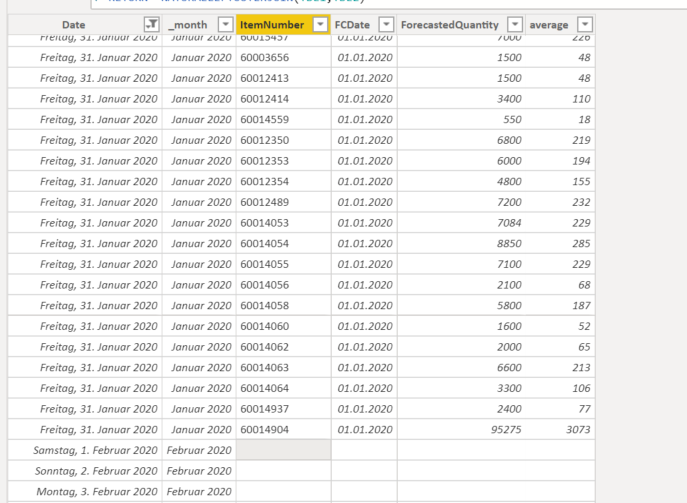
Hi Ryan,
my date format is long month + year in the value table (e.g. June 2020). My "Month" column that I ve created in my date table has the same date format. (mmm YYYY)
Thank you
iiomarioii
- Mark as New
- Bookmark
- Subscribe
- Mute
- Subscribe to RSS Feed
- Permalink
- Report Inappropriate Content
I ve deleted everything and started from the beginning. Now it works!!
Thank you very much Ryan!
You have been great help!
Best regards
iiomarioii

Helpful resources

Power BI Monthly Update - November 2025
Check out the November 2025 Power BI update to learn about new features.

Fabric Data Days
Advance your Data & AI career with 50 days of live learning, contests, hands-on challenges, study groups & certifications and more!

FabCon Atlanta 2026
Join us at FabCon Atlanta, March 16-20, for the ultimate Fabric, Power BI, AI and SQL community-led event. Save $200 with code FABCOMM.


