Party with Power BI’s own Guy in a Cube
Power BI is turning 10! Tune in for a special live episode on July 24 with behind-the-scenes stories, product evolution highlights, and a sneak peek at what’s in store for the future.
Save the date- Power BI forums
- Get Help with Power BI
- Desktop
- Service
- Report Server
- Power Query
- Mobile Apps
- Developer
- DAX Commands and Tips
- Custom Visuals Development Discussion
- Health and Life Sciences
- Power BI Spanish forums
- Translated Spanish Desktop
- Training and Consulting
- Instructor Led Training
- Dashboard in a Day for Women, by Women
- Galleries
- Webinars and Video Gallery
- Data Stories Gallery
- Themes Gallery
- Contests Gallery
- Quick Measures Gallery
- Notebook Gallery
- Translytical Task Flow Gallery
- R Script Showcase
- Ideas
- Custom Visuals Ideas (read-only)
- Issues
- Issues
- Events
- Upcoming Events
Enhance your career with this limited time 50% discount on Fabric and Power BI exams. Ends August 31st. Request your voucher.
- Power BI forums
- Forums
- Get Help with Power BI
- Desktop
- Spark line not showing in column of table matrix
- Subscribe to RSS Feed
- Mark Topic as New
- Mark Topic as Read
- Float this Topic for Current User
- Bookmark
- Subscribe
- Printer Friendly Page

- Mark as New
- Bookmark
- Subscribe
- Mute
- Subscribe to RSS Feed
- Permalink
- Report Inappropriate Content
Spark line not showing in column of table matrix
Hello everyone, I am experiencing a problem with a sparkline I setup within a column. I do not get any errors in my DAX code and I changed the value for to Image-URL. It seems like a box for the sparkline gets created for the column but there is no image in it. I wonder what could be the issue. Below is my code:
Sparkline =
// Static line color
VAR LineColor = "#01B8AA"
// "Date" field used in this example along the X axis
VAR XMinDate = MIN(Kalender[MaandNr])
VAR XMaxDate = MAX(Kalender[MaandNr])
// Obtain overall min and overall max measure values when evaluated for each date
VAR YMinValue = MINX(VALUES(Kalender[MaandNr]),CALCULATE([Actuals2]))
VAR YMaxValue = MAXX(VALUES(Kalender[MaandNr]),CALCULATE([Actuals2]))
// Build table of X & Y coordinates and fit to 100 x 100 viewbox
VAR SparklineTable = ADDCOLUMNS(
    SUMMARIZE(Kalender,Kalender[MaandNr]),
        "X",INT(100 * DIVIDE(Kalender[MaandNr] - XMinDate, XMaxDate - XMinDate)),
        "Y",INT(100 * DIVIDE([Actuals2] - YMinValue,YMaxValue - YMinValue)))
// Concatenate X & Y coordinates to build the sparkline
VAR Lines = CONCATENATEX(SparklineTable,[X] & "," & 100-[Y]," ", [MaandNr])
// Add to SVG, and verify Data Category is set to Image URL for this measure
VAR SVGImageURL = IF(HASONEVALUE('KPI Data (2)'[Actual]),
    "data:image/svg+xml;utf8," &
    "<svg xmlns='http://www.w3.org/2000/svg' x='0px' y='0px' viewBox='0 0 30 120'>" &
     "<polyline fill='none' stroke='" & LineColor &
     "' stroke-width='5' points='" & Lines &
     "'/></svg>",
     BLANK())
RETURN SVGImageURL


- Mark as New
- Bookmark
- Subscribe
- Mute
- Subscribe to RSS Feed
- Permalink
- Report Inappropriate Content
Hi @john4614 ,
No, you just need to set them in measure. Please refer to https://www.w3schools.com/graphics/svg_polyline.asp
If this post helps, then please consider Accept it as the solution to help the other members find it more quickly.
Best Regards,
Dedmon Dai
- Mark as New
- Bookmark
- Subscribe
- Mute
- Subscribe to RSS Feed
- Permalink
- Report Inappropriate Content
Hi @john4614 ,
Would you please try to change the last part of your code to:
VAR SVGImageURL = IF(HASONEVALUE('KPI Data (2)'[Actual]),
"data : image/svg+xml;utf8," &
"<svg xmlns='http://www.w3.org/2000/svg' x='0px' y='0px' viewBox='0 0 30 120'>" &
"<polyline fill='none' stroke='" & LineColor &
"' stroke-width='5' points='" & Lines &
"'/></svg>",
BLANK())
For more details, please refer to https://gist.github.com/deldersveld/62523ca8350ac97797131560cb317677
If this post helps, then please consider Accept it as the solution to help the other members find it more quickly.
Best Regards,
Dedmon Dai
- Mark as New
- Bookmark
- Subscribe
- Mute
- Subscribe to RSS Feed
- Permalink
- Report Inappropriate Content
Thanks for the reply, however it is still not rendering the image. I think it must be a small issue somewhere but I do not know what it could be.
- Mark as New
- Bookmark
- Subscribe
- Mute
- Subscribe to RSS Feed
- Permalink
- Report Inappropriate Content
Hi @john4614 ,
Just based on my test, the code I use can render the image:
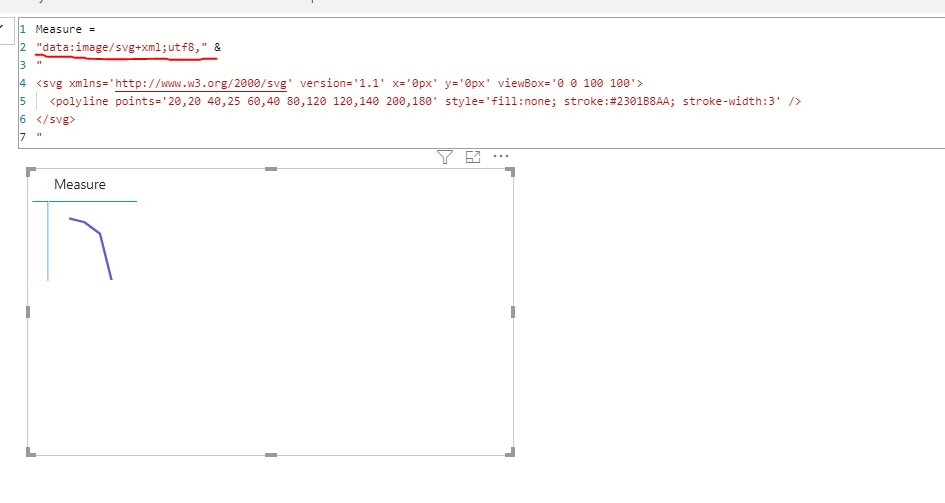
If this post helps, then please consider Accept it as the solution to help the other members find it more quickly.
Best Regards,
Dedmon Dai
- Mark as New
- Bookmark
- Subscribe
- Mute
- Subscribe to RSS Feed
- Permalink
- Report Inappropriate Content
Okay, I tried your exact test code on my company laptop and personal PC and both got this broken image. I also used the image url category. Do I need to check my settings?
- Mark as New
- Bookmark
- Subscribe
- Mute
- Subscribe to RSS Feed
- Permalink
- Report Inappropriate Content
Hi Dedmon, thanks for the info. It seems like it helps. It looks like the image just doesn't want to render.

- Mark as New
- Bookmark
- Subscribe
- Mute
- Subscribe to RSS Feed
- Permalink
- Report Inappropriate Content
Hi @john4614 ,
I have edit my original reply, please pay attention to the bold part.
If this post helps, then please consider Accept it as the solution to help the other members find it more quickly.
Best Regards,
Dedmon Dai


- Mark as New
- Bookmark
- Subscribe
- Mute
- Subscribe to RSS Feed
- Permalink
- Report Inappropriate Content
what's the rationale behind:
IF(HASONEVALUE('KPI Data (2)'[Actual])?
- Mark as New
- Bookmark
- Subscribe
- Mute
- Subscribe to RSS Feed
- Permalink
- Report Inappropriate Content
Hi, I think that was a little mistake. Now I placed the category there instead.

Helpful resources

Power BI Monthly Update - July 2025
Check out the July 2025 Power BI update to learn about new features.

Join our Fabric User Panel
This is your chance to engage directly with the engineering team behind Fabric and Power BI. Share your experiences and shape the future.

Fabric Community Update - June 2025
Find out what's new and trending in the Fabric community.

| User | Count |
|---|---|
| 69 | |
| 68 | |
| 40 | |
| 29 | |
| 26 |


| User | Count |
|---|---|
| 88 | |
| 49 | |
| 45 | |
| 38 | |
| 37 |


